EasyManua.ls Logo

Sony TRINITRON KV-21PM2 - Convergence

Sony TRINITRON KV-21PM2
39 pages
Print Icon
To Next Page IconTo Next Page
To Previous Page IconTo Previous Page
Loading...
KV-21PS2/21RS22C/21RS50/21RS50C/21SD2
(RM-Y145)
KV-21PM2/21R22/21R22C/21RD2
(RM-Y146)
3-2.
CONVERGENCE
_
Preparation:
Before
starting,
perform
FOCUS,
V.
LIN
and
V.
SIZE
adjustments.
Set
BRIGHTNESS
control
to
minimum.
Feed
in
dot
pattern.
(1)
Vertical
Static
Convergence
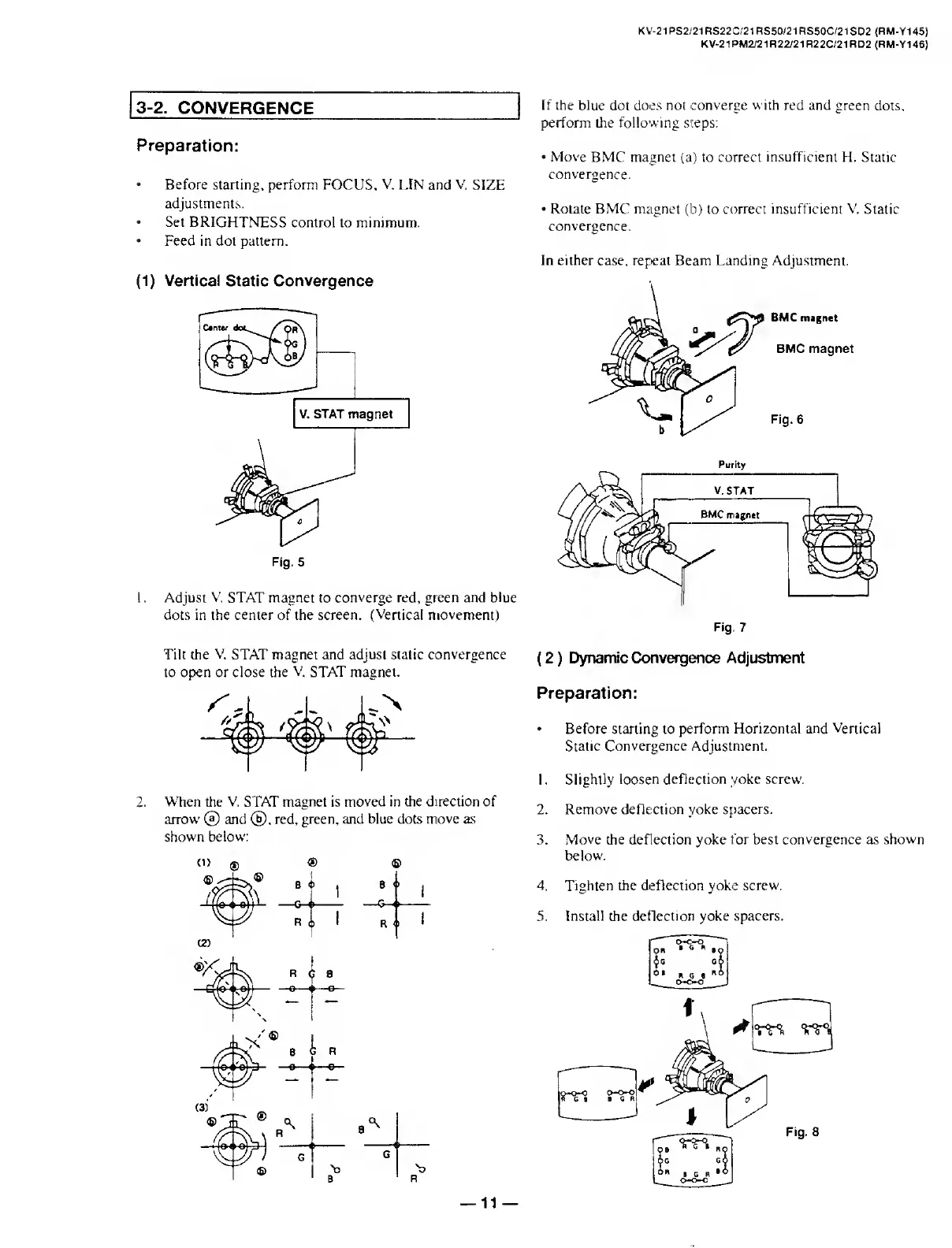
1.
A
djust
V.
STAT
magnet
to
converge
red,
green
and
blue
dots
in
the
center
of
the
screen.
(Vertical
movement)
Tilt
the
V.
STAT
magnet
and
adjust
static
convergence
to
open
or
close
the
V.
STAT
magnet.
2.
W
hen
the
V.
STAT
magnet
is
moved
in
the
direction
of
arrow
©
and
©.
red,
green,
and
blue
dots
move
as
shown
below:
If
the
blue
dot
does
not
converge
with
red
and
green
dots,
perform
the
following
steps:
Move
BMC
magnet
(a)
to
correct
insufficient
H.
Static
convergence.
Rotate
BMC
magnet
(b)
to
correct
insufficient
V.
Static
convergence.
In
either
case,
repeat
Beam
Landing
Adjustment.
BMC
magnet
BMC
magnet
Fig.
6
Preparation:
Before
starting
to
perform
Horizontal
and
Vertical
Static
Convergence
Adjustment.
1.
Slightly
loosen
deflection
yoke
screw.
2.
Remove
deflection
yoke
spacers.
3.
Move
the
deflection
yoke
for
best
convergence
as
shown
below.
4.
Tighten
the
deflection
yoke
screw.
5.
Install
the
deflection
yoke
spacers.
11

Related product manuals