EasyManua.ls Logo

Sony TRINITRON KV-21PM2 - Picture Tube Removal

Sony TRINITRON KV-21PM2
39 pages
Print Icon
To Next Page IconTo Next Page
To Previous Page IconTo Previous Page
Loading...
KV-21PS2/21RS22C/21RS50/21RS50C/21SD2
(RM-Y145)
KV-21PM2/21R22/21R22C/21RD2
(RM-Y146)
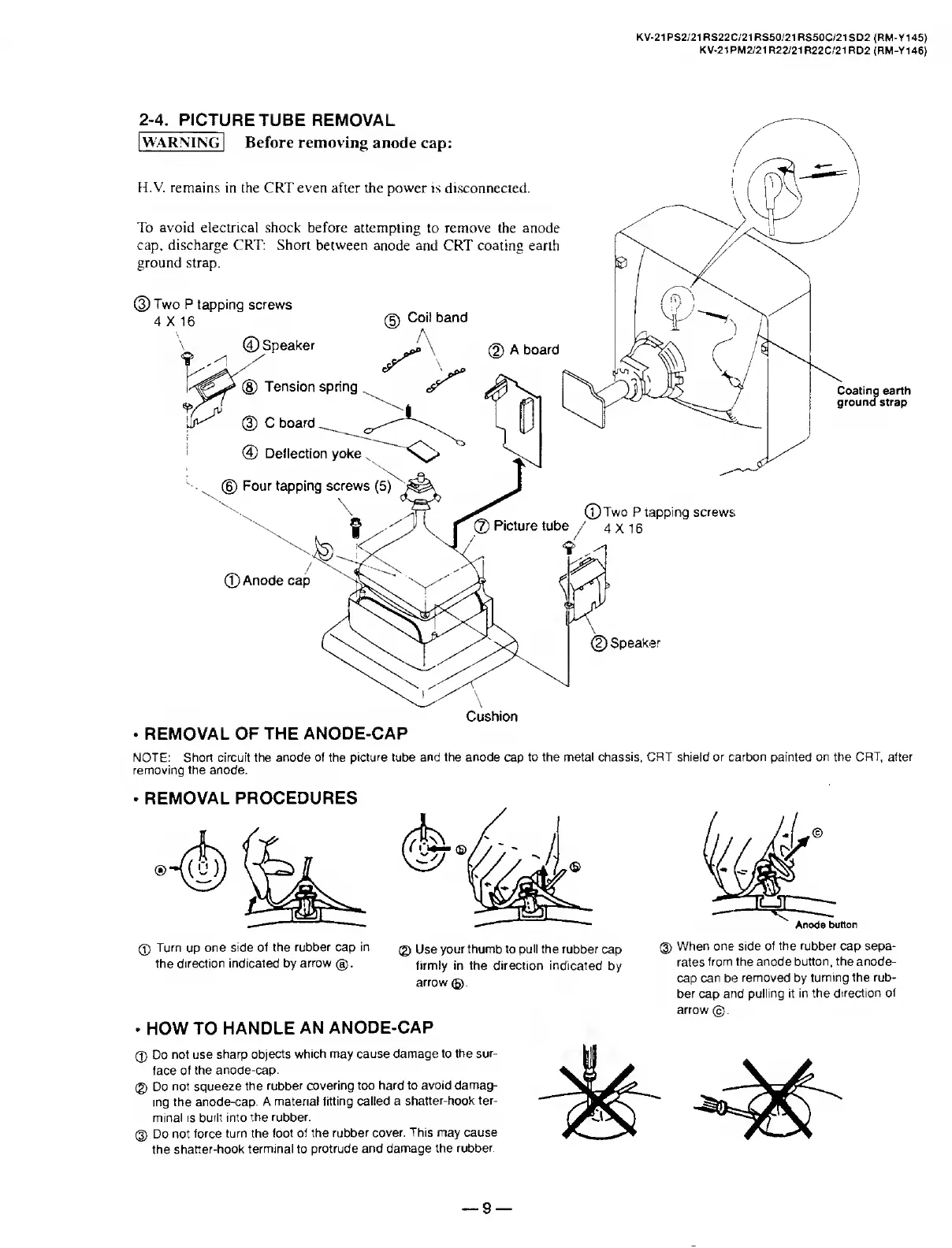
REMOVAL
OF
THE
ANODE-CAP
NOTE:
Short
circuit
the
anode
of
the
picture
tube
and
the
anode
cap
to
the
metal
chassis,
CRT
shield
or
carbon
painted
on
the
CRT,
after
removing
the
anode.
REMOVAL
PROCEDURES
0
Turn
up
one
side
of
the
rubber
cap
in
the
direction
indicated
by
arrow
®.
@
Use
your
thumb
to
pull
the
rubber
cap
®
firmly
in
the
direction
indicated
by
arrow
(§).
.
HOW
TO
HANDLE
AN
ANODE-CAP
®
Do
not
use
sharp
objects
which
may
cause
damage
to
the
sur¬
face
of
the
anode-cap.
@
Do
not
squeeze
the
rubber
covering
too
hard
to
avoid
damag¬
ing
the
anode-cap.
A
material
fitting
called
a
shatter-hook
ter¬
minal
is
built
into
the
rubber.
®
Do
not
force
turn
the
foot
of
the
rubber
cover.
This
may
cause
the
shatter-hook
terminal
to
protrude
and
damage
the
rubber.
When
one
side
of
the
rubber
cap
sepa¬
rates
from
the
anode
button,
the
anode-
cap
can
be
removed
by
turning
the
rub¬
ber
cap
and
pulling
it
in
the
direction
of
arrow
©.
9

Related product manuals