EasyManua.ls Logo

Sony TRINITRON KV-21PM2 - SECTION 5 CIRCUIT ADJUSTMENTS; Electrical Adjustment by Remote Commander

Sony TRINITRON KV-21PM2
39 pages
Print Icon
To Next Page IconTo Next Page
To Previous Page IconTo Previous Page
Loading...
KV-21PS2/21RS22C/21RS50/21RS50C/21SD2
(RM-Y145)
KV-21PM2/21R22/21R22C/21RD2
{RM-Y146}
SECTION
5
CIRCUIT
ADJUSTMENTS
5-1.
ELECTRICAL
ADJUSTMENT
BY
REMOTE
COMMANDER
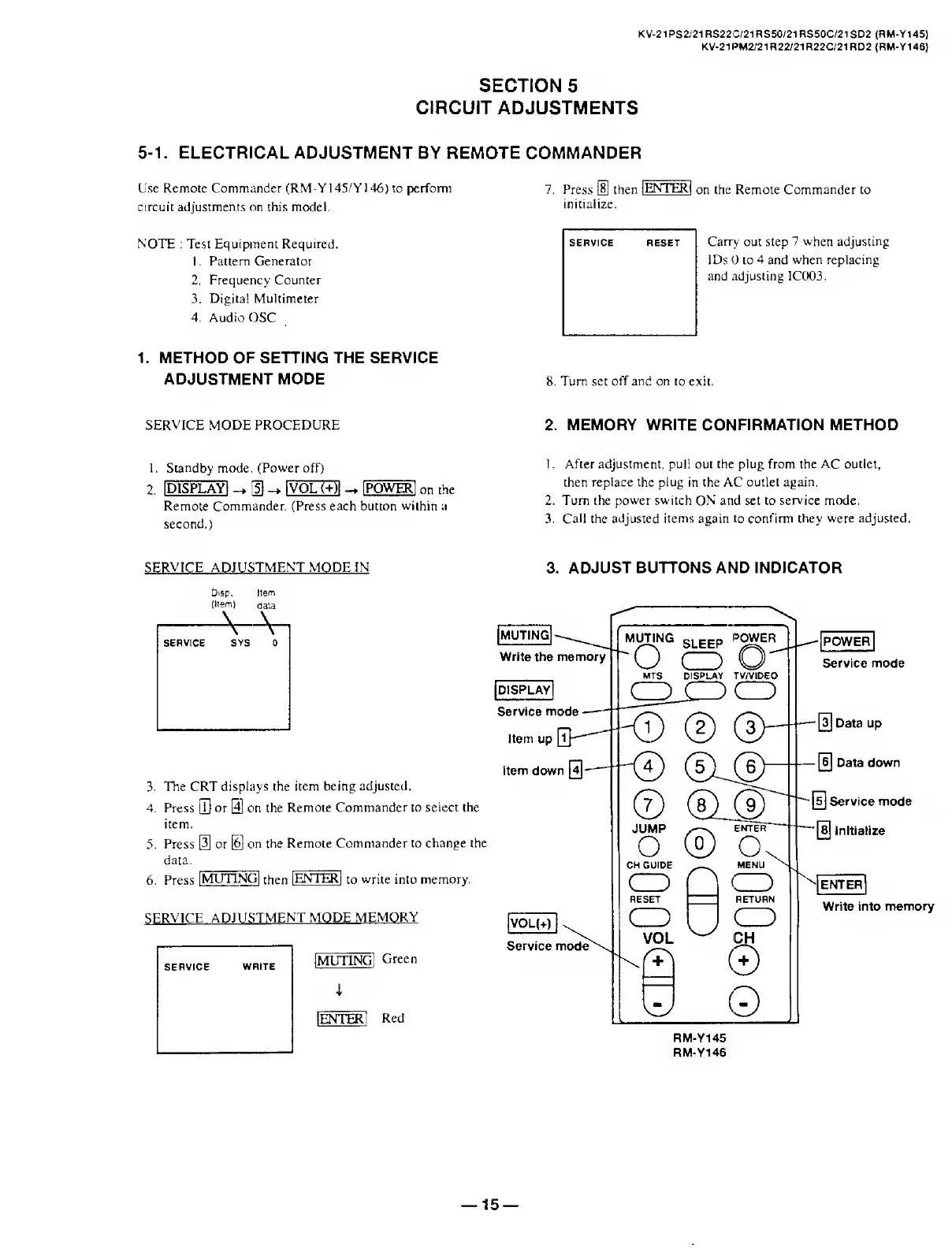
Use
Remote
Commander
(RM-YI45/YI46)
to
perform
7.
Press
®
then
I
ENTER!
on
the
Remote
Commander
to
circuit
adjustments
on
this
model.
initialize.
NOTE
:
Test
Equipment
Required.
1.
Pattern
Generator
2.
Frequency
Counter
3.
Digital
Multimeter
4.
Audio
OSC
1.
M
E
THOD
OF
SETTING
THE
SERVICE
ADJUSTMENT
MODE
8.
Turn
set
off
and
on
to
exit.
SERVICE
MODE
PROCEDURE
1.
Standby
mode.
(Power
off)
2.
IDISPLAYI
_,[§-
IVOL
(+)l
-
I
POWER;
on
the
Remote
Commander.
(Press
each
button
within
a
second.)
2.
M
EMORY
WRITE
CONFIRMATION
METHOD
!.
After
adjustment,
pull
out
the
plug
from
the
AC
outlet,
then
replace
the
plug
in
the
AC
outlet
again.
2.
Turn
the
power
switch
ON
and
set
to
service
mode.
3.
Call
the
adjusted
items
again
to
confirm
they
were
adjusted.
3.
A
D
JUST
BUTTONS
AND
INDICATOR
Disp.
Item
(Item)
data
3.
The
CRT
displays
the
item
being
adjusted.
4.
Press
GO
or
@
on
the
Remote
Commander
to
select
the
item.
5.
Press
[3]
or
[6]
cm
the
Remote
Commander
to
change
the
data.
6.
Press
1
MUTING]
then
IENTEKI
to
write
into
memory.
MUTING
c,
P
pp
POWER
v
bLfcfcP
Write
the
memory
'(^)
(
""
MTS
DISPLAY
TV/VIDEO
[display]
CDJ
)
CD
Service
mode-*
N
—-
-
M
)
(2)
(3V
Item
down
0-"
(^)
©
®JJl
JUMP
enter
o
®
<x
CH
GUIDE
MENU
oHo
CD
VOL
|VOL(+)
I
^
Service
mode
CD
CH
©
[POWER
|
Service
mode
Da
*
a
U
P
-
Data
down
[5]
Service
mode
~[s]
Initialize
enter|
Write
into
memory
RM-Y145
RM-Y146
15

Related product manuals