EasyManua.ls Logo

Sony TRINITRON KV-21PM2 - A Board Adjustments

Sony TRINITRON KV-21PM2
39 pages
Print Icon
To Next Page IconTo Next Page
To Previous Page IconTo Previous Page
Loading...
KV-21PS2/21RS22C/21RS50/21RS50C/21SD2
(RM-Y145}
KV-21
PM2/21R22/21R22C/21RD2
(RM-Y146)
5-2.
A
BOARD
ADJUSTMENTS
RF
AGC
ADJUSTMENT
(IF
BLOCK
VR)
1.
Input
a
color-bar
signal.
2.
Adjust
AGC
VR
of
TU10I
so
that
snow,
noise,
and
cross-modulation
disappear
from
the
picture.
3.
Verify
picture
quality
on
each
channel.
H.
FREQUENCY
ADJUSTMENT
1.
Input
a
monoscope
signal.
2.
Set
to
Service
adjustment
Mode.
3.
Connect
a
frequency
counter
to
base
of
Q550
(TP-86
H.
DRIVE).
4.
Select
the
item
of
AFC,
set
to
3
level
(free
run).
5.
Check
H.
Frequency
for
the
15800
±
100
Hz.
6.
Select
the
item
of
AFC
again,
adjust
the
level
''1
7.
Write
into
the
memory
by
pressing
[MUTING!
then
[ENTER
1
.
V.
FREQUENCY
ADJUSTMENT
1.
Select
video
1
with
no
signal
input.
2.
Set
the
conditions
with
standard
setting.
3.
Connect
the
frequency
counter
across
CN501
VDY
(+)
(pin
6)
connector
and
ground.
4.
Check
V.
Frequency
for
the
60
±
2
Hz.
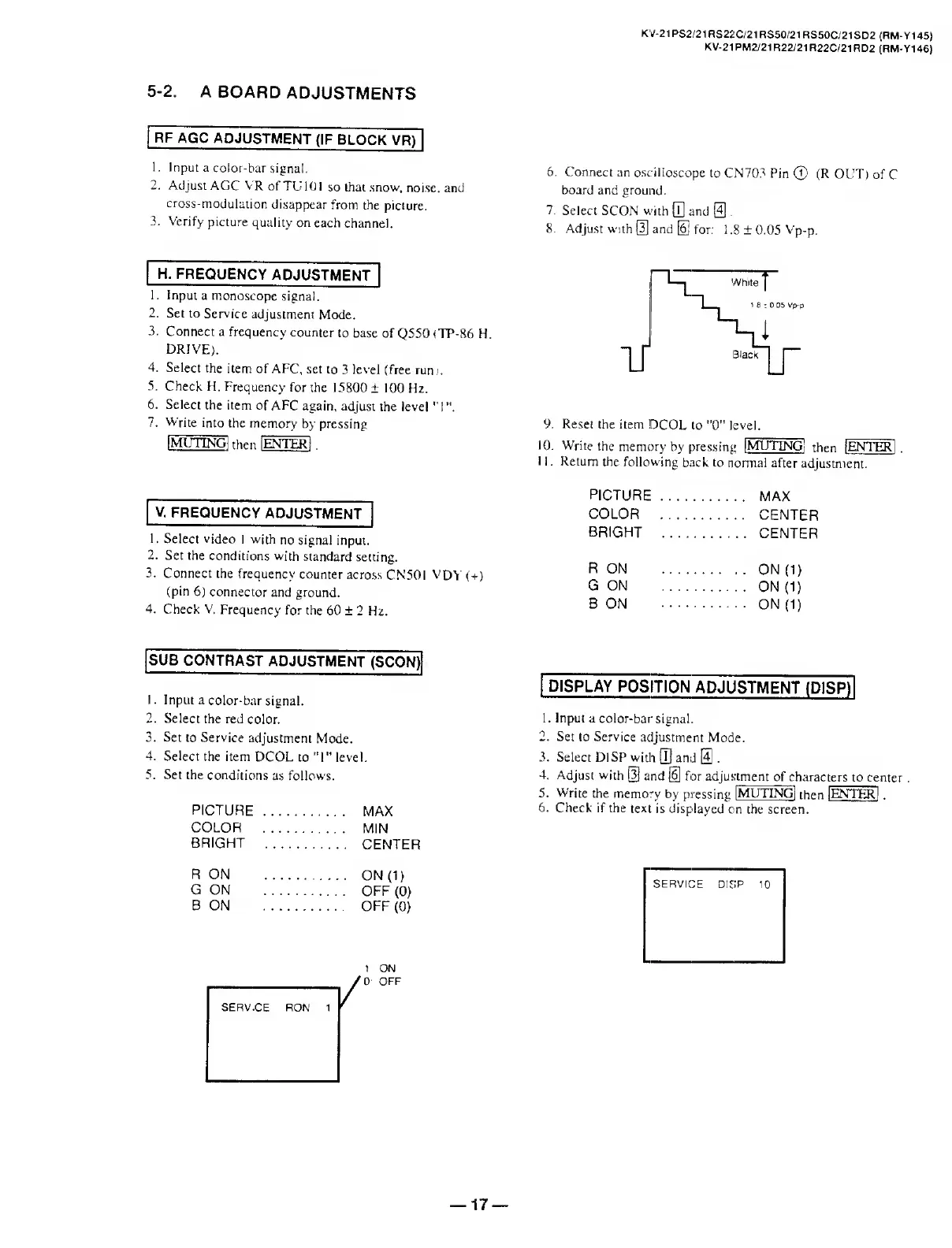
6.
Connect
an
oscilloscope
to
CN703
Pin
©
(R
OUT)
of
C
board
and
ground.
7.
Select
SCON
with
[T]
and
@
.
8.
Adjust
with
S
and
[6j
for:
1.8
±
0.05
Vp-p.
9.
R
eset
the
item
1DCOL
to
"0"
level.
10.
W
rite
the
memory
by
pressing
[MUTING!
then
[ENTER
11
Return
the
following
back
to
normal
after
adjustment.
PICTURE.
.
MAX
COLOR
.
.
CENTER
BRIGHT
.
.
CENTER
R
ON
.
.ON
(1)
G
ON
.
.
ON
(1)
B
ON
.
.
ON
(1)
SUB
CONTRAST
ADJUSTMENT
(SCON)
1.
Input
a
color-bar
signal.
2.
Select
the
red
color.
3.
Set
to
Service
adjustment
Mode.
4.
Select
the
item
DCOL
to
"I"
level.
5.
Set
the
conditions
as
follows.
PICTURE
....
.
MAX
COLOR
....
.
MIN
BRIGHT
_
.
CENTER
R
ON
....
.
ON
(1)
G
ON
....
.
OFF
(0)
B
ON
.
OFF
(0)
1
ON
/0
OFF
DISPLAY
POSITION
ADJUSTMENT
(D1SP)
1.
Input
a
color-bar
signal.
2.
Set
to
Service
adjustment
Mode.
3.
Select
DISP
with
[U
and
@
.
4.
Adjust
with
[3]
and
[6]
for
adjus
tment
of
c
haracters
to
center
.
5.
Write
the
memory
by
pressing
[MUTINGl
then
[ENTER[
.
6.
Check
if
the
text
is
displayed
on
the
screen.
SERVICE
DISP
10
17

Related product manuals