EasyManua.ls Logo

Sony TRINITRON KV-21PM2 - Picture Alignment Adjustments

Sony TRINITRON KV-21PM2
39 pages
Print Icon
To Next Page IconTo Next Page
To Previous Page IconTo Previous Page
Loading...
KV-21PS2/21RS22C/21RS50/21RS50C/21SD2
(RM-Y145)
KV-21PM2/21R22/21R22C/21RD2
(RM-Y146)
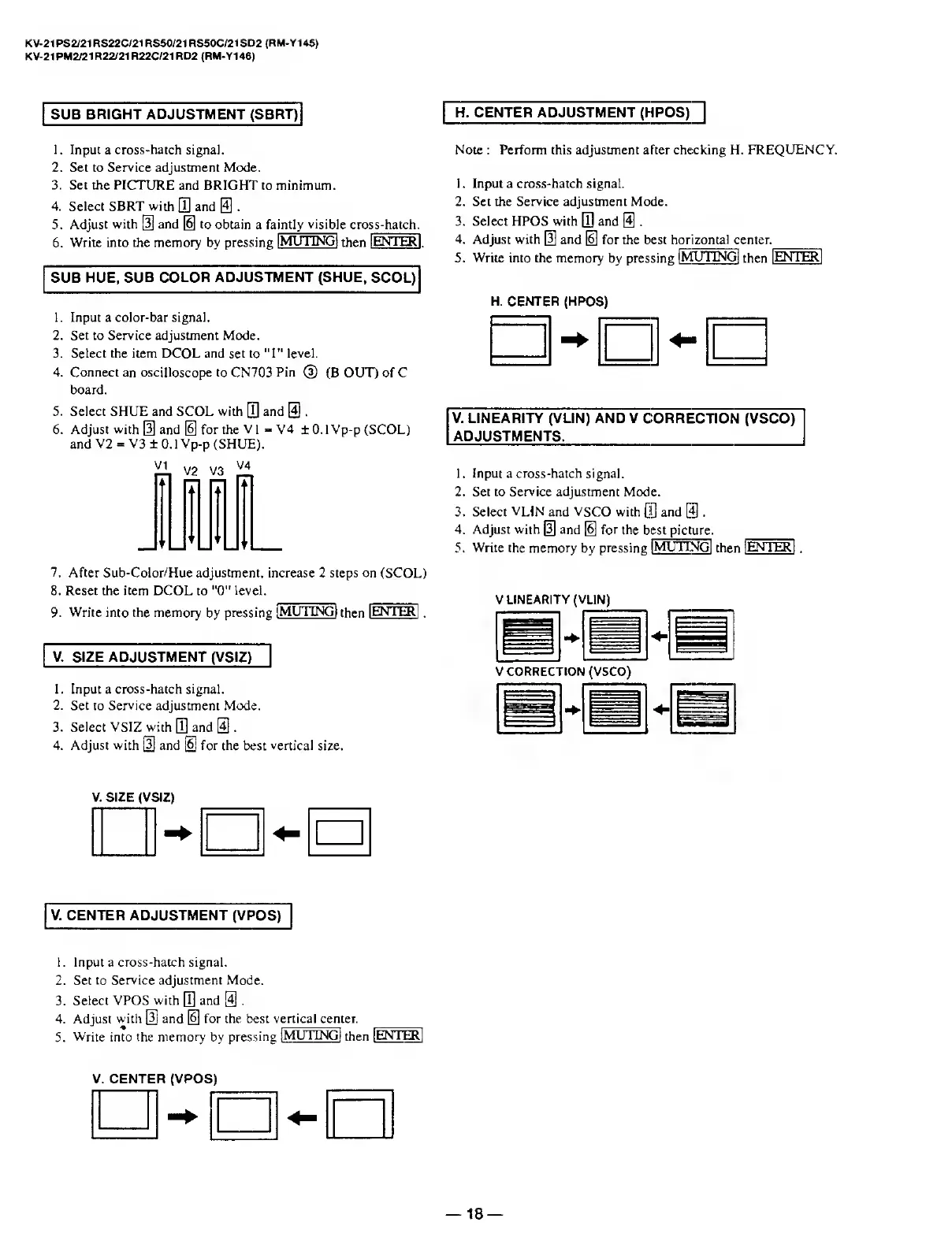
SUB
BRIGHT
ADJUSTMENT
(SBRT)
H.
CENTER
ADJUSTMENT
(HPOS)"]
1.
Input
a
cross-hatch
signal.
2.
Set
to
Service
adjustment
Mode.
3.
Set
the
PICTURE
and
BRIGHT
to
minimum.
4.
Select
SBRT
with
0
and
31
5.
Adjust
with
[3]
and
@
to
obtain
a
fa
intly
visibl
e
cro
ss-hatch.
6.
Write
into
the
memory
by
pressing
1
MUTING]
then
lENTERl
.
SUB
HUE,
SUB
COLOR
ADJUSTMENT
(SHUE,
SCOL)
1.
Input
a
color-bar
signal.
2.
Set
to
Service
adjustment
Mode.
3.
Select
the
item
DCOL
and
set
to
"1"
level.
4.
Connect
an
oscilloscope
to
CN703
Pin
(3)
(B
OUT)
of
C
board.
5.
Select
SHUE
and
SCOL
with
0
and
@
.
6.
Adjust
with
[3
and
[6]
for
the
VI
-
V4
±0.1
Vp-p
(SCOL)
and
V2
=
V3
±
0.1
Vp-p
(SHUE).
Note
:
Perform
this
adjustment
after
checking
H.
FREQUENCY.
1.
Input
a
cross-hatch
signal.
2.
Set
the
Service
adjustment
Mode.
3.
Select
HPOS
with
0
and
0
.
4.
Adjust
with
[5]
and
H]
for
the
best
hor
izontal
center._
5.
Write
into
the
memory
by
pressing
[MUTING]
then
I
ENTER]
H.
CENTER
(HPOS)
V.
LINEARITY
(VL1N)
AND
V
CORRECTION
(VSCO)
ADJUSTMENTS.
1.
Input
a
cross-hatch
signal.
2.
Set
to
Service
adjustment
Mode.
3.
Select
VLIN
and
VSCO
with
CO
and
[4]
.
4.
Adjust
with
[5]
and
0
for
the
best
picture.
5.
Write
the
memory
by
pressing
I
MUTING]
then
1
ENTER
7.
After
Sub-Color/Hue
adjustment,
increase
2
steps
on
(SCOL)
8.
Reset
the
item
DCOL
to
"0"
level.
9.
Write
into
the
memory
by
pressing
i
MUTING]
then
I
ENTER]
.
V.
SIZE
ADJUSTMENT
(VSIZ)
1.
Input
a
cross-hatch
signal.
2.
Set
to
Service
adjustment
Mode.
3.
Select
VSIZ
with
0
and
31.
4.
Adjust
with
@
and
[6]
for
the
best
vertical
size.
V
LINEARITY
(VLIN)
=====
"ii
:
VCORREC
TION
(VSCO)
m
BBS
V.
SIZE
(VSIZ)
V.
CENTER
ADJUSTMENT
(VPOS)
1.
Input
a
cross-hatch
signal.
2.
Set
to
Service
adjustment
Mode.
3.
Select
VPOS
with
0
and
0
.
4.
Adjust
with
[3]
and
0
for
the
best
vertical
center.
5.
Write
into
the
memory
by
pressing
I
MUTING]
then
1
ENTER]
V.
CENTER
(VPOS)
18

Related product manuals