EasyManua.ls Logo

Sony TRINITRON KV-21V5A - Step 3 - Tuning in to TV Stations; Presetting Channels Automatically; Selecting the Menu Language

Sony TRINITRON KV-21V5A
62 pages
Print Icon
To Next Page IconTo Next Page
To Previous Page IconTo Previous Page
Loading...
SECTION
1
The
operation
instruction
mentioned
here
are
partial
abstracts
from
GENERAL
the
Operating
Instruction
Manual.
The
page
numbers
of
the
Operating
Instruction
Manual
remain
as
in
the
manual.
(Part
No
:
3-860-137-11)
Step
3
Tuning
in
to
TV
Stations
‘You
can
preset
up
to
80
TV
channels,
either
automatically
or
manually.
“The
automatic
method
is
easier
if
you
want
to
preset
all
receivable
channels
at
once.
Use the
manual
method
if
you
want
to
allocate
‘Programme
numbers
to
the
channels
one
by
one.
———
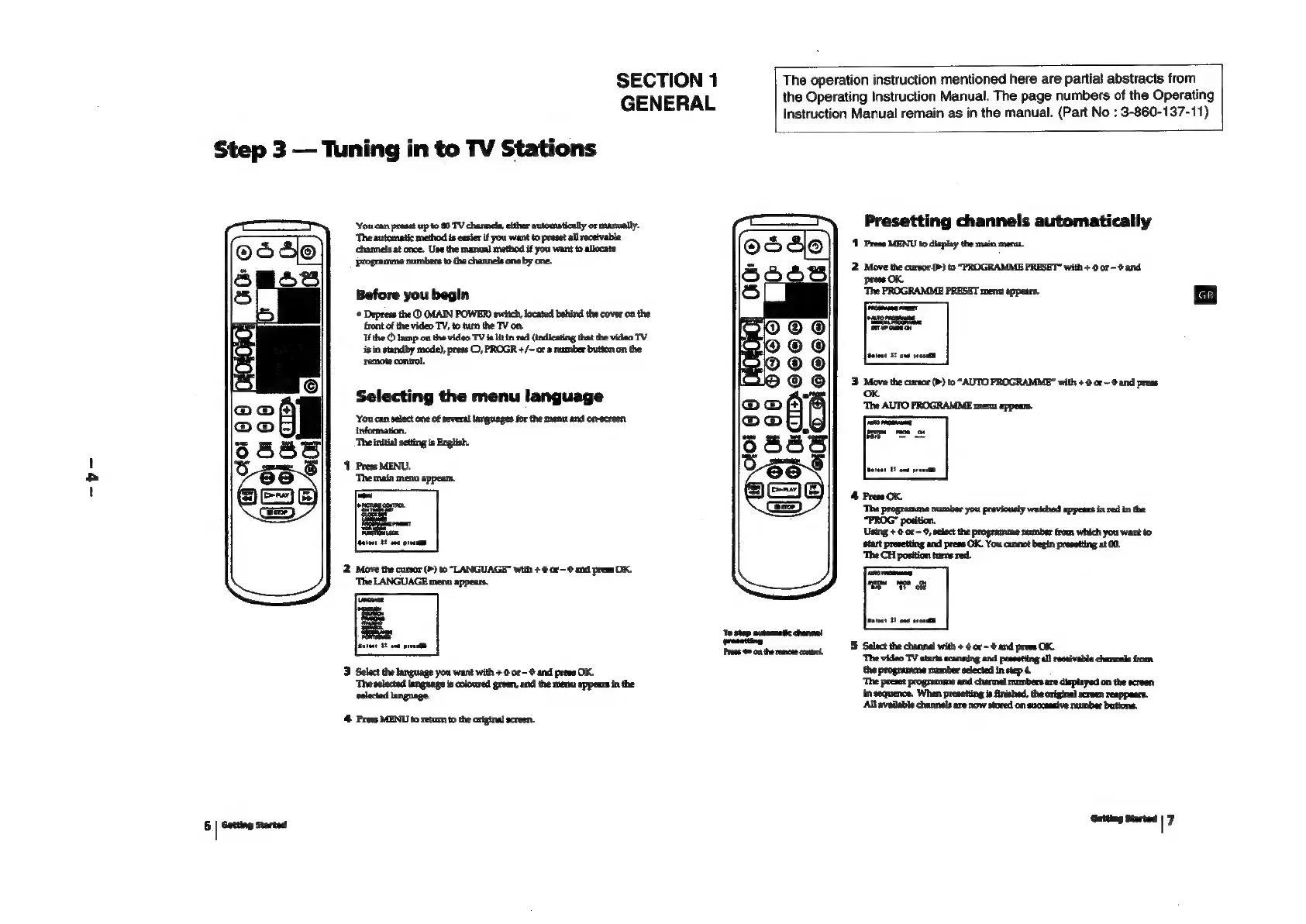
Presetting
channels
automatically
1
Press
MENU
to
display
the
main
mem.
2.
Move
the
cursor
(>)
to
“PROGRAMME
PRESET”
with
+
0
or
-@
and
press
OK,
Before
you
begin
‘*
Depress
the
(MAIN
POWER)
switch,
located
behind
the
cover
on
the
front
of
the
video
TV,
to
turn
the
TV
on.
Ifthe
®
lamp
on
the
video
TV
is
lit
in
red
(indicating
that
the
video
TV
isin
standby
mode),
press
©,
PROGR
+/~
or
a
number
button
on
the
‘remote
control.
Selecting
the
menu
language
‘You
can
select
one
of
several
languages
for
the
menu
and
on-screen
information.
‘The
initial
setting
is
English.
‘1
Press
MENU.
‘Themain
menu
appears.
‘The
programme
number
you
previously
watched appeans
in
red
in
the
“PROG”
Using
+
@
or
~
©,
select
the
programme
number
from
which
you
want
to
start
presetting
and
press
OK.
You
cannot
begin
presetting
at
00.
‘The
CH
position
turns
red.
2.
Move
the
cursor
(P)
to
“LANGUAGE”
with
+
@
or-@
and
press
OK.
‘The
LANGUAGE
menu
appears.
‘To
stop
mutomatic
channel
Jeeteet
BE
ant
preeelt
|
epee
Pree
on
the
remote
contol
3
Select
the
language
you
want
with
+
©
or
and
press
OK.
‘The
selected
language
is
coloured
green,
and
the
menu
appears
in
the
.
in
sequence.
When
presetting
is
finished,
the
original
screen
reappaars.
‘All
available
channels
are
now
stored
on
successive
rumber
butions.
4
Press
MENU
to
retum
to
the
original
screen.
6
|
Getting
started
Geteng
Sorted
|7

Related product manuals