EasyManua.ls Logo

Sony TRINITRON KV-21V5A - Muting the Sound; Displaying the On-Screen Information; Listening with Headphones

Sony TRINITRON KV-21V5A
62 pages
Print Icon
To Next Page IconTo Next Page
To Previous Page IconTo Previous Page
Loading...
-ol-
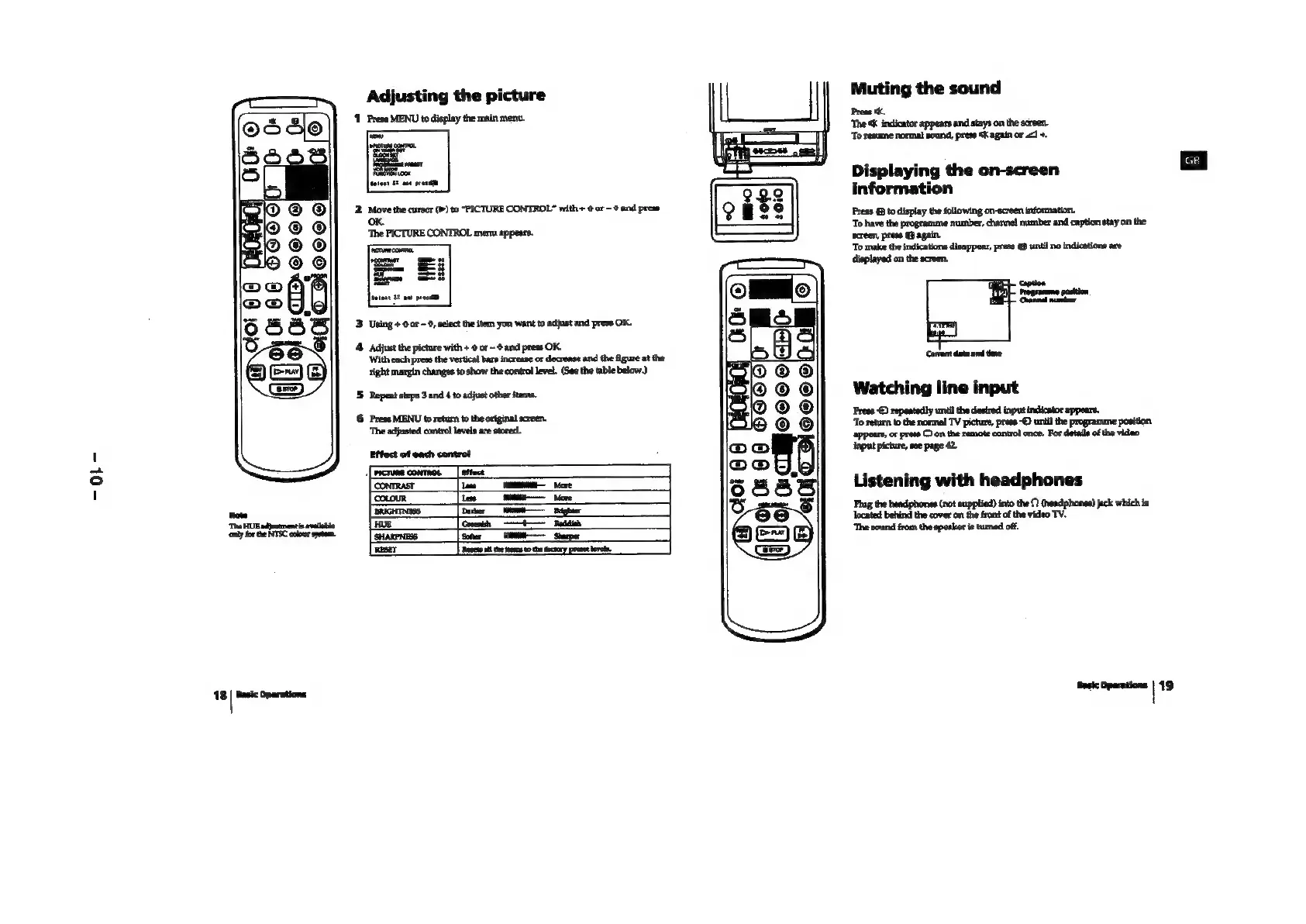
Muting
the
sound
‘Press
tk,
‘The
«K
indicator
appears
and
stays
on
the
screen.
‘To
resume
normal
sound,
press
K
again
or
<1
+.
Adjusting
the
picture
1
Prese
MENU
to
display
the
main
ment.
Displaying
the
on-screen
information
Press
(@
to
display
the
following
on-screen
information.
‘To
have
the
programme
number,
channel
number
and
caption
stay
on
the
screen,
press
@
again.
‘To
make
the
indications
disappear,
press
@
until
no
indications
are
displayed
on
the
screen.
ction
Canad
nanoer
3
Using
+
0
or
0,
select
the
item
you
want
to
adjast
and
press
OK.
4.
Adjust
the
picture
with
+
6
or
and
press
OK.
‘With
each
press
the
vertical
bars
increase
or
decrease
and
the
figure
at
the
right
margin
changes
to
show
the
control
evel.
(See
the
table
below.)
'5
Repeat
steps
3
and
4
to
adjust
other
items.
6
Press
MENU
to
return
to
the
original
screen.
‘The
adjusted
contro!
levels
are
stored.
Corrent
date
and
tne
Watching
line
input
Preee
-©)
repeatedly
until
the
desired
input
indicator
‘To
return
to
the
normal
TV
picture,
press
“©
until
the
programme
position
“appears,
or
press
©
con
the
remote
control
once.
For
details
ofthe
video
‘input
picture,
see
page
42.
Listening
with
headphones
Plug
the
headphones
(not
supplied)
into
the
(headphones)
jack
which
is
located
behind
the
cover
am
the
front
of
the
video
TV.
‘The
sound
from
the
speaker
is
tuned
off.
a
——
_
Beighier
only
forthe
NTSC
colour
sytem,
ary
RESET
Resell
te
ems
tothe
factory
preset
evel.
18
|
Basic
Operations
asic
Operations
|
19