EasyManua.ls Logo

Sony TRINITRON KV-21V5A - Circuit Adjustments; How to Enter into Service Mode

Sony TRINITRON KV-21V5A
62 pages
Print Icon
To Next Page IconTo Next Page
To Previous Page IconTo Previous Page
Loading...
SECTION
5
CIRCUIT
ADJUSTMENTS
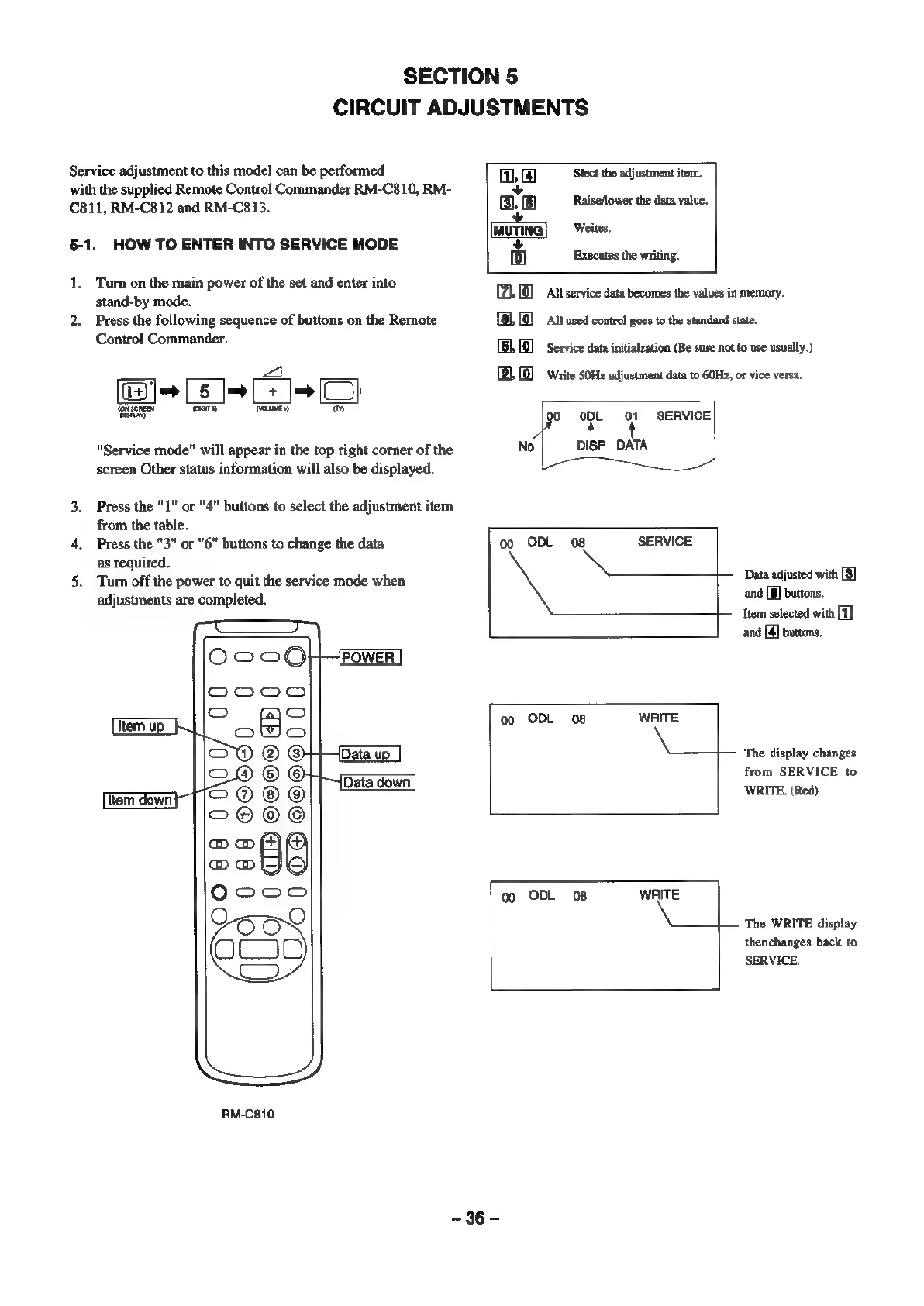
Service
adjustment
to
this
model
can
be
performed
Slect
the
adjustment
item.
with
the
supplied
Remote
Control
Commander
RM-C810,
RM-
.
C811,
RM-C812
and
RM-C813.
Rebello
te
dasa
vale:
Weites.
5-1.
HOW
TO
ENTER
INTO
SERVICE
MODE
Executes
the
writing.
1.
Turn
on
the
main
power
of
the
set
and
enter
into
x
a
stand-by
mode.
(21,
©
llservice
data
becomes
the
values
in
memory.
2.
Press
the
following
sequence
of
buttons
on
the
Remote
Control
Commander.
All
used
control
goes
to
the
standard
state.
Service
data
initialzation
(Be
sure
not
to
use
usually.)
Write
50Hz
adjustment
data
to
60Hz,
or
vice
versa.
CJ}
m
ODL
01
SERVICE
"Service
mode"
will
appear
in
the
top
right
corner
of
the
No
DISP_DATA
screen
Other
status
information
will
also
be
displayed.
3.
Press
the "1"
or
"4"
buttons
to
select
the
adjustment
item
from
the
table.
4.
Press
the
"3"
or
"6"
buttons
to
change
the
data
00
ODL
08
SERVICE
as
required.
5.
Turn
off
the
power
to
quit
the
service
mode
when
t—
Data
adjusted
with
[3]
adjustments
are
completed.
and
[6]
buttons.
Item
selected
with
[1]
and
[4]
buttons.
[POWER
bape
c=
bees
00
ODL
08
WRITE
OWo
COO
®@
©
pee
The
display
changes
Io®
©
©
from
SERVICE
to
Tem
down
|
@
WRITE.
(Red)
COOO
DoD
eo
aoye
O°°O
00
ODL
08
WRITE
9
OO
O
The
WRITE
display
O
i)
thenchanges
back
to
SERVICE.
UU
RM-C810
-36-—