EasyManua.ls Logo

Sony TRINITRON KV-21V5A - Manual Fine-Tuning

Sony TRINITRON KV-21V5A
62 pages
Print Icon
To Next Page IconTo Next Page
To Previous Page IconTo Previous Page
Loading...
Ht
you
have
made
a
mictaie
‘Prem
4
to
return
tothe
previews,
position
10
|
Getting
started
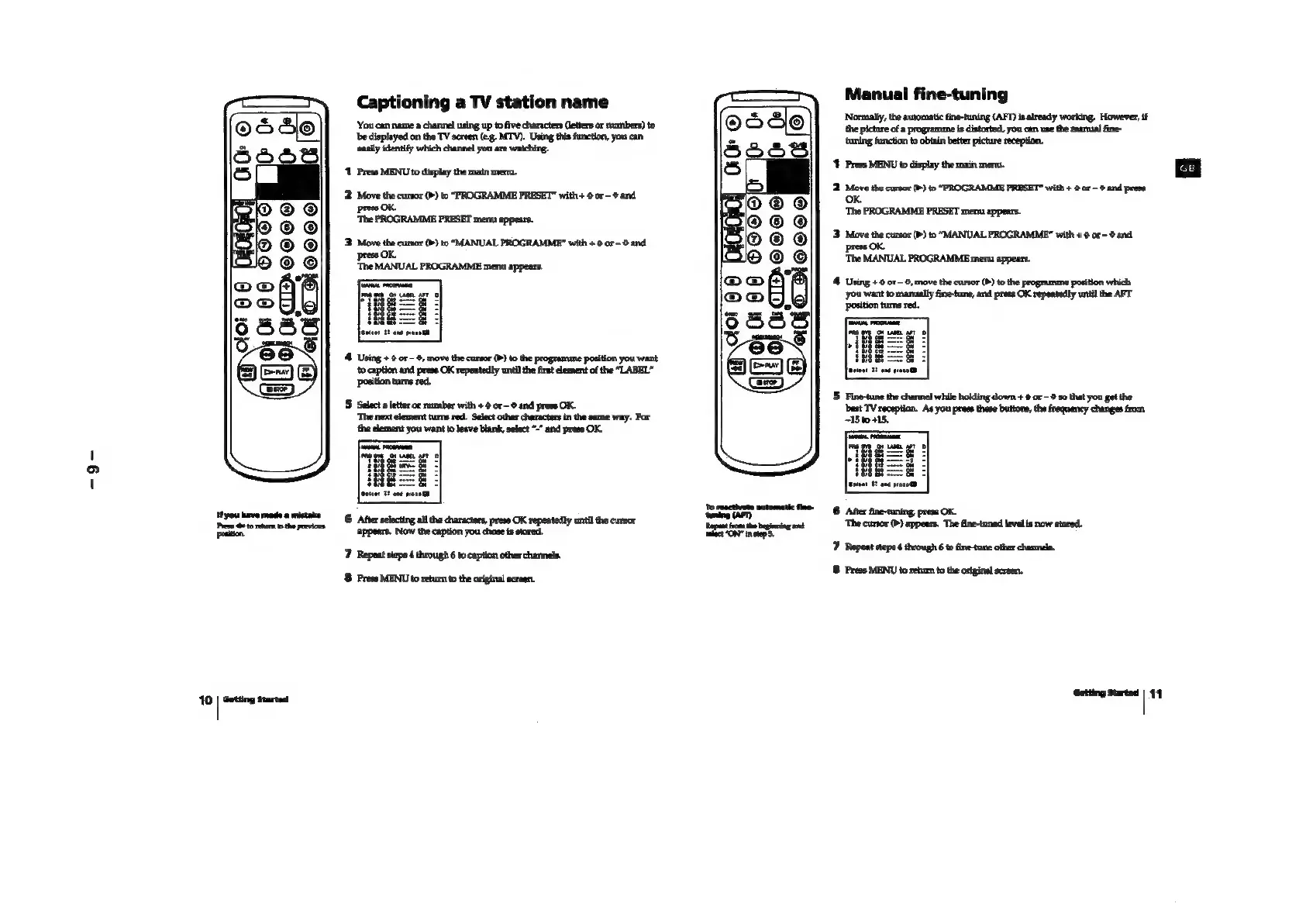
Captioning
a
TV
station
name
‘You
can
name
a
channel
using
up
to
five
characters
(letters
or
numbers)
to
‘be
displayed
on
the
TV
screen
(e.g.
MTV). Using
this
function,
you
can
‘easily
identify
which
channel
you are
watching.
‘1
Press
MENU
to
display
the
main
menu.
2
Move
the
cursor
(>)
to
“PROGRAMME
PRESET”
with
+
0
or
-@
and
press
OK.
‘The
PROGRAMME
PRESET
menu
appears.
3
Move
the
cursor
(b>)
to
“MANUAL
PROGRAMME?
with
+
0
or
8
and
4.
Using
+
@
or
©,
move
the
cursor
(P)
to
the
programme
position
you
want
to
caption
and
press
OK
repeatedly
until
the
first
element
of
the
“LABEL”
position
turns
red.
5
Selecta
letter
or
number
with
+
0
or
~
and
press
OK.
‘The next
element
turns
red.
Select
other
characters
in
the
same
way.
For
‘the
element
you
want
to
leave
blank,
select
-”
and
press
OK,
6
After
selecting
all the
characters,
press
OK
repeatedly
until
the
cursor
appears.
Now
the
oxption
you
chose
is
stored.
7
Repeat
steps
4
through
6
to
caption
other
channels.
8
Press
MENU
to
retum
to
the
original
screen.
Teepecteae
evtometic
tne
ee
iat
Manual
fine-tuning
‘Normally,
the
automatic
fine-tuning
(AFT)
is
already
working.
However,
if
the
picture
of
a
programme
is
distorted,
you
can
use
the
mamnial
fine-
‘tuning
function
to
obtain
better
picture
reception.
1
Press
MENU
to
display
the
main
menu.
2.
Move
the
cursor
(>)
to
“PROGRAMME
PRESET”
with
+
@
or
-
©
and
press
OK.
‘The
PROGRAMME
PRESET
menu
appears.
3
Move
the
cursor
(P)
to
“MANUAL
PROGRAMME”
with
+
@
or
-@
and
press
OK.
‘The
MANUAL
PROGRAMME
menu
appears.
4
Using
+
0
or
~
0,
move
the
cursor
(b)
to
the
programme
position
which
‘you
want
to
manually
fine-tune,
and
press
OK
repeatedly
until
the
AFT
position
tums red.
5
Fine-tune
the
channel
while
holding
down
+
9
or
-
9
so
that
you
get
the
best
TV
reception.
As
you
press these
buttons,
the
frequency
changes
from
5
+15.
6
Aer
fine-tuning,
press
OK.
‘The
cursor
(>)
appears.
The
fine-tuned
level
is
now
stored.
7)
Repeat
stepe
4
through
6
to
fine-tune
other
channels.
8
Frees
MENU
to
return
to
the
original
screen.
Getting
Started
|
4