EasyManua.ls Logo

Sony TRINITRON KV-21V5A - Presetting Channels Manually; Skipping Programme Positions

Sony TRINITRON KV-21V5A
62 pages
Print Icon
To Next Page IconTo Next Page
To Previous Page IconTo Previous Page
Loading...
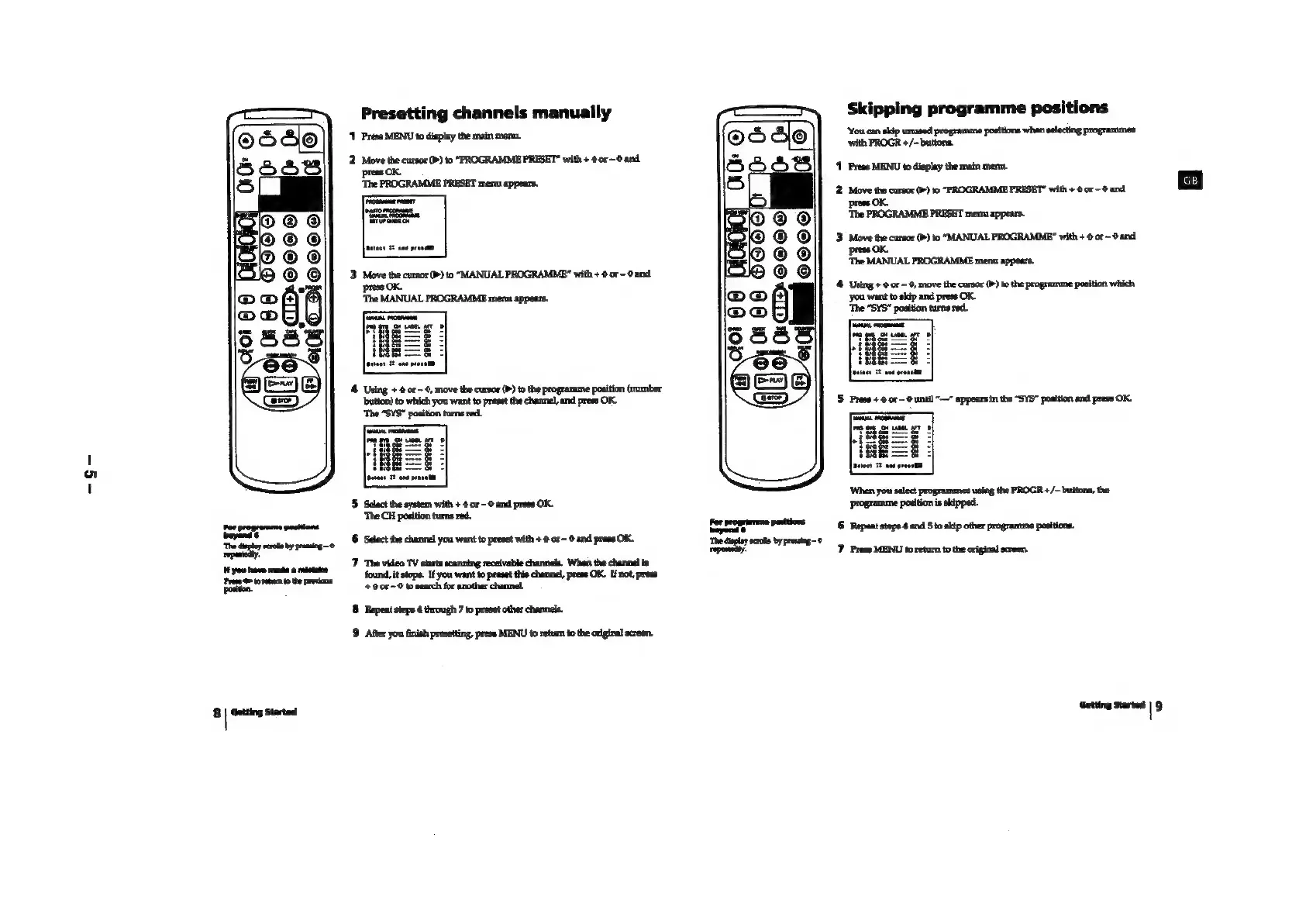
Presetting
channels
manually
Press
MENU
to
display
the
main
men.
n=
‘Move
the
cursor
(P)
to
“PROGRAMME
PRESET”
with
+
0
or~0and
OK.
4
Using
+
or-
9,
move
the
cursor
(>)
to
the
programme
position
(number
‘bution)
to
which
you
want
to
preset
the
chartnel,
and
prese
OK.
‘The
“SYS”
position
turns
red.
'5
Select
the
system
with
+
@
or
-
©
and
press
OK.
‘The
CH
position
turns
red.
6
‘Select
the
channel
you
want
to
preset
with
+
@
or
~
©
and
press
OK.
‘7
The
video
TV
starts
scanning
receivable
channels.
When
the
channel
is
found,
it
stops.
If
you
want
to
preset
this
channel,
press
OK.
If
not,
press
+0080
to
search
for
another
channel.
8
Repent
stepe
4
through
7
to
preset
other
channels.
9
After
you
finish
presetting,
press
MENU
to
retum
to
the
original
screen.
Skipping
programme
positions
‘You
can
skip
unused
programme
positions
whan
selecting
programmes
‘with
PROGR
+/—buttons.
1
Press
MENU
to
display
the
main
mens.
2.
Move
the
cursor
(P)
to
“PROGRAMME
PRESET”
with
+
0
or
-
@
and
press
OK.
‘The
FROGRAMME
PRESET
menu
appears.
3
Move
the
cursor
(P)
to
“MANUAL
PROGRAMME”
with
+
or
©
and
press:
‘The
MANUAL
PROGRAMME
mena
appears.
4 Using
+
0
or
-0,
move
the
cursor
(b)
to
the
prograunme
position
which
you
want
to
skip
and
press
OK.
‘The
“SYS"
position
turns
red.
‘When
you
select
programmes
using
the
PROGR
+/~
buttons,
the
Programme
position
is
skipped.
or
programme
positions
rj
©
Repeat
steps
4
and
5
to
skip
other
programme
positions.
‘The
diplay
scrote
by
presing-'
~—
7
Press
MENU
to
retum
tothe
original
scren.
Getting
Started
|
9