EasyManua.ls Logo

Sony TRINITRON KV-21V5A - Page 7

Sony TRINITRON KV-21V5A
62 pages
Print Icon
To Next Page IconTo Next Page
To Previous Page IconTo Previous Page
Loading...
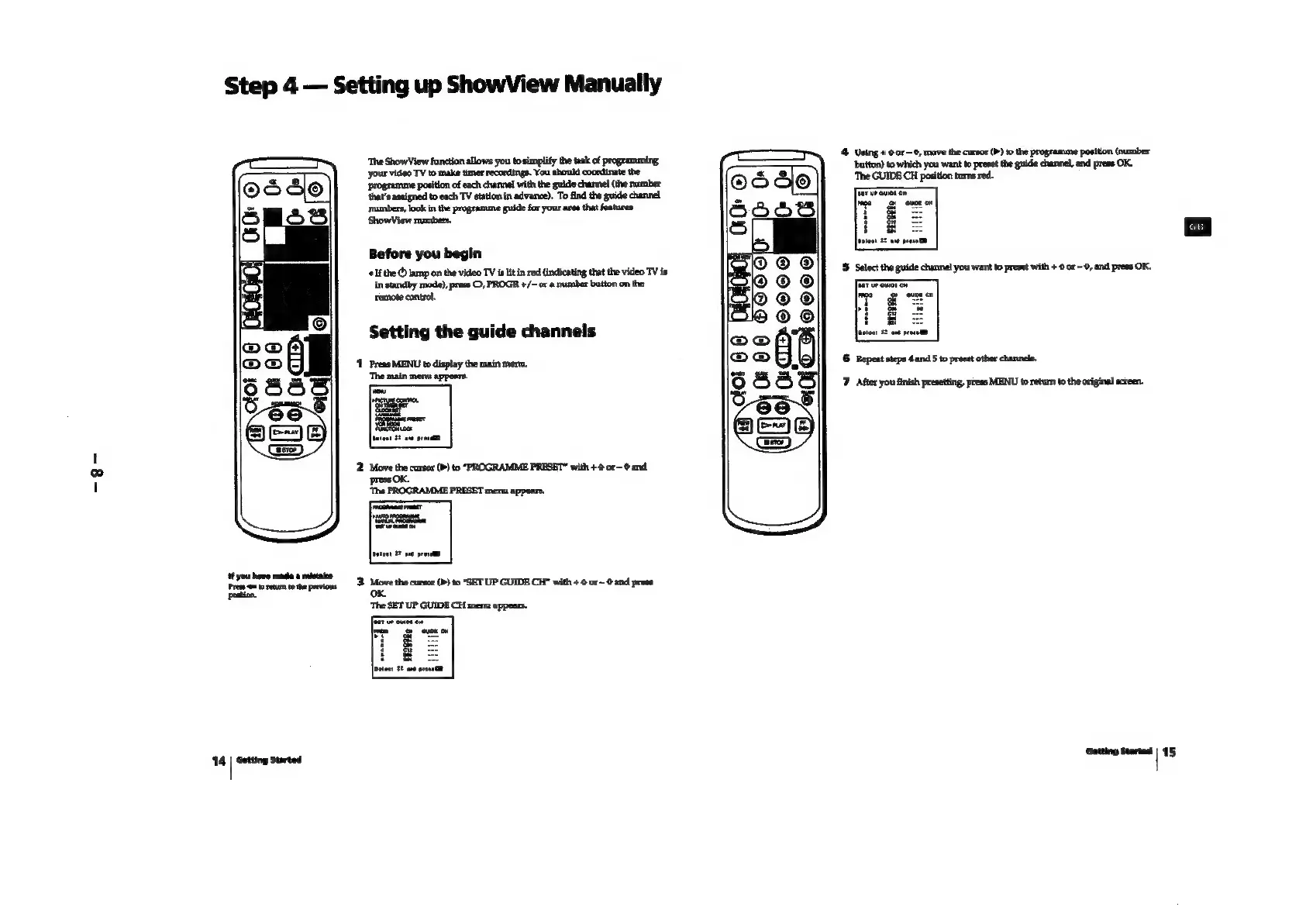
Step
4
Setting
up
ShowView
Manually
‘The
ShowView
function
allows
you
to
simplify
the
task
of
programming,
your
video
TV
to
make
timer
recordings.
You
should
coordinate
the
position
of
each
channel
with
the
guide
channel
(the
number
that’s
assigned
to
each
TV
station
in
advance).
To
find
the
guide
channel
numbers,
look
in
the
programme
guide
for
your
area
that
features
ShowView
numbers,
Before
you
begin
‘¢
Ifthe
©
lamp
on
the
video
TV
is
lit
in
red
(indicating
that
the
video
TV
is
in
standby
mode),
preas
©,
PROGR
+/~
or
a
rramber
button
on
the
remote
control.
Setting
the
guide
channels
‘1
Preas
MENU
to
display
the
main
men,
‘The main
menu
appears.
‘tf
you
hove
mada
a
mistaice
Press
=
to
retum tothe
previous
poation.
14
|
Gatting
started
4 Using
+
0
or—
6,
mave
the
cursor
(>
to
the
programme
position
(number
button)
to
which
you
want
to
preset
the
guide
channel,
and
press
OK.
‘The
GUIDE
CH
position
turns
red.
6
Repeat
steps
4
and
5
to
preset
other
channels.
7
Afier
you
finish
presetting,
ptess
MENU
to
return
to
the
original
screen.
Getting
Started
|
15