EasyManua.ls Logo

Sony Trinitron KV-27V20 - Page 6

Sony Trinitron KV-27V20
32 pages
Print Icon
To Next Page IconTo Next Page
To Previous Page IconTo Previous Page
Loading...
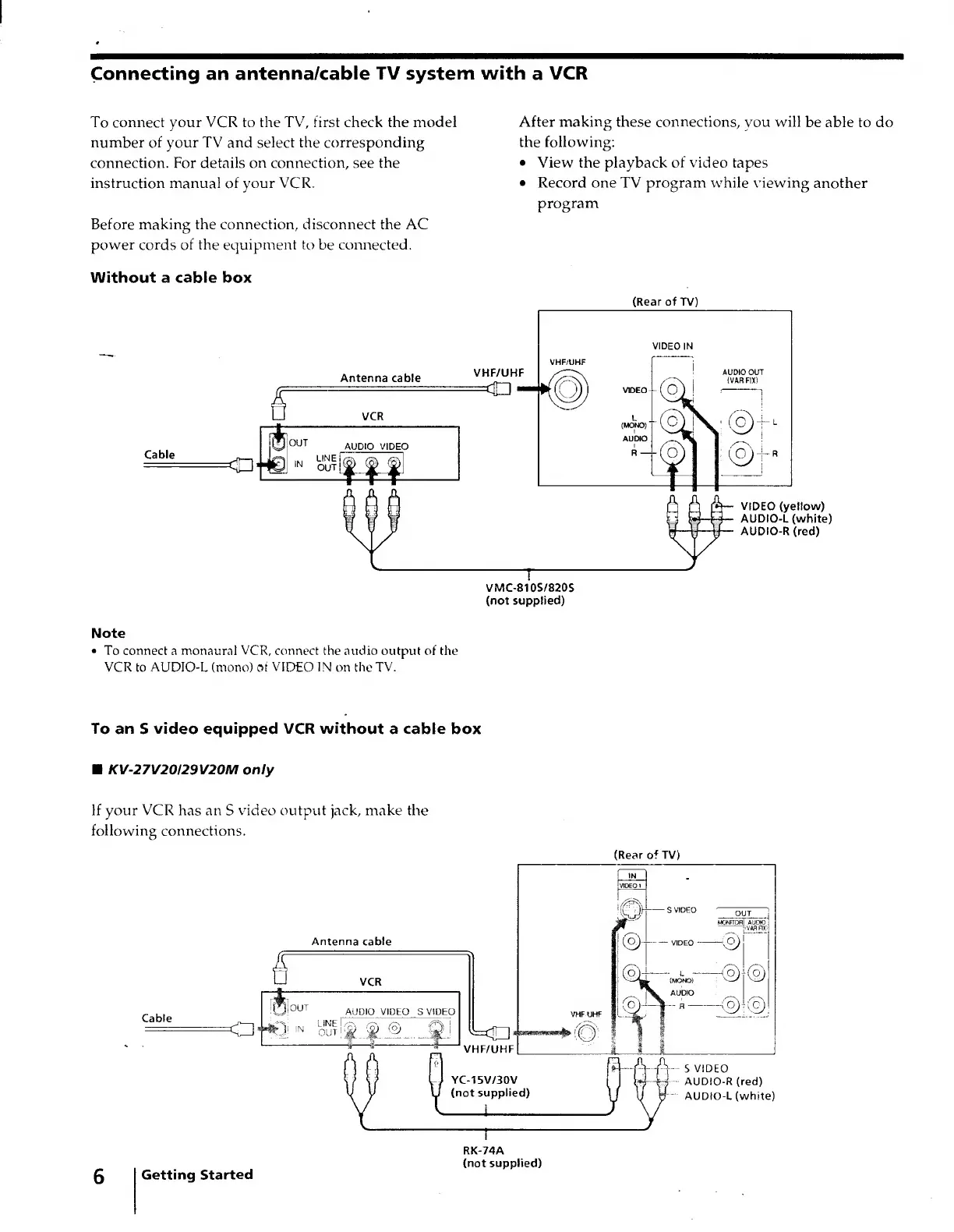
Connecting
an
antenna/cable
TV
system
with
a
VCR
To
connect
your
VCR
to
the
TV,
first
check
the
model
number
of
your
TV
and
select
the
corresponding
connection.
For
details
on
connection,
see
the
instruction
manual
of
your
VCR.
Before
making
the
connection,
disconnect
the
AC
power
cords
of
the
equipment
to
be
connected.
Without
a
cable
box
Antenna
cable
After
making
these
connections,
you
will
be
able
to
do
the
following:
View
the
playback
of
video
tapes
Record
one
TV
program
while
viewing
another
program
VMC-810S/820S
(not
supplied)
Note
To
connect
a
monaural
VCR,
connect
the
audio
output
of
the
VCR
to
AUDIO-L
(mono)
of
VIDEO
IN
on
the
TV.
To
an
S
video
equipped
VCR
without
a
cable
box
(Rear
of
TV)
VIDEO
(yellow)
AUDIO-L
(white)
AUDIO-R
(red)
KV-27V20I29V20M
only
If
your
VCR
has
an
S
video
output
jack,
make
the
following
connections.
Antenna
cable
Di°
UT
AUDIO
VIDE
O
S
VID
EO
J
IN
OUT
©
D
!
YC-15V/30V
(not
supplied)
(Rear
of
TV)
Q)-VIDEO-
-OJ
-
l
-
(o)-(q)
(MONO)
"—'
V—•/
AUDIO
»-<£)-©
S
VIDEO
AUDIO-R
(red)
AUDIO-L
(white)
Getting
Started
RK-74A
(not
supplied)

Other manuals for Sony Trinitron KV-27V20

Related product manuals