EasyManua.ls Logo

Sony Trinitron KV-27XBR51 - Section 5: Circuit Adjustments; Service Mode Entry and Remote Controls

Sony Trinitron KV-27XBR51
81 pages
Print Icon
To Next Page IconTo Next Page
To Previous Page IconTo Previous Page
Loading...
KV-27XBR5
l/27XBR55
RM-Y106 RM-Y107
SECTION 5
CIRCUIT ADJUSTMENTS
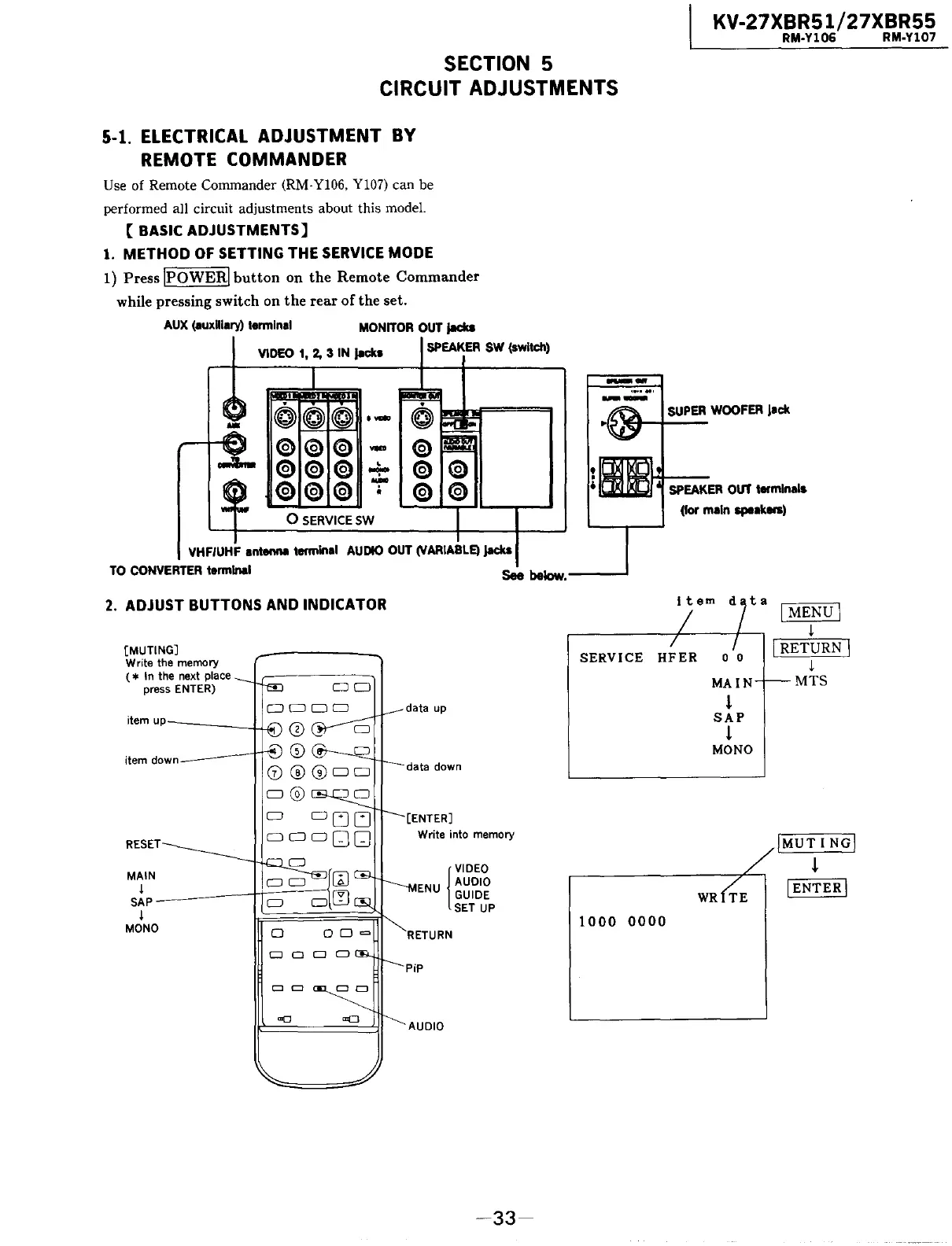
5-1.
ELECTRICAL ADJUSTMENT BY
REMOTE COMMANDER
Use of Remote Commander (RM-Yl06, Yl07) can be
performed all circuit adjustments about this model.
[BASIC
ADJUSTMENTS]
1.
METHOD
OF
SETTING THE
SERVICE
MODE
1)
Press JPOWER[
button
on
the
Remote Commander
while pressing switch on
the
rear of the set.
AUX
(auxHlary)
terminal
MONITOR
OUT
jadca
VIDEO 1, 2, 3 IN jecks
~
@
(@
·-
@
©
©
-
©
© ®
'"'\""
©
©
©
-
0
SERVICE
SW
SPEAKER
SW
(switch)
©
©
VHF/UHF antenna terminal
AUDIO
OUT
(VARIABLE)
jadca
--
.......
--
SUPER
WOOFER
jack
~HI---
SPEAKER
OUT
terminals
(for main speakers)
TO
CONVERTER
terminal See
below.----'
2.
ADJUST BUTTONS AND INDICATOR
[MUTING]
Write the memory
( * In the next place
press ENTER)
MAIN
s;p~~~~---1H-:::::--=--;:::
j
MONO
D
CJ
CJ
Cl
Write into memory
{
VIDEO
ENU
AUDIO
GUIDE
SET
UP
-33-
SERVICE
HFER
1000
0000
ta
0 0
MAIN
l
SAP
l
MONO
[MENU[
i
I RETURN I
i
MTS
JMUT
I
NG[
l
[ENTER[

Related product manuals