EasyManua.ls Logo

Sony Trinitron KV-27XBR51 - How to Watch TV Programs

Sony Trinitron KV-27XBR51
81 pages
Print Icon
To Next Page IconTo Next Page
To Previous Page IconTo Previous Page
Loading...
I
co
I
1-3. WATCHING
TV
PROGRAMS
~~~~~~~~rv
a3'.'.I
POWER
',~:
. I
VOL+/-
'.
--
·-·1
'C!JC!J
.
l~EiD[;JD:I
I~
-
,,,,_,II
1D-CJL.;..1Ql
1
~)
,--.-.
Notes
~
To
tum
off
lh•
TV
Press
POWER
on
the
TV
or the Remote Com·
mande again.
If
the Indication "VIDEO
1,
VIDEO
2,
VIDEO
3,
S VIDEO,
LD,
or
VTA"
ls
dlspliyed
on
the
......
Press
TV
on
the Remote Commander.
If
you
Mt
the
FAVORITE
CHANNEL
You
can choose the channels more easily
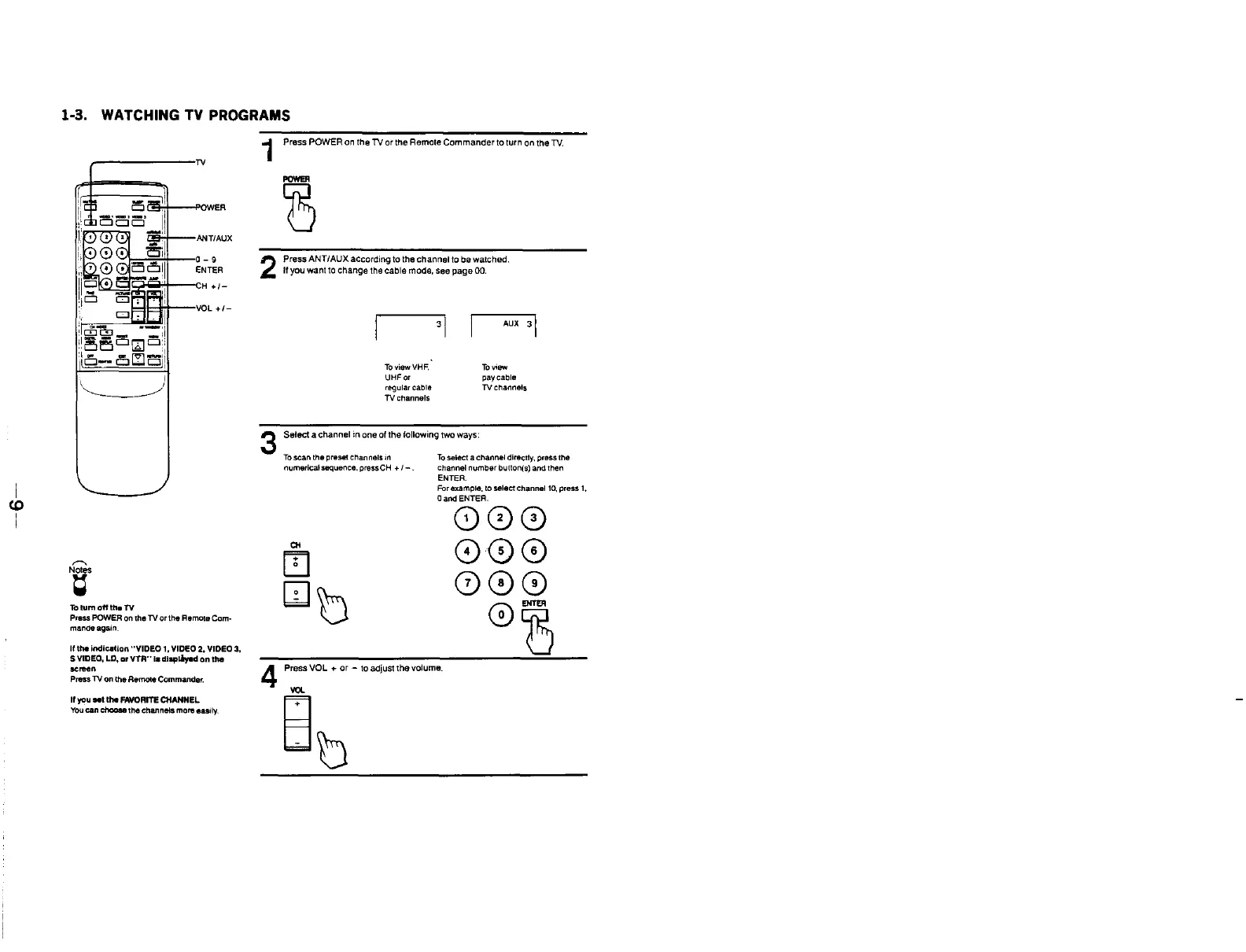
1 Press
POWER
on
the
TV
or
the Remote Commander
to
turn
on
the
TV.
2
3
4
8
Press
ANT/AUX
according to the channel to be walched.
If
you
want
to
change
the cable mode, see
page
00.
I
3
1
1
AUX
31
To
view
VHF,
UHF
or
regular
cable
TV
channels
To
view
pay cable
TV
channels
Select a channel in one of the following
two
ways:
To
scan
the
preset
channels
in
numerical sequence. press CH +
1-
CH
[!]
[Jo
To
select a channel directly, press the
Channel
number
button(s)
and
then
ENTER.
For example. to
select
channel
10,
press
1,
Oand ENTER.
000
©©©
000
©~
Press VOL +
or
- to adjust
the
volume.
ab

Related product manuals