EasyManua.ls Logo

Sony Trinitron KV-29F3A - PICTURE GEOMETRY ADJUSTMENTS; Convergence Adjustment

Sony Trinitron KV-29F3A
58 pages
Print Icon
To Next Page IconTo Next Page
To Previous Page IconTo Previous Page
Loading...
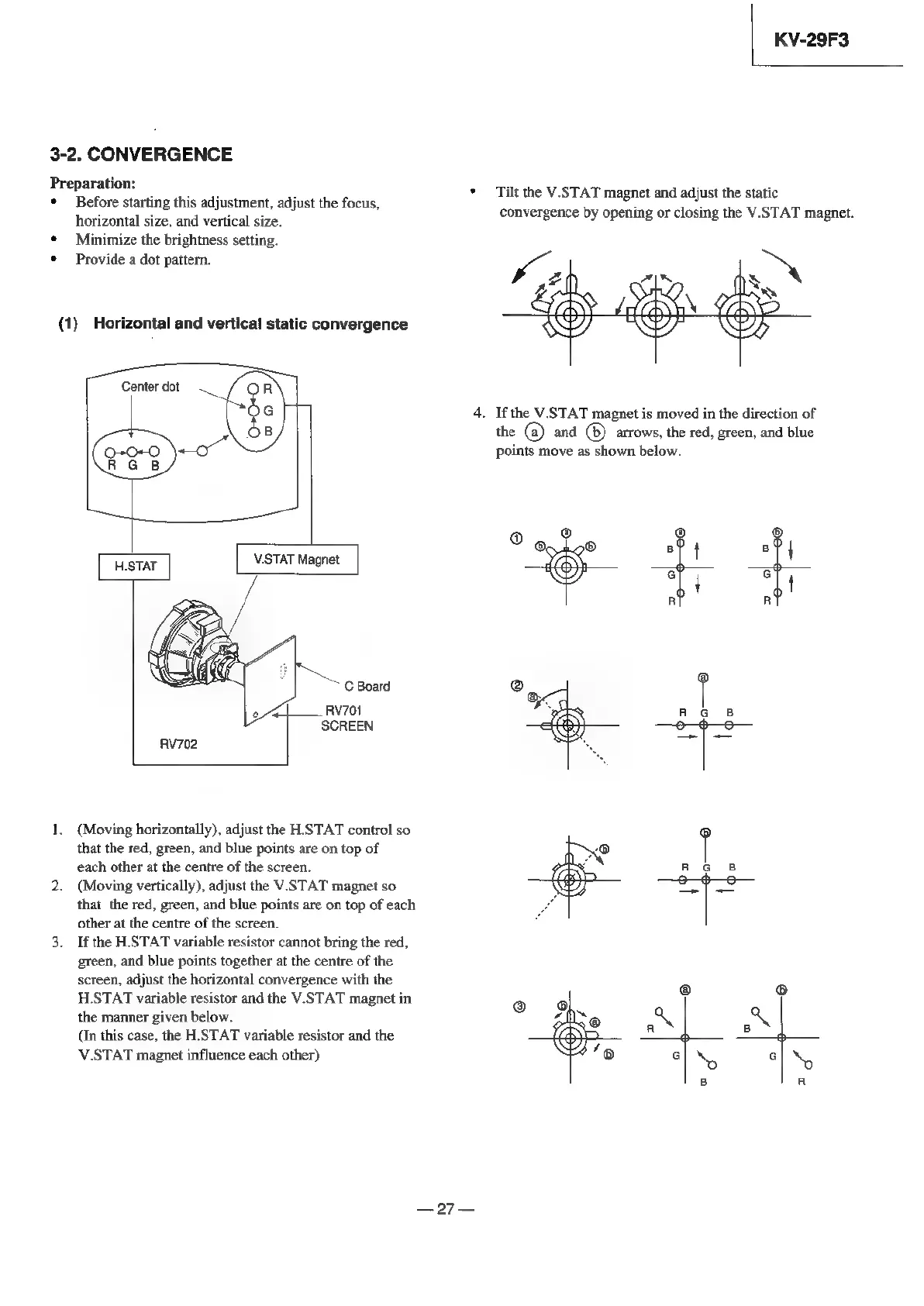
3-2.
CONVERGENCE
Preparation:
¢
Before
starting
this
adjustment,
adjust
the
focus,
horizontal
size,
and
vertical
size.
¢
Minimize
the
brightness
setting.
¢
Provide
a
dot
pattern.
(1)
Horizontal
and
vertical
static
convergence
Center
dot
HSTAT
V.STAT
Magnet
C
Board
|
____
RV701
SCREEN
RV702
1.
(Moving
horizontally),
adjust
the
HSTAT
control
so
that
the
red,
green,
and
blue
points
are
on
top
of
each
other
at
the
centre
of
the
screen.
2.
(Moving
vertically),
adjust
the
V.STAT
magnet
so
that
the
red,
green,
and
blue
points
are
on
top
of
each
other
at
the
centre
of
the
screen.
3. If
the
HSTAT
variable
resistor
cannot
bring
the
red,
green,
and
blue
points
together
at
the
centre
of
the
screen,
adjust
the
horizontal
convergence
with
the
H.STAT
variable
resistor
and
the
V.STAT
magnet
in
the
manner
given
below.
(In
this
case,
the
H.STAT
variable
resistor
and
the
V.STAT
magnet
influence
each
other)
oF
KV-29F3
Tilt
the
V.STAT
magnet
and
adjust
the
static
convergence
by
opening
or
closing
the
V.STAT
magnet.
;
>
\
Ss
*
If
the
V.STAT
magnet
is
moved
in
the
direction
of
the
@
and
®
arrows,
the
red,
green,
and
blue
points
move
as
shown
below.
i)
43
@
oO
te
al al
ro
SING
BIN

Related product manuals