EasyManua.ls Logo

Sony Trinitron KV-29F3A - ADVANCED TEST MODES; Test Mode 2 Functions

Sony Trinitron KV-29F3A
58 pages
Print Icon
To Next Page IconTo Next Page
To Previous Page IconTo Previous Page
Loading...
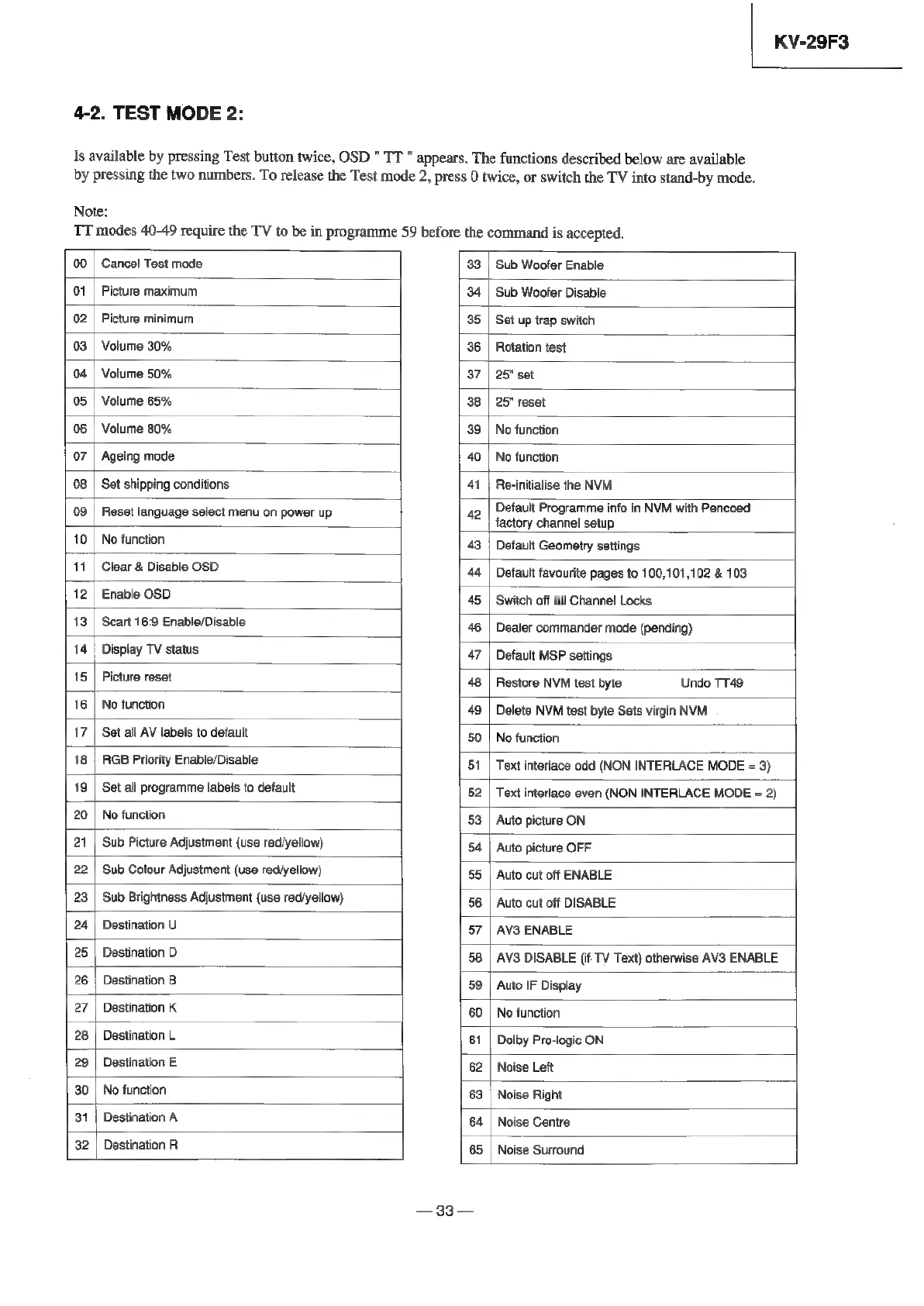
4-2.
TEST
MODE
2:
KV-29F3
Is
available
by
pressing
Test
button
twice,
OSD
"
TT
"
appears.
The
functions
described
below
are
available
by
pressing
the
two
numbers.
To
release
the
Test
mode
2,
press
0
twice,
or
switch
the
TV
into
stand-by
mode.
Note:
TT
modes
40-49
require
the
TV
to
be
in
programme
59
before
the
command
is
accepted.
00
|
Cancel
Test
mode
33
|
Sub
Woofer
Enable
01
|
Picture
maximum
34
|
Sub
Woofer
Disable
02
|
Picture
minimum
35
|
Set
up
trap
switch
03
|
Volume
30%
36
|
Rotation
test
04
|
Volume
50%
37
|
25"
set
05
|
Volume
65%
38
|
25"
reset
06
|
Volume
80%
39
|
No
function
07
|
Ageing
mode
40
|
No
function
08
|
Set
shipping
conditions
41
|
Re-initialise
the
NVM
09
|
Reset
language
select
menu
on
power
up
42
ae
Lie
aie
in
NM
with
Pencoed.
10
|
No
function
43
|
Default
Geometry
settings
11
|
Clear
&
Disable
OSD
44
|
Default
favourite
pages
to
100,101,102
&
103
12
|
Enable
OSD
45
|
Switch
off
all
Channel
Locks
13
|
Scart
16:9
Enable/Disable
46
|
Dealer
commander
mode
(pending)
14
|
Display
TV
status
47
|
Default
MSP
settings
15
|
Picture
reset
48
|
Restore
NVM
test
byte
Undo TT49
16
|
No
function
49
|
Delete
NVM
test
byte
Sets
virgin
NVM
17
|
Set
all
AV
labels
to
default
50
|
No
function
18
|
RGB
Priority
Enable/Disable
51
|
Text
interlace
odd
(NON
INTERLACE
MODE
=
3)
19
|
Set
all
programme
labels
to
default
52
|
Text
interlace
even
(NON
INTERLACE
MODE
=
2)
20
|
No
function
53
|
Auto
picture
ON
21
|
Sub
Picture
Adjustment
(use
red/yellow)
54
|
Auto
picture
OFF
22
|
Sub
Colour
Adjustment
(use
red/yellow)
55
|
Auto
cut
off
ENABLE
23
|
Sub
Brightness
Adjustment
(use
red/yellow)
56
|
Auto
cut
off
DISABLE
24
|
Destination
U
57
|
AV3
ENABLE
25
|
Destination
D
58
|
AV3
DISABLE
(if
TV
Text)
otherwise
AV3
ENABLE
26
|
Destination
B
59
|
Auto
IF
Display
27
|
Destination
K
60
|
No
function
28
|
Destination
L
61
|
Dolby
Pro-logic
ON
29
|
Destination
E
62
|
Noise
Lett
30
|
No
function
63
|
Noise
Right
31
|
Destination
A
64
|
Noise
Centre
32
|
Destination
R
65
|
Noise
Surround
—33—

Related product manuals