Using the Menus
33
Using the Channel Menu
Favorite
Channels
Quick access
to favorite
channels
1 Use the F or f buttons to highlight the position (1-8) where you want to set a
favorite channel, then press .
2 Use the F or f buttons to find the channel you want to add to your favorite
channels.
3 Press to select the channel. The TV will automatically change to the
selected channel.
4 Press G to return to the Channel menu or press to exit.
Cable Use the F or f buttons to highlight one of the following options, then press to
select it.
On: Select if you are receiving cable channels with a CATV cable.
Off: Select if you are using a TV antenna.
Channel Fix Use the F or f buttons to highlight one of the following options, then press
to select it.
Off: Channel Fix is not set.
2-6: Select when you want to control all channel selection through a cable
box or VCR. Select the appropriate channel (usually 3 or 4) and use
the cable box’s or VCR’s remote control for channel selection.
AUX 2-6: Select this setting instead of 2-6 if you want to change channels
using a cable box, VCR, or satellite receiver and you’ve connected it
to the AUX input.
Video 1:
Select from available video inputs when you have connected video
equipment (e.g., a satellite receiver) and you want your TV fixed to it.
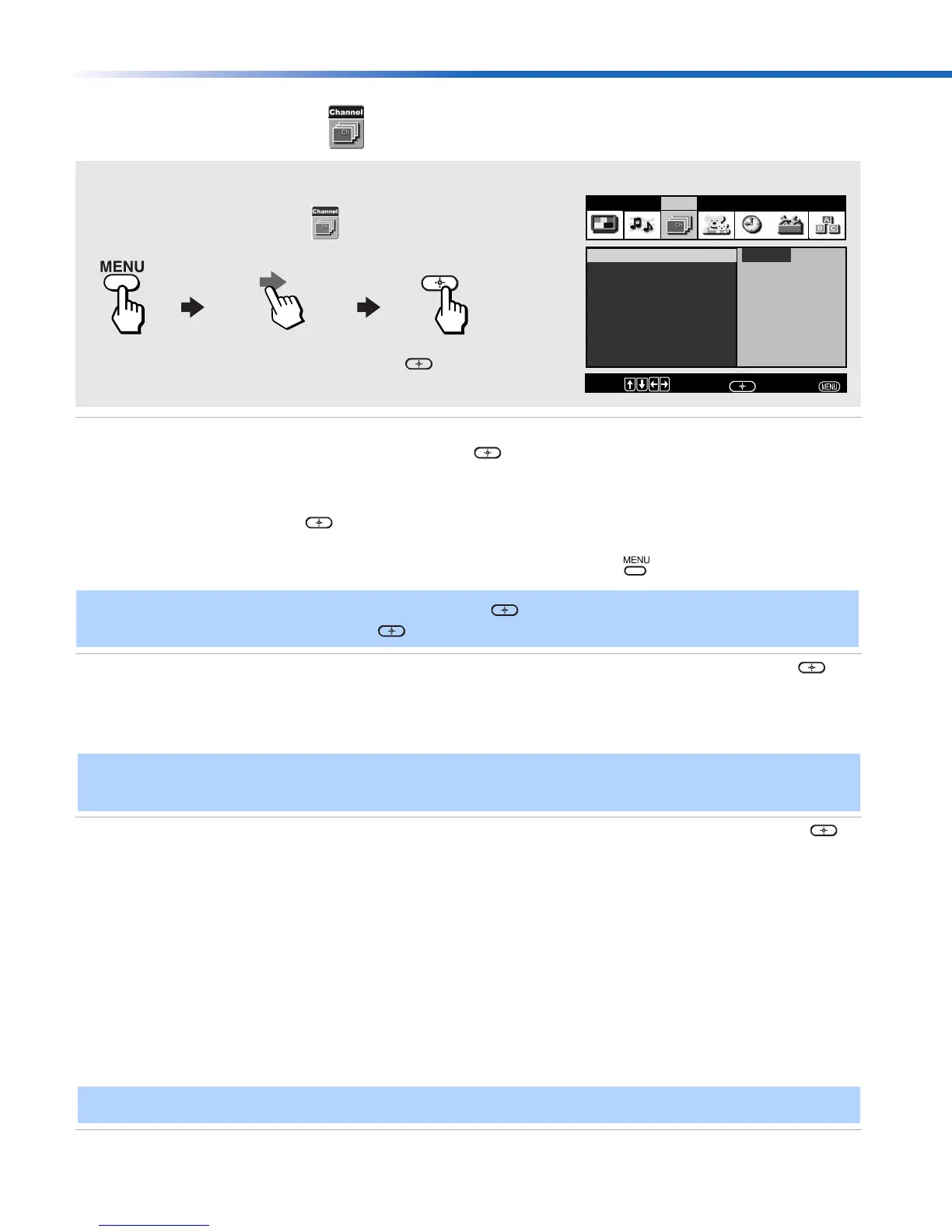
To access the Channel menu, use the following steps:
To Display To Highlight To Select
Press f to highlight an option; then press .
Favorite Channels
Cable : On
Channel Fix: Off
Auto Program
Channel Skip/Add
Channel Label
Video Audio Channel Parent Timer Setup Basic
Program
Program favorite
channels
Move:
Select:
End:
✍ To use Favorite Channels, exit all menus and press . Press F or f to move the cursor to the
desired channel number and press .
✍ After changing your cable settings, you will need to perform Auto Program. See “To perform Auto
Program again” on page 23
✍
You cannot use Favorite Channels, Cable, Channel Skip/Add, or Channel Label when Channel Fix is set.
01US01COV-BR2.book Page 33 Tuesday, February 4, 2003 11:51 AM







 To Next Page