— 15 —
KV-32FV1/34FVL1/36FV1
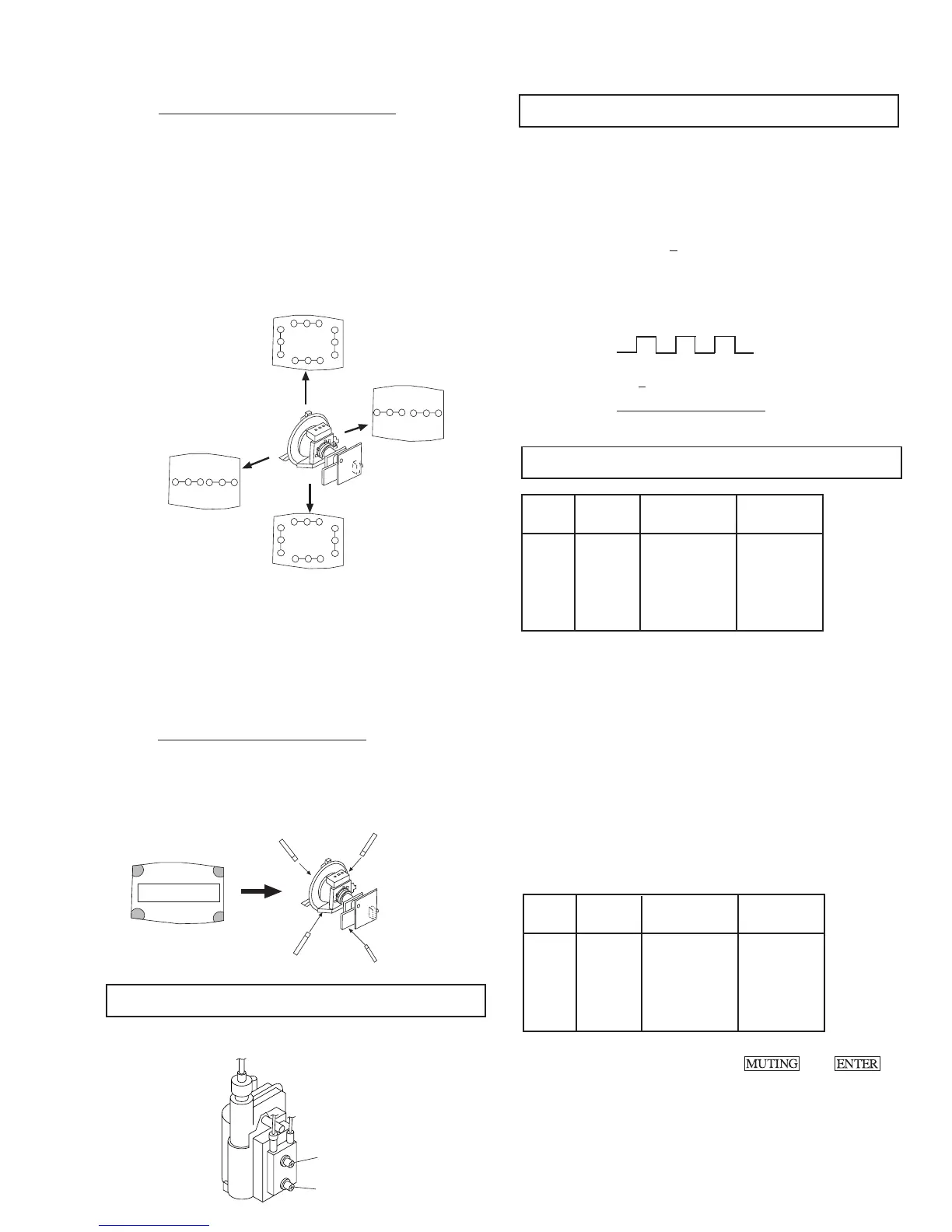
( 2 ) Dynamic Convergence Adjustment
• Before starting, perform Horizontal and Vertical
Static Convergence Adjustment.
1. Slightly loosen deflection yoke screw.
2. Remove deflection yoke spacers.
3. Move the deflection yoke for best convergence as
shown below:
R
G
B
B
G
R
B G R
R G B
R G B B G R
R G BB G R
R
G
B
B
G
R
B G R
R G B
4. Tighten the deflection yoke screw.
5. Install the deflection yoke spacers.
6. Adjust vertical red and blue convergence with
VLT (VR).
7. Adjust horizontal red and blue convergence with
YCH (VR).
(3) Screen-corner Convergence
Affix a permalloy assembly to correspond with the
misconverged areas:
a-d: screen-corner
misconvergence
b
c
a
d
b
c
a
d
3-3. FOCUS
Adjust FOCUS control for best picture.
FOCUS
SCREEN
NN
NN
N
NN
NN
N
pedestal
NN
NN
N
GND
170Vdc
170 + 2 V DC
3-4. SCREEN (G2)
1. Input dot pattern from the pattern generator.
2. Set the PICTURE and BRIGHT controls at normal.
3. Adjust S BRT, G CUT, B CUT in service mode with an
oscilloscope so that voltages on the red, green, and blue
cathodes are 170V
+ 2 V DC.
4. Observe the screen and adjust SCREEN (G2) VR on FBT
to obtain the faintly visible background of dot signal.
3-5. WHITE BALANCE ADJUSTMENTS
NO. Disp. Item Average
18 GDRV Green Drive 36
19 BDRV Blue Drive 25
20 GCUT Green Cut-off 3
21 BCUT Blue Cut-off 10
29 SBRT Sub Bright 30
1. Input an entire white signal.
2. Set to Service adjustment Mode.
3. Set the PICTURE and BRIGHT to minimum.
4. Adjust with SBRT if necessary.
5. Select GCUT and BCUT with 1 and 4 .
6. Adjust with 3 and 6 for the best white balance.
7. Set the PICTURE and BRIGHT to maximum.
8. Select GDRV and BDRV with 1 and 4 .
9. Adjust with 3 and 6 for the best white balance.
10. After adjusting the white balance, adjust the white balance
video four as follows:
NO. Disp. Item
22 4GDR Green Drive GDRV+2
23 4BDR Blue Drive BDRV +1
24 4GCT Green Cut-off GCUT
25 4BCT Blue Cut-off BCUT-1
11. Write into the memory by pressing then .











 To Next Page