— 22 —
KV-32FV1/34FVL1/36FV1
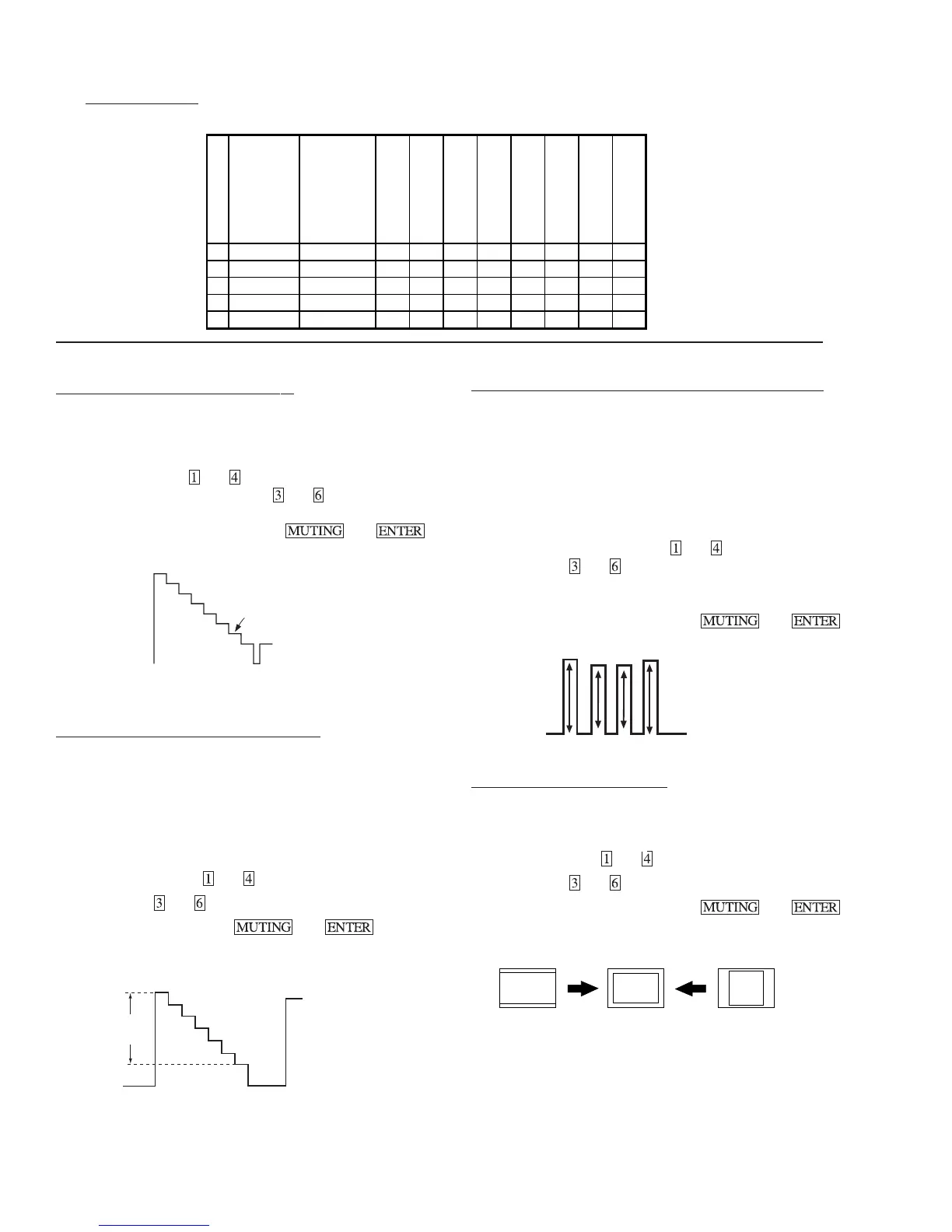
SUB HUE, SUB COLOR ADJUSTMENT (SHUE, SCOL)
1.Input a color bar signal.
2.Set to Service adjustment Mode and set to
VIDEO mode = STANDARD
PICTURE = 100%
COLOR = 50%
HUE = 50%.
3.Connect an oscilloscope to CN351 Pin 3 of A Board.
4.Select SHUE and SCOL with
and .
5.Adjust with
and for the V1 = V4 (SCOL) and V2 = V3
(SHUE).
6.Write SHUE data 1 step down and SCOL data 2 steps up.
7.Write into the memory by pressing
then .
V1
V2V3
V4
H. SIZE ADJUSTMENT (HSIZ)
1.Input a monoscope signal.
2.Set to Service adjustment Mode.
3.Select HSIZ with and .
4.Adjust with
and for the best Horizontal size.
5.Write into the memory by pressing
then .
H. SIZE
SUB BRIGHT ADJUSTMENT (SBRT)
1.Set to Service adjustment Mode.
2.Input a gray scale pattern signal.
3.Set the PICTURE to minimum, and BRIGHT to normal.
4.Select SBRT with
and .
5.Adjust SUB BRIGHT level with
and so that the stripe
second from the right is faintly visible.
6.Write into the memory by pressing then .
white
black
second from the right
SUB CONTRAST ADJUSTMENT (SCON)
1.Input a 75% color-bar signal.
2.Set to VIDEO mode = STANDARD, COLOR = minimum,
PICTURE = 100%.
GON = 0 (OFF), BON = 0 (OFF).
3.Set to Service adjustment Mode and Connect an oscilloscope
pin 1 of CN351 on A Board.
4.Select SCON with
and .
5.Adjust with
and for the 1.90 ± 0.05Vp-p of level.
6.Write into the memory by
then .
White
Black
1.90±
0.05Vp-p
(5) Feature ID Map
KV-
DESTINATION
ID-0
ID-1
ID-2
ID-3
ID-4
ID-5
ID-6
ID-7
1 32FV1 US 89 63 47 0 139173 6 0
2 32FV1 CND 89 63 47 0 139173 6 0
3 34FVL1 E 2563476417117360
4 36FV1 US 89 63 47 0 139173 6 0
5 36FV1 CND 89 63 47 0 139173 6 0




 To Next Page