19
Menu Adjustment
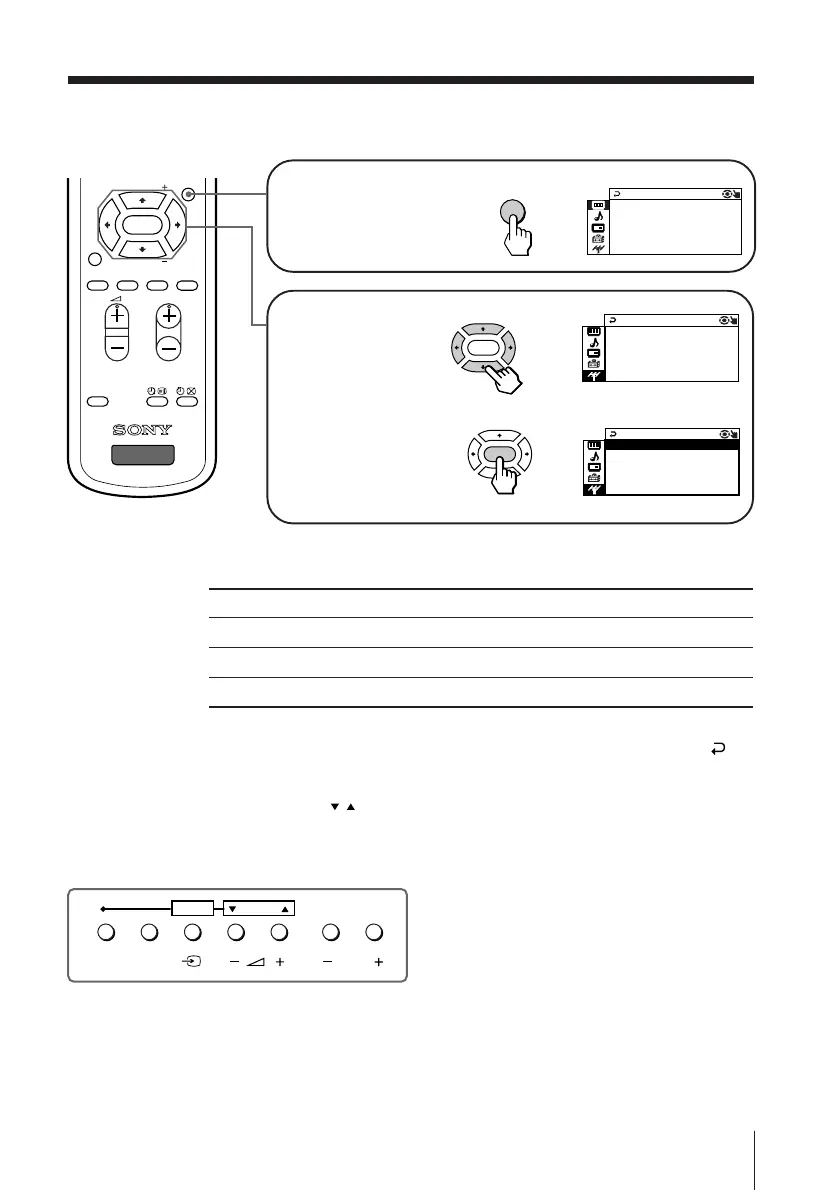
How to use the menu
Press V or v (or B/b)
to select the desired
item.
Press ENTER to
confirm your
selection and go to
the next level.
Press MENU to display
the menu.
Other menu operations
Tips
• If you want to exit from Menu level 2 to Menu level 1, press V or v until the return icon ( )
is highlighted, then press ENTER.
• Some of the menu items can be operated directly using the remote buttons.
• The MENU, ENTER, and SELECT
/
buttons on the TV can also be used for the operations
above.
PROGR
MENU
PIC
MODE
DTE
SOUND
MODE
WIDE
MODE
SURROUND
RESET
TV
PIP PROGR
PIP PROGR
ENTER
b
ENTER
AUTO PROGR
CHP P R E SET
TVA SYS : B/G
MA N U A L F
PROGR AM
AM
G
b
ENTER
B/
AUTOT PROGR
CHP PRESET
TVA S YS :
MANUA L F PROGRAM
AM
PROGRMENU
AUTO
PROGR
ENTER
SELECT
Front of TV
b
MENU
PICTURE
NT P
IC:OFF
WI DE MODE : OF F
GAME MODE : OF F
DTE : N
O
PICTURE MO C
DE : DYNAM I
To
Adjust the setting value
Move to the next/previous menu level
Cancel the menu
Press
V, v, B or b .
B or b.
MENU.












 To Next Page