9
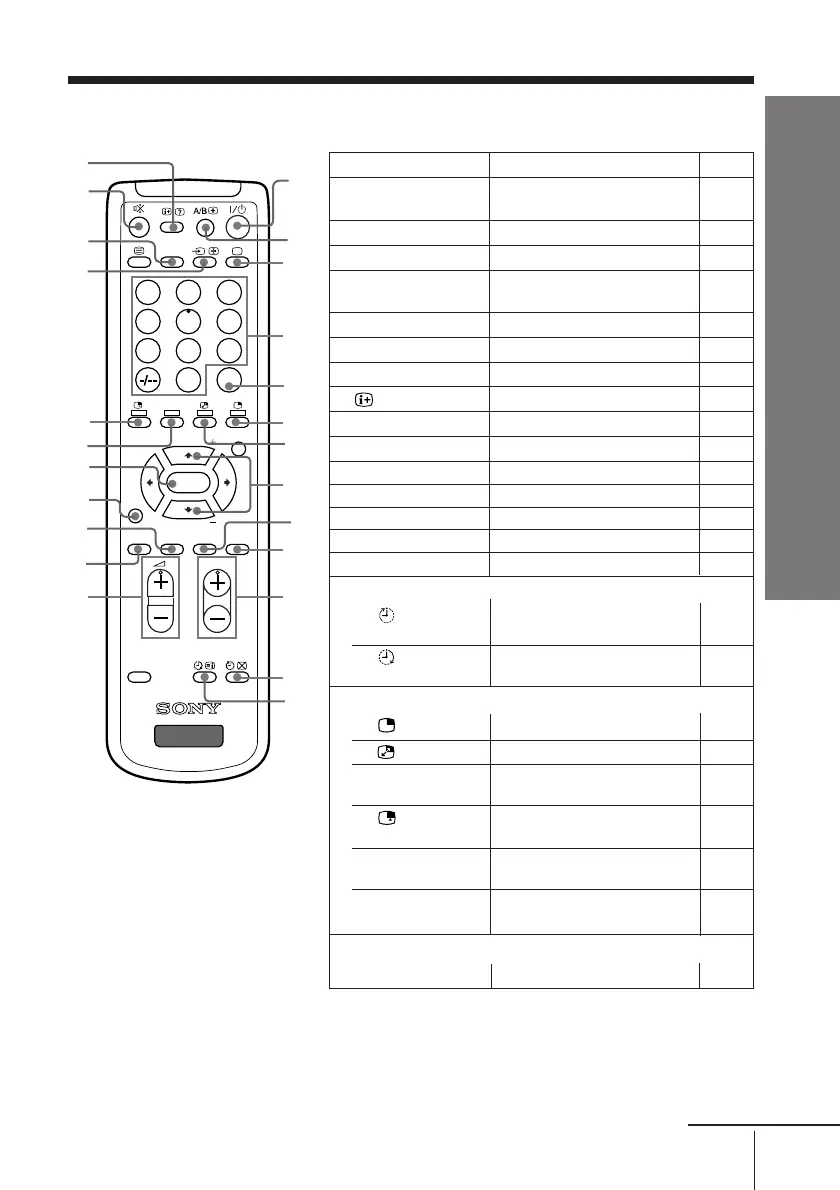
Overview of Controls
Overview of Controls
x Remote control
231
564
897
0
JUMP
PROGR
MENU
PIC
MODE
SOUND
MODE
WIDE
MODE
SURROUND
RESET
SOUND
TV
PIP PROGR
PIP PROGR
ENTER
DVD
DTE
wf
3
4
5
6
8
0
qa
qs
qk
wa
2
qf
qh
qj
w;
7
qd
9
wd
ws
1
qg
ql
continue
Button Function Page
1 ?/1 Turn off temporarily or –
turn on the TV.
3 a Display the TV input. –
4 0 – 9, - Input numbers. –
5 JUMP Jump to previous program –
number.
9 SURROUND Select surround mode. 14
0 WIDE MODE Select wide-mode (16:9). 12
qa PROGR +/– Select program number. –
qf
Display on-screen information.
–
qg % Mute the sound. –
qh DVD
Select component video input.
31
qj t
Select TV or video input.
30
wa DTE
Select DTE mode.
12
ws SOUND MODE Select sound mode. 11
wd PIC MODE Select picture mode. 11
wf 2 +/– Adjust volume. –
Timer operations
qs Set TV to turn off 15
automatically.
qd Set TV to turn on 15
automatically.
PIP operations (yellow label)
6 Display a sub screen. 13
7 Swap main and sub screens. 13
8 PIP PROGR +/ Display and change 13,14
PIP PROGR – programs in the sub screen.
qk Select a video input in the 13
sub screen.
ql SOUND Swap sound between main 13
and sub screen.
w; ENTER
Change sub screen to main 14
screen.
Stereo/bilingual operations
2 A/B
Not function for your TV.
–












 To Next Page