EasyManua.ls Logo

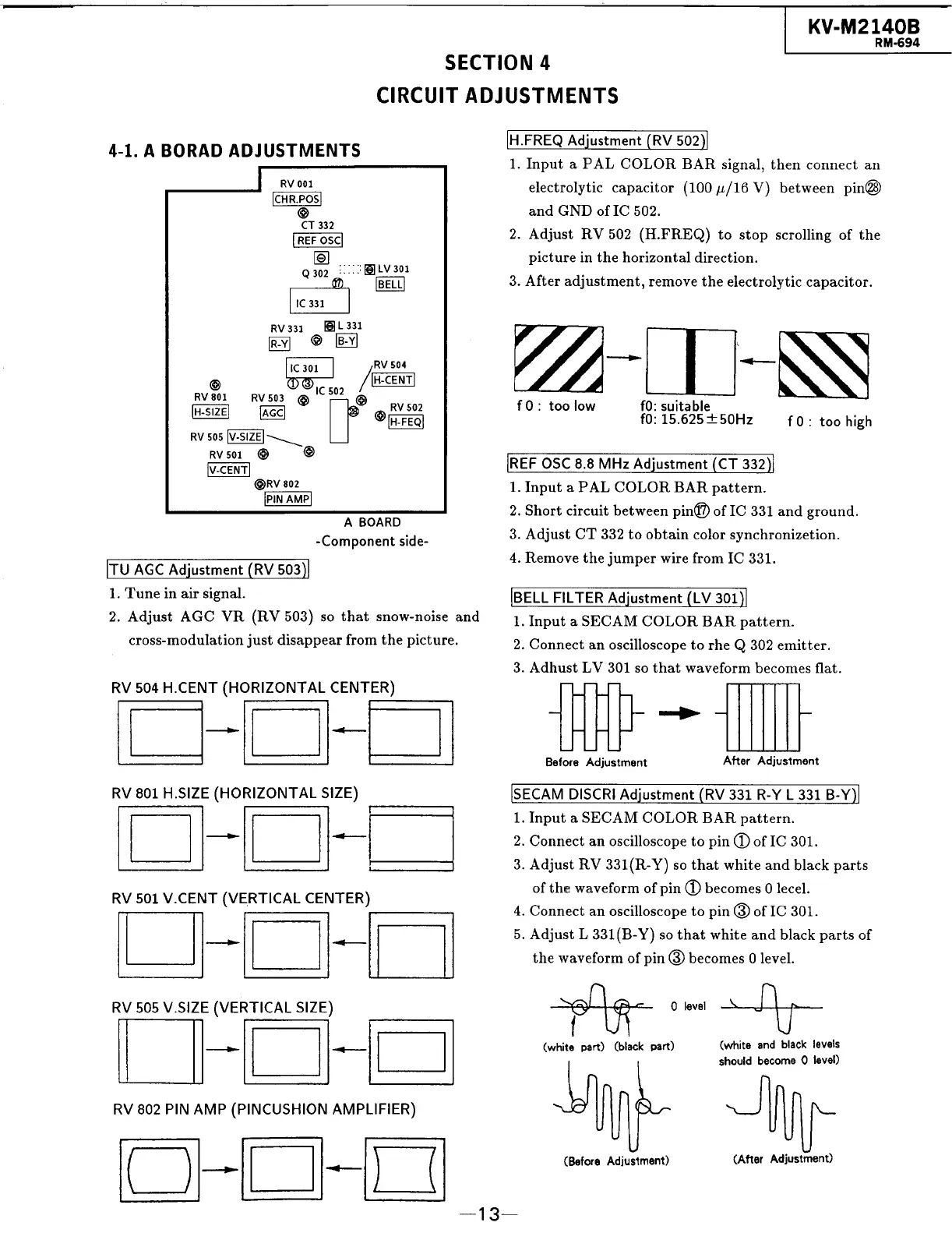
Sony TRINITRON KV-M2140B - Section 4 Circuit Adjustments; 4-1. A Board Adjustments

Sony TRINITRON KV-M2140B
48 pages
Print Icon
To Next Page IconTo Next Page
To Previous Page IconTo Previous Page
Loading...
|
KV-M2140B
RM-694
SECTION
4
CIRCUIT
ADJUSTMENTS
4-1.
A
BORAD
ADJUSTMENTS
EVE
REQ
/Ajustinent(
i
502)
.
1.
Input
a
PAL
COLOR
BAR
signal,
then
connect
an
RV
001
electrolytic
capacitor
(100
4/16
V)
between
pin@®)
[CHR.POS|
[cams
and
GND
of
IC
502.
i
2.
Adjust
RV
502
(H.FREQ)
to
stop
scrolling
of
the
ie
picture
in
the
horizontal
direction.
301
BELL
3.
After
adjustment,
remove
the
electrolytic
capacitor.
RV
331
a
_
a
fic 301
|
301
RV
504
te
Dic
=
be
[H-CENT|
®
een
os
mses
=
4
—~,
|
REF
OSC
8.8
MHz
Adjustment
(CT
332
oe
aN
1.
Input
a
PAL
COLOR
BAR
pattern.
aOnnD
2.
Short
circuit
between
pin@?
of
IC
331
and
ground.
-Component
side-
3.
Adjust
CT
332
to
obtain
color
synchronizetion.
FU
AGC
Adjustment
(RV
503)
4.
Remove
the
jumper
wire
from
IC
331.
1.
Tune
in
air
signal.
2.
Adjust
AGC
VR
(RV
503)
so
that
snow-noise
and
cross-modulation
just
disappear
from
the
picture.
BELL
FILTER
Adjustment
(LV
301
1.
Input
aSECAM
COLOR
BAR
pattern.
2.
Connect
an
oscilloscope
to
rhe
Q
302
emitter.
3.
Adhust
LV
301
so
that
waveform
becomes
flat.
RV
504
H.CENT
(HORIZONTAL
CENTER)
a
7
Before
Adjustment
After
Adjustment
RV
801
H.SIZE
(HORIZONTAL
SIZE)
ISECAM
DISCRI
Adjustment
(RV
331
R-Y
L
331
B-Y)
1.
Input
aSECAM
COLOR
BAR
pattern.
2.
Connect
an
oscilloscope
to
pin
@
of
IC
301.
3.
Adjust
RV
331(R-Y)
so
that
white
and
black
parts
fth
fe
f
pi
b
lecel.
RV
501
V.CENT
cael
CENTER)
of
the
wavelorm
of
pin)
Decomigs
ace
4.
Connect
an
oscilloscope
to
pin
@
of
IC
301.
5.
Adjust
L
331(B-Y)
so
that
white
and
black
parts
of
the
waveform
of
pin
@
becomes
0
level.
RV
505
V.SIZE
(VERTICAL
SIZE)
sea
0
level
he
(white
part)
(black
part)
(white
and
black
jevels
should
become
0
level)
RV
802
PIN
AMP
(PINCUSHION
AMPLIFIER)
pp
Hy
=e
(Before
Adjustment)
(After
Adjustment)

Related product manuals