EasyManua.ls Logo

Sony TRINITRON KV-M2140B - 1-2. To Preset Channels; 1-3. Daily Use of the TV

Sony TRINITRON KV-M2140B
48 pages
Print Icon
To Next Page IconTo Next Page
To Previous Page IconTo Previous Page
Loading...
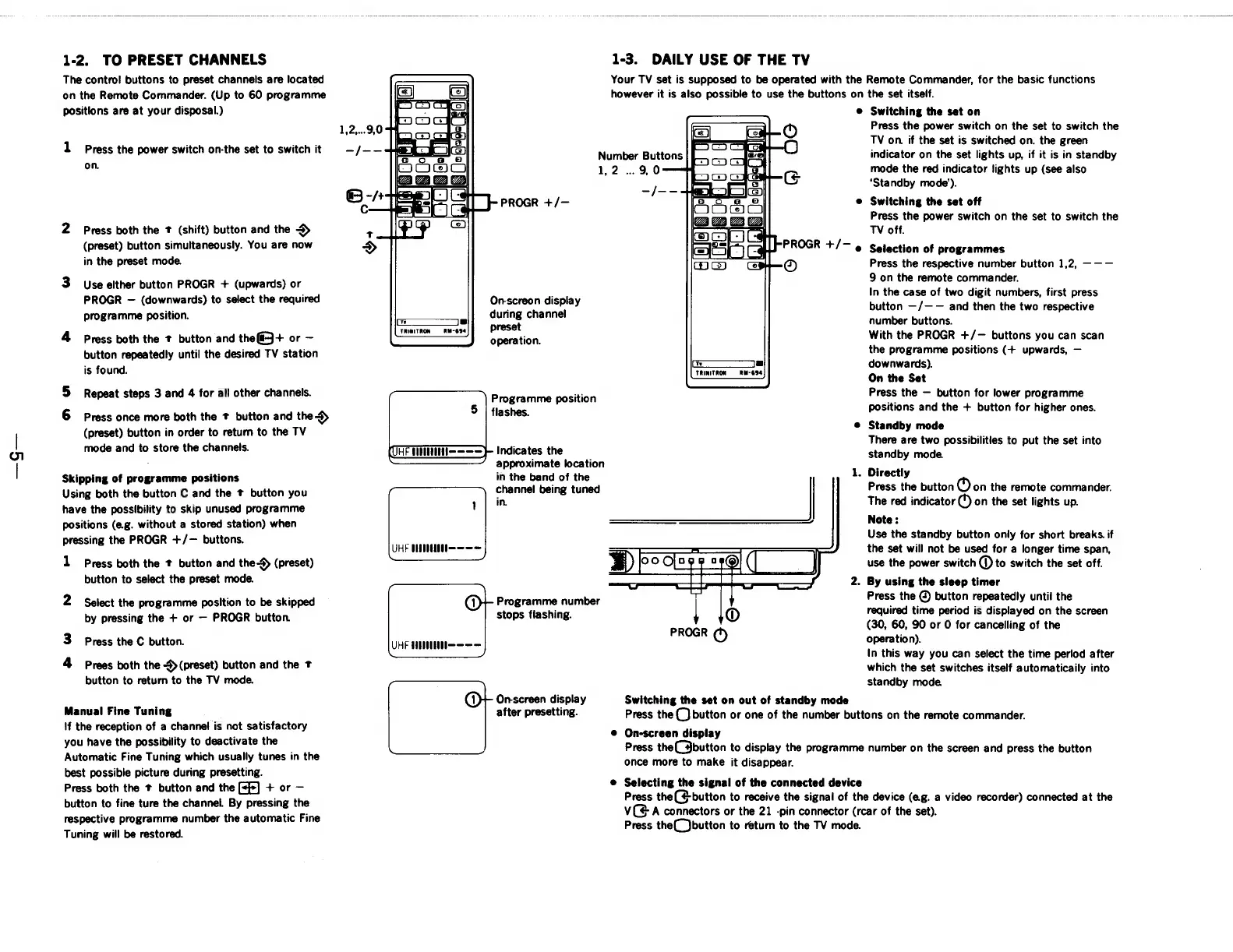
1-2.
TO
PRESET
CHANNELS
The
control
buttons
to
preset
channels
are
located
on
the
Remote
Commander.
(Up
to
60
programme
positions
are
at
your
disposal.)
1
Press
the
power
switch
on-the
set
to
switch
it
on.
2
Press
both
the
t
(shift)
button
and
the
>
(preset)
button
simultaneously.
You
are
now
in
the
preset
mode.
3
Use
elther
button
PROGR
+
(upwards)
or
PROGR
(downwards)
to
select
the
required
programme
position.
4
Press
both
the
t
button
and
thefi3+
or
button
repeatedly
until
the
desired
TV
station
is
found.
5
Repeat
steps
3
and
4
for
all
other
channels.
6
Press
once
more
both
the
t
button
and
the
(preset)
button
in
order
to
return
to
the
TV
mode
and
to
store
the
channels.
Skipping
of
programme
positions
Using
both
the
button
C
and
the
t
button
you
have
the
possibility
to
skip
unused
programme
positions
(e.g.
without
a
stored
station)
when
pressing
the
PROGR
+/—
buttons.
1
Press
both
the
t
button
and
the-
(preset)
button
to
select
the
preset
mode.
2
Select
the
programme
position
to
be
skipped
by
pressing
the
+
or
PROGR
button.
3
Press
the
C
button.
4
Prees
both
the
S>(preset)
button
and
the
T
button
to
return
to
the
TV
mode.
Manual
Fine
Tuning
If
the
reception
of
a
channel
is
not
satisfactory
you
have
the
possibility
to
deactivate
the
Automatic
Fine
Tuning
which
usually
tunes
in
the
best
possible
picture
during
presetting.
Press
both
the
*
button
and
the
[+f]
+
or
button
to
fine
ture
the
channel.
By
pressing
the
respective
programme
number
the
automatic
Fine
Tuning
will
be
restored.
Onscreon
display
during
channel
preset
operation.
|
TRINITRON
—-RM-694
Programme
position
flashes.
Indicates
the
—————’_
approximate
location
in
the
band
of
the
channel
being
tuned
in.
UHF
UHM
Programme
number
stops
flashing.
UHF
HEE
Onscreen
display
after
presetting.
1-3.
DAILY
USE
OF
THE
TV
Your
TV
set
is
supposed
to
be
operated
with
the
Remote
Commander,
for
the
basic
functions
however
it
is
also
possible
to
use
the
buttons
on
the
set
itself.
®
Switching
the
set
on
C3
1,2
..
9,0
ic
L
RM-694
TRINITRON
Switching
the
set
on
out
of
standby
mode
Press
the
power
switch
on
the
set
to
switch
the
TV
on.
if
the
set
is
switched
on.
the
green
indicator
on
the
set
lights
up,
if it
is
in
standby
mode
the
red
indicator
lights
up
(see
also
‘Standby
mode’).
Switching
the
set
off
Press
the
power
switch
on
the
set
to
switch
the
TV
off.
Selection
of
programmes
Press
the
respective
number
button
1,2,
———
9
on
the
remote
commander.
In
the
case
of
two
digit
numbers,
first
press
button
—/—-—
and
then
the
two
respective
number
buttons.
With
the
PROGR
+/—
buttons
you
can
scan
the
programme
positions
(+
upwards,
downwards).
On
the
Set
Press
the
button
for
lower
programme
positions
and
the
+
button
for
higher
ones.
Standby
mode
There
are
two
possibilities
to
put
the
set
into
standby
mode.
Directly
Press
the
button
Oon
the
remote
commander.
The
red
indicator
(4)
on
the
set
lights
up.
Note:
Use
the
standby
button
only
for
short
breaks.
if
the
set
will
not
be
used
for
a
longer
time
span,
use
the
power
switch
(D
to
switch
the
set
off.
.
By
using
the
sleep
timer
Press
the
@
button
repeatedly
until
the
required
time
period
is
displayed
on
the
screen
(30,
60,
90
or
O
for
cancelling
of
the
operation).
In
this
way
you
can
select
the
time
perlod
after
which
the
set
switches
itself
automaticaily
into
standby
mode.
Press
the
(}
button
or
one
of
the
number
buttons
on
the
remote
commander.
On-screen
display
Press
the
button
to
display
the
programme
number
on
the
screen
and
press
the
button
once
more
to
make
it
disappear.
Selecting
the
signal
of
the
connected
device
Press
the
(4
button
to
receive
the
signal
of
the
device
(e.g.
a
video
recorder)
connected
at
the
ve
A
connectors
or
the
21
-pin
connector
(rcar
of
the
set).
Press
the(_)button
to
return
to
the
TV
mode.

Related product manuals