EasyManua.ls Logo

Sony TRINITRON KV-M2140B - Page 28

Sony TRINITRON KV-M2140B
48 pages
Print Icon
To Next Page IconTo Next Page
To Previous Page IconTo Previous Page
Loading...
K
KV-M2140K/M2141K
|
394
RM-694
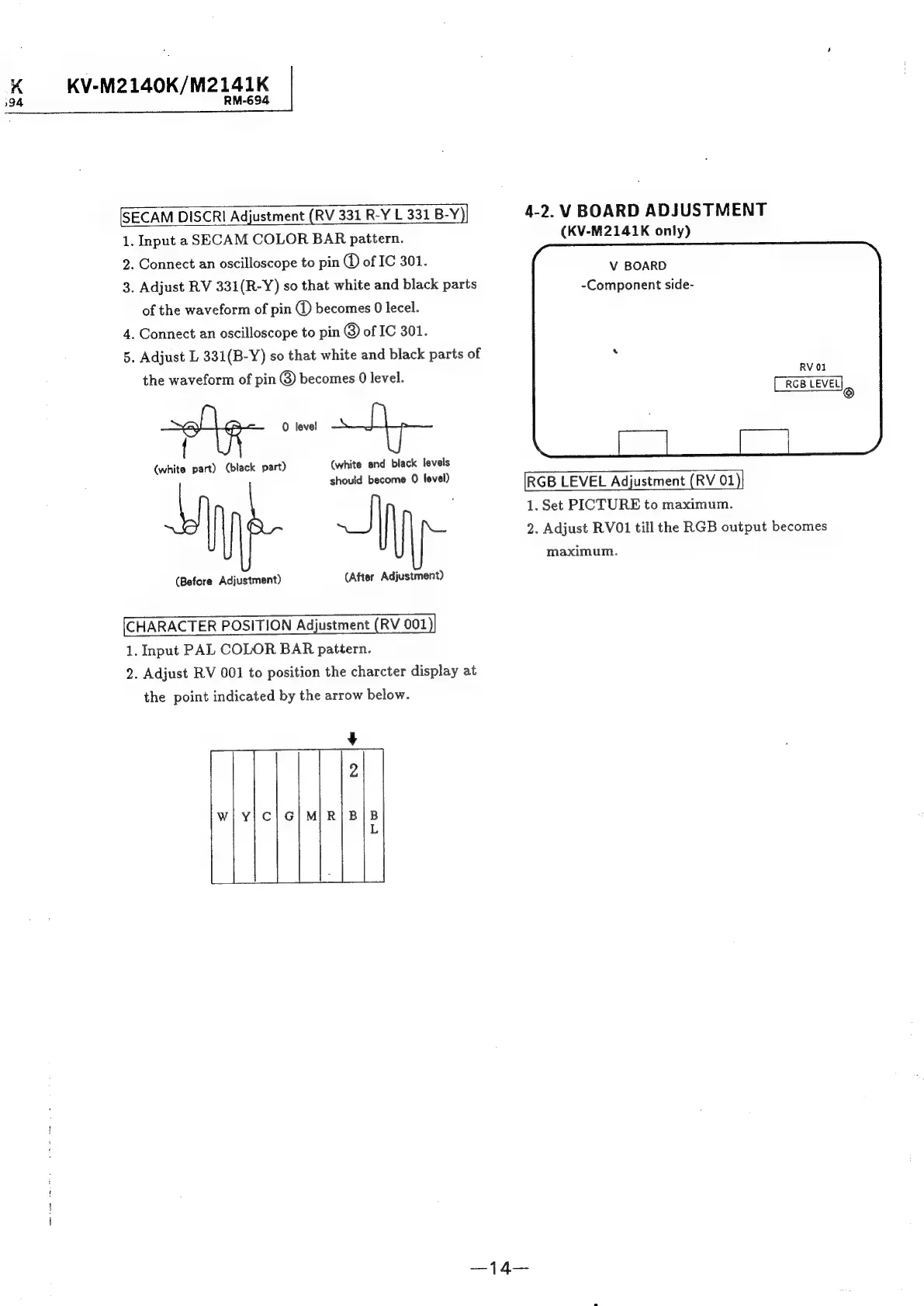
[SECAM
DISCRI
Adjustment
(RV
331
R-Y
L
331
B-Y)}
4-2.
V
BOARD
ADJUSTMENT
1.
Input
a
SECAM
COLOR
BAR
pattern.
(KV-M2141K
only)
2.
Connect
an
oscilloscope
to
pin
@
of
IC
301.
3.
Adjust
RV
331(R-Y)
so
that
white
and
black
parts
of
the
waveform
of
pin
@
becomes
0
lecel.
4.
Connect
an
oscilloscope
to
pin
@
of
IC
301.
5.
Adjust
L
331(B-Y)
so
that
white
and
black
parts
of
V
BOARD
-Component
side-
the
waveform
of
pin
becomes
0
level.
mua
:
~og-
0
level
+h
.
(white
part)
(black
part)
(white
and
black
levels
should
become
0
level)
RGB
LEVEL
Adjustment
(RV
01
;
1.
Set
PICTURE
to
maximum.
2.
Adjust
RV01
till
the
RGB
output
becomes
maximum.
(Before
Adjustment)
(After
Adjustment)
CHARACTER
POSITION
Adjustment
(RV
001
1.
Input
PAL
COLOR
BAR
pattern.
2.
Adjust
RV
001
to
position
the
charcter
display
at
the
point
indicated
by
the
arrow
below.
¥
2
Wi
Y|C|G/M|R/|
BIB

Related product manuals