33Additional Information
Identifying parts and controls
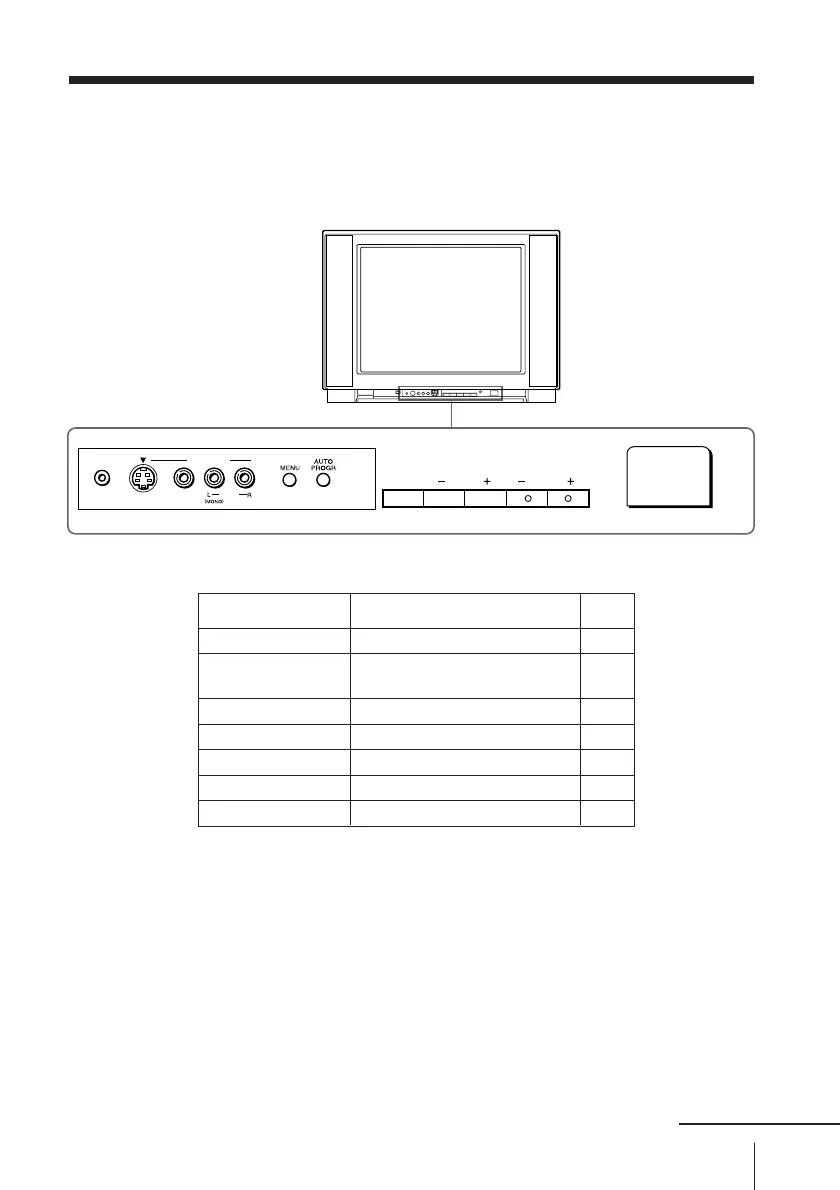
Front panel
CHANNEL
VOLUMETV/VIDEO
POWER
AUDIOVIDEO
S VIDEO
2
VIDEO 3 INPUT
continued
PageFunction
Button
AUTO PROGR
POWER
CHANNEL +/–
VOLUME +/–
TV/VIDEO
MENU
i
Preset channels automatically. 5
Turn off completely or 9
turn on the TV.
Select program number. 9
Adjust volume. 10
Select TV or video input. 10
Display the menu. 19
Headphone jack. –
Note
• The TV/VIDEO, CHANNEL +/–, and VOLUME +/– buttons on the TV
works as the VIDEO, CH+/–, and VOL +/– buttons respectively on the
remote.



 To Next Page