4
Using Your New TV
VIDEO
VIDEO IN
VIDEO OUT
AUDIO
R L
WOOFER
(8 )
VIDEO
IN
1 2 3
MONITOR
OUT
S VIDEO
AUDIO
L(MONO)
VIDEO
Getting Started
Step 1
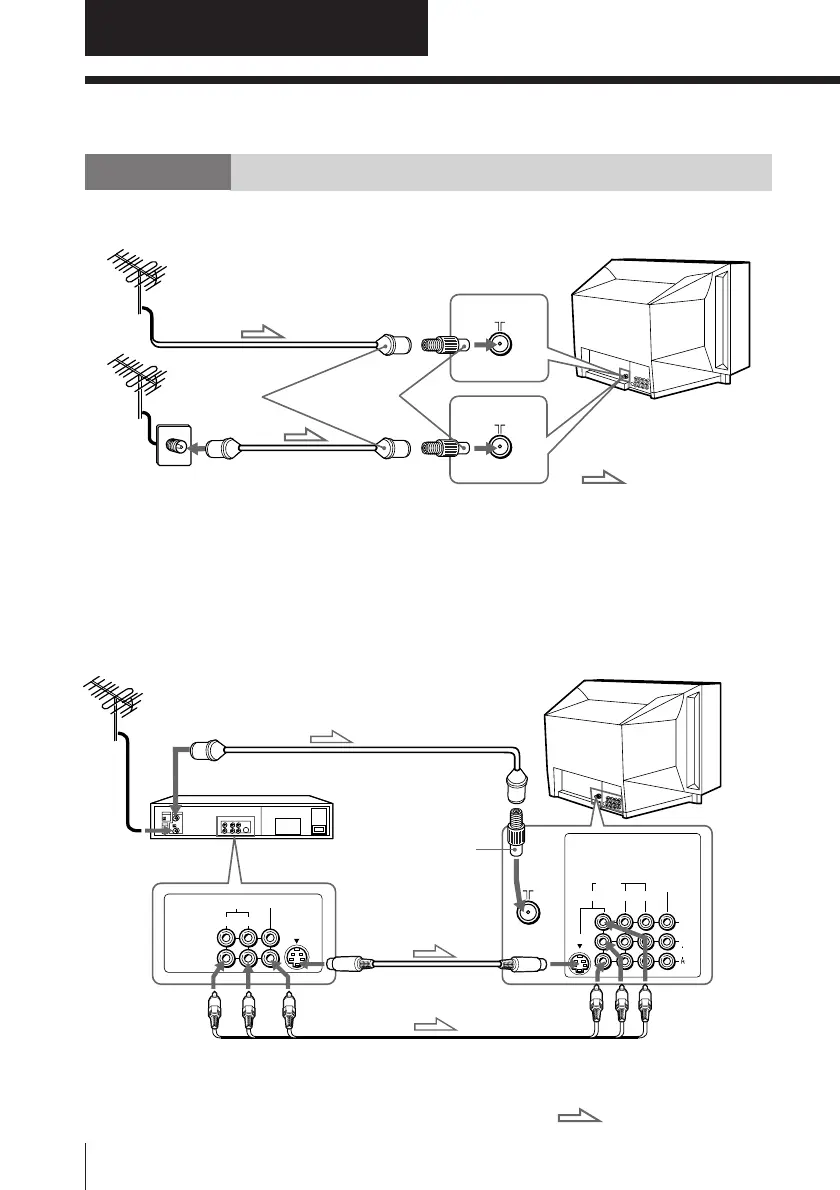
Connect the antenna
If you wish to connect a VCR, see the “Connecting a VCR” diagram below.
CAUTION
Do not connect the power cord until you have completed making all other
connections; otherwise a minimum leakage current might flow through the antenna
and other terminals to ground.
Connecting a VCR
To play a video tape, press VIDEO (see page 10).
Using Your New TV
F connector
(not supplied)
To video and
audio outputs
VCR
VIDEO (yellow)
AUDIO-L (MONO) (white)
AUDIO-R (red)
To S video
output
Antenna cable (not supplied)
To VIDEO IN
1, 2 or 3
Audio/Video cable
(not supplied)
S video cable
(not supplied)
: Signal flow
To S video
input
To antenna
output
To antenna
or
: Signal flow
Antenna cable (not supplied)
Antenna cable
(not supplied)
Antenna adapter
(supplied)
Rear of TV
Rear of TV
Antenna
adapter
(supplied)







 To Next Page