8
Using Your New TV
Presetting the
channels
manually
To receive a new channel or a channel with a weak signal, preset the channel
manually.
1
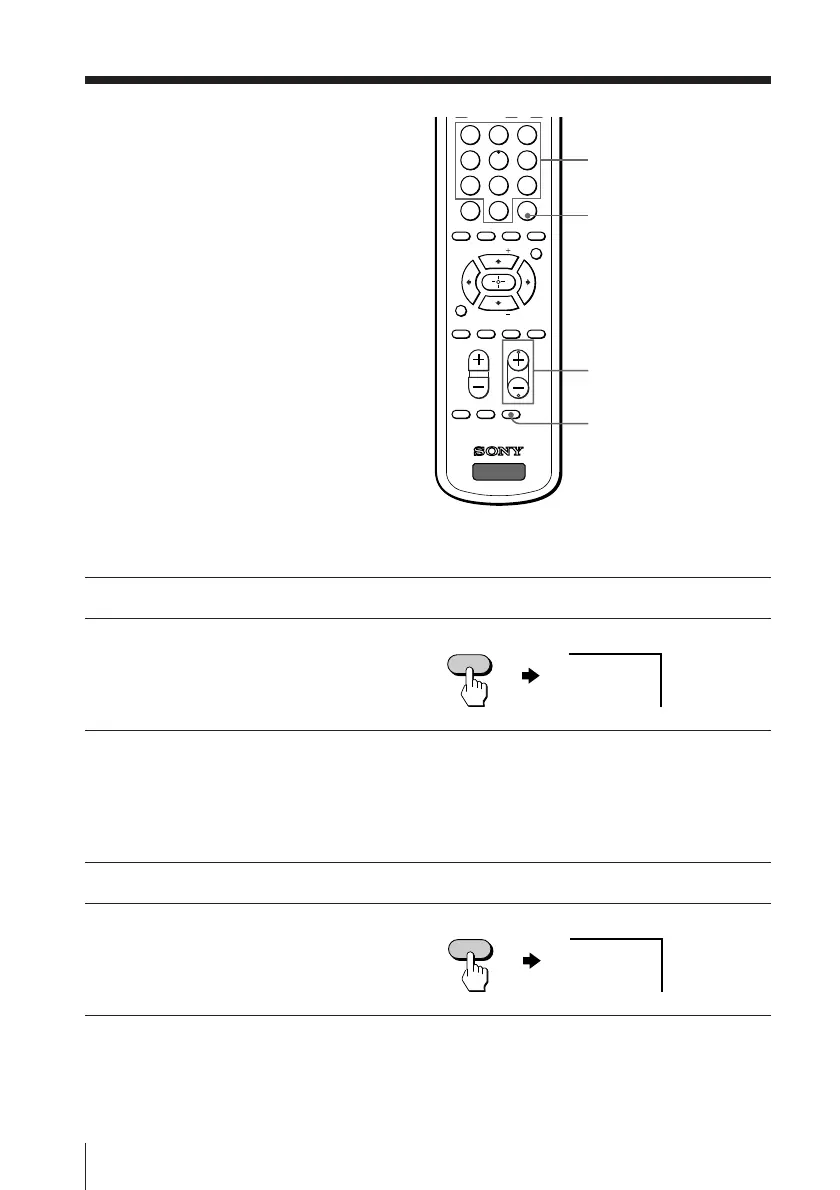
Press number buttons to select the desired channel, then press ENTER.
2
Press ADD/ERASE.
“+” appears beside the
channel number, indicating
that presetting is complete.
Disabling channels
By disabling unused or unwanted channels, you can skip those channels when you
press CH +/–.
1
Press CH +/– until the unused or unwanted channel appears on the screen.
2
Press ADD/ERASE.
“–” appears beside the
channel number, indicating
that disabling is complete.
To cancel the skip setting
Preset the channel automatically again.
ADD/ERASE
ENTER
CH +/–
ADD/ERASE
+25
–25
ADD/ERASE
231
564
897
0
ENTER
JUMP
TV/VIDEO FREEZE SWAP PIP
CHVOL
MENU
FAVORITE
SURROUND
AUTO PROGR ADD/ERASECABLE
WAKE UP
SOUND
MODE
TV
PIP CH
PIP CH
SLEEP
Number
buttons



 To Next Page