EasyManua.ls Logo

Sony TRINITRON PVM-20N1E - Page 12

Sony TRINITRON PVM-20N1E
15 pages
Print Icon
To Next Page IconTo Next Page
To Previous Page IconTo Previous Page
Loading...
Using
On-Screen
Menus
[2d]USER
MEMORY
menu
USER
MEMORY
STORE
RECALL
FACTORY
PRESET
EBDSELECT
lETfg_HEP
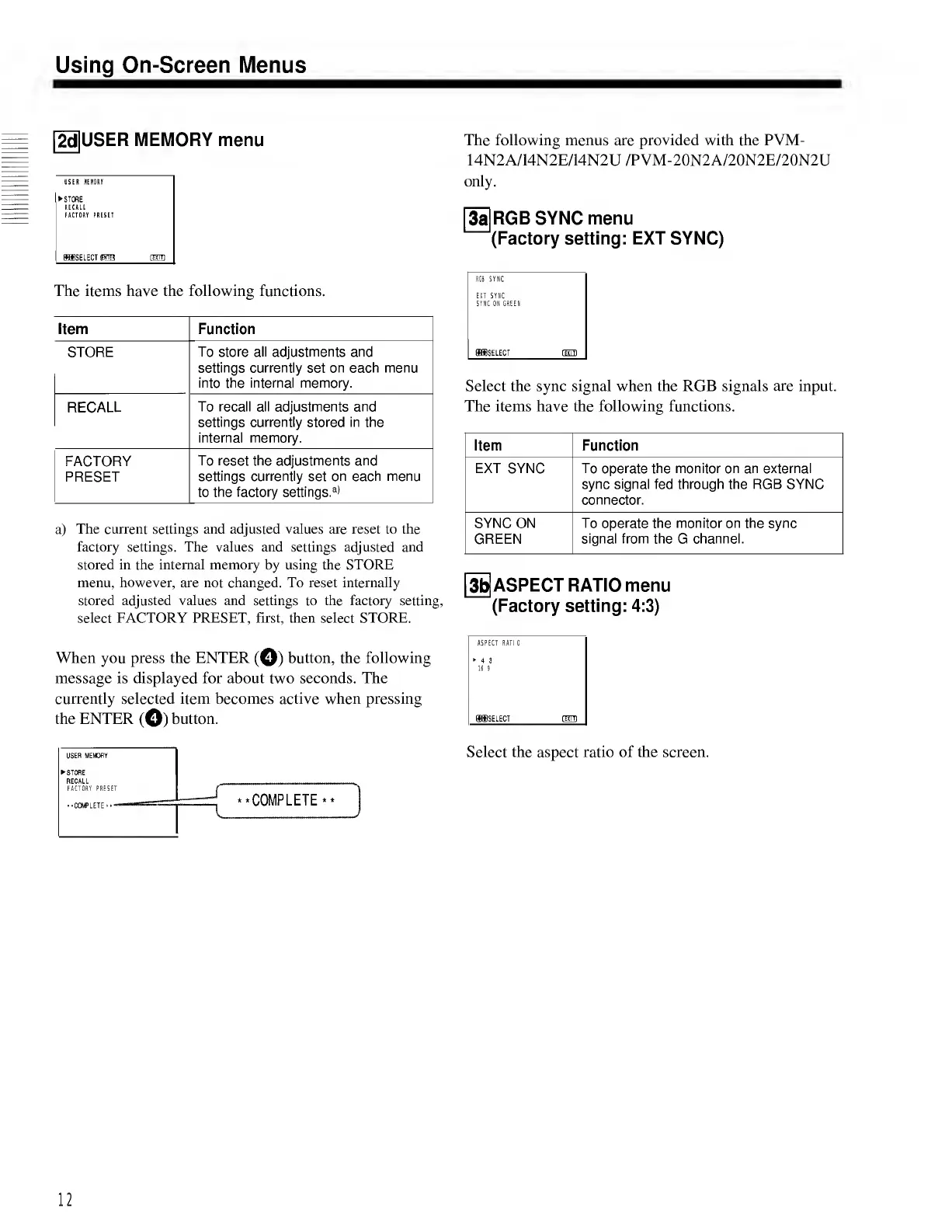
The
items
have
the
following
functions.
Item
Function
STORE
To
store
all
adjustments
and
settings
currently
set
on
each
menu
into
the
internal
memory.
RECALL
To
recall
all
adjustments
and
settings
currently
stored
in
the
internal
memory.
FACTORY
PRESET
To
reset
the
adjustments
and
settings
currently
set
on
each
menu
to
the
factory
settings.
a)
a)
The
current
settings
and
adjusted
values
are
reset
to
the
factory
settings.
The
values
and
settings
adjusted
and
stored
in
the
internal
memory
by
using
the
STORE
menu,
however,
are
not
changed.
To
reset
internally
stored
adjusted
values
and
settings
to
the
factory
setting,
select
FACTORY
PRESET,
first,
then
select
STORE.
When
you
press
the
ENTER
(©)
button,
the
following
message
is
displayed
for
about
two
seconds.
The
currently
selected
item
becomes
active
when
pressing
the
ENTER
(©)
button.
The
following
menus
are
provided
with
the
PVM-
14N2A/14N2E/14N2U
/PVM-20N2A/20N2E/20N2U
only.
[3i]RGBSYNC
menu
(Factory
setting:
EXT
SYNC)
RGB
SYNC
EXT
SYNC
SYNC
ON
GREEN
ffiffiSELECT
flm)
Select
the
sync
signal
when
the
RGB
signals
are
input.
The
items
have
the
following
functions.
Item
Function
EXT
SYNC
To
operate
the
monitor
on
an
external
sync
signal
fed
through
the
RGB
SYNC
connector.
SYNC
ON
GREEN
To
operate
the
monitor
on
the
sync
signal
from
the
G
channel.
[3b|ASPECT
RATIO
menu
(Factory
setting:
4:3)
ASPECT
RATIO
4:3
16
9
(SfflSELECT
CETD
USER
MEMORY
STORE
RECALL
FACTORY
PRESET
-
^
t.mMPI
FTF
**
-COMPLETE
•*
.
V
.J
Select
the
aspect
ratio
of
the
screen.
12

Related product manuals