EasyManua.ls Logo

Sony TRINITRON PVM-20N1E - Page 6

Sony TRINITRON PVM-20N1E
15 pages
Print Icon
To Next Page IconTo Next Page
To Previous Page IconTo Previous Page
Loading...
Location
and
Function
of
Parts
and
Controls
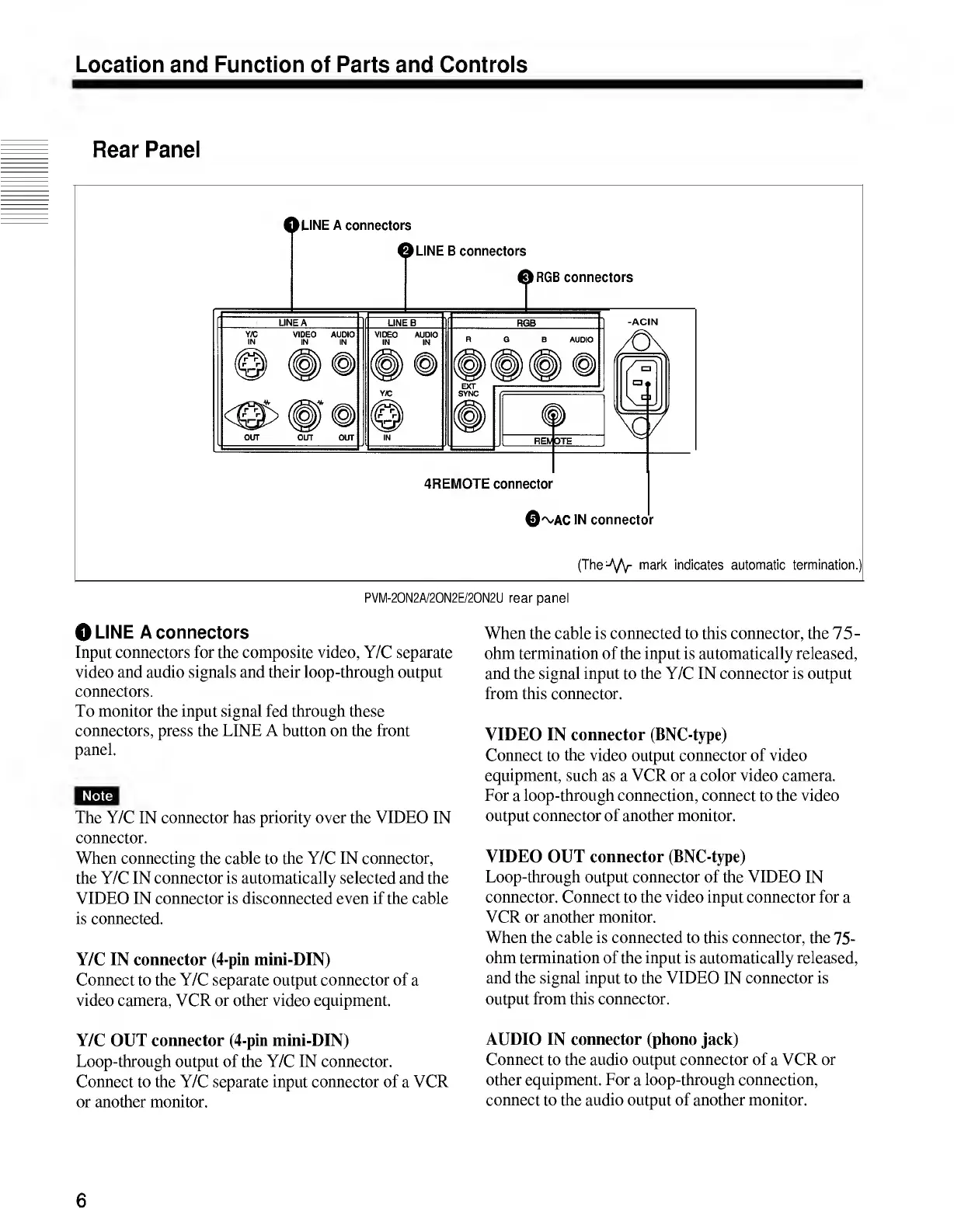
Rear
Panel
(TheA/Y
m
a
r
k
indicates
automatic
termination.)
PVM-20N2A/20N2E/20N2U
rear
panel
O
LINE
A
connectors
Input
connectors
for
the
composite
video,
Y/C
separate
video
and
audio
signals
and
their
loop-through
output
connectors.
To
monitor
the
input
signal
fed
through
these
connectors,
press
the
LINE
A
button
on
the
front
panel.
Note
The
Y/C
IN
connector
has
priority
over
the
VIDEO
IN
connector.
When
connecting
the
cable
to
the
Y/C
IN
connector,
the
Y/C
IN
connector
is
automatically
selected
and
the
VIDEO
IN
connector
is
disconnected
even
if
the
cable
is
connected.
Y/C
IN
connector
(4-pin
mini-DIN)
Connect
to
the
Y/C
separate
output
connector
of
a
video
camera,
VCR
or
other
video
equipment.
When
the
cable
is
connected
to
this
connector,
the
75-
ohm
termination
of
the
input
is
automatically
released,
and
the
signal
input
to
the
Y/C
IN
connector
is
output
from
this
connector.
VIDEO
IN
connector
(BNC-type)
Connect
to
the
video
output
connector
of
video
equipment,
such
as
a
VCR
or
a
color
video
camera.
For
a
loop-through
connection,
connect
to
the
video
output
connector
of
another
monitor.
VIDEO
OUT
connector
(BNC-type)
Loop-through
output
connector
of
the
VIDEO
IN
connector.
Connect
to
the
video
input
connector
for
a
VCR
or
another
monitor.
When
the
cable
is
connected
to
this
connector,
the
75-
ohm
termination
of
the
input
is
automatically
released,
and
the
signal
input
to
the
VIDEO
IN
connector
is
output
from
this
connector.
Y/C
OUT
connector
(4-pin
mini-DIN)
Loop-through
output
of
the
Y/C
IN
connector.
Connect
to
the
Y/C
separate
input
connector
of
a
VCR
or
another
monitor.
AUDIO
IN
connector
(phono
jack)
Connect
to
the
audio
output
connector
of
a
VCR
or
other
equipment.
For
a
loop-through
connection,
connect
to
the
audio
output
of
another
monitor.
6

Related product manuals