Rear panel
2
3
LINE 2
~
LINE 3 (INPUT)
~VIDEOi i i
G1Y VO
@®@@~~
IN V1DEO OUT
~~
VIC Y/C
@l@
AUDIO
@~@
81B·Y
A-L
EXT
SYNC
@@
l'::====:::f-t====:::'.J AUDIO
IL:::==='"=====?\ "===========
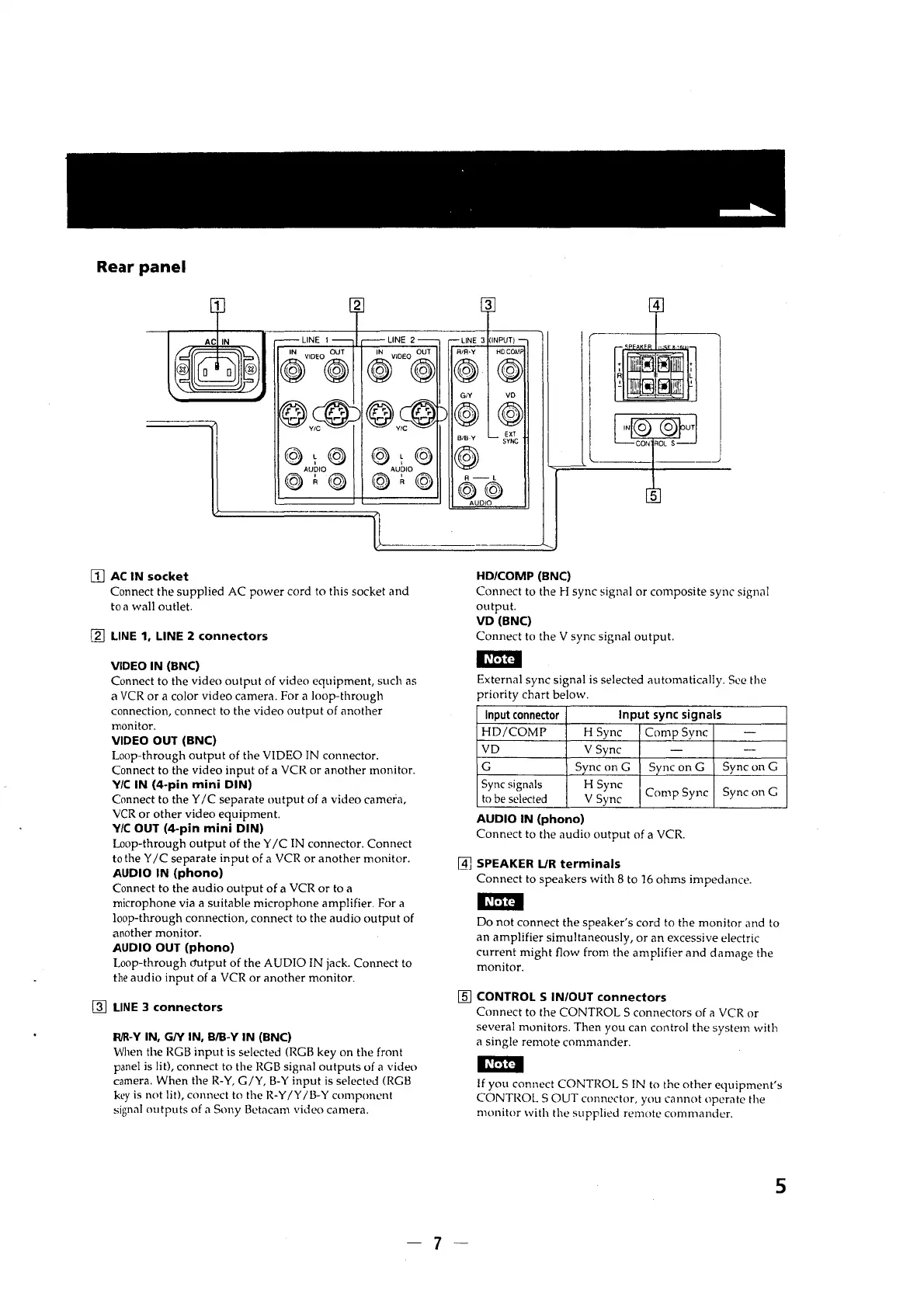
II] AC IN socket
Connect the supplied AC power cord to this socket and
to a wall outlet.
[g) LINE 1, LINE 2 connectors
VIDEO IN (BNC)
Connect to the video output of video equipment, such as
a VCR or a color video camera. For a loop-through
connection, connect to the video output of another
monitor.
VIDEO OUT (BNC)
Loop-through output of the VIDEO IN connector.
Connect to the video input of a VCR or another monitor.
Y/C IN (4-pin mini DIN)
Connect to the Y /C separate output of a video camera,
VCR or other video equipment.
Y/C OUT (4-pin mini DIN)
Loop-through output of the Y /C IN connector. Connect
to the Y /C separate input of a VCR or another monitor.
AUDIO IN (phono)
Connect to the audio output of a VCR or to a
microphone via a suitable microphone amplifier. For a
loop-through connection, connect to the audio output of
another monitor.
AUDIO OUT (phono)
Loop-through m.itput of the AUDIO IN jack. Connect to
the audio input of a VCR or another monitor.
lli] LINE 3 connectors
R/R·Y IN, GN IN, B/B-Y IN (BNC)
When the RGB input is selected (RGB key on the front
panel is lit), connect to the RGB signal outputs of a video
camera. When the R-Y, G/Y, B-Y input is selected (RGB
key is not lit), connect to the R-Y /Y /B-Y component
signal outputs of a Sony Betacam video camera.
HD/COMP (BNC)
Connect to the H sync signal or composite sync sign,11
output.
VD (BNC)
Connect to the V sync signal output.
External sync signal is selected automatically. See the
priority chart below.
Input connector
Input sync signals
HD/COMP H Sync
Comp Sync
-
VD
VSync -
-
G Sync on G
Sync on G
Sync on G
Sync signals H Sync
Comp Sync
Sync on G
to be selected V Sync
AUDIO IN (phono)
Connect to the audio output of a VCR.
~
SPEAKER L/R terminals
Connect to speakers with 8 to 16 ohms imped,mce.
Do not connect the speaker's cord to the monitor and to
an amplifier simultaneously, or an excessive electric
current might flow from the amplifier and damage the
monitor.
[fil CONTROL S IN/OUT connectors
Connect to the CONTROLS connectors of a VCR or
several monitors. Then you can control the system with
a single remote commander.
mm
If you connect CONTROLS IN to the other equipment's
CONTROLS OUT connector, you cannot operate the
monitor with the supplied remote commander.
5
-7-




 To Next Page