3. Camera Operations: Monitoring Menu
78
Monitoring > VF Display
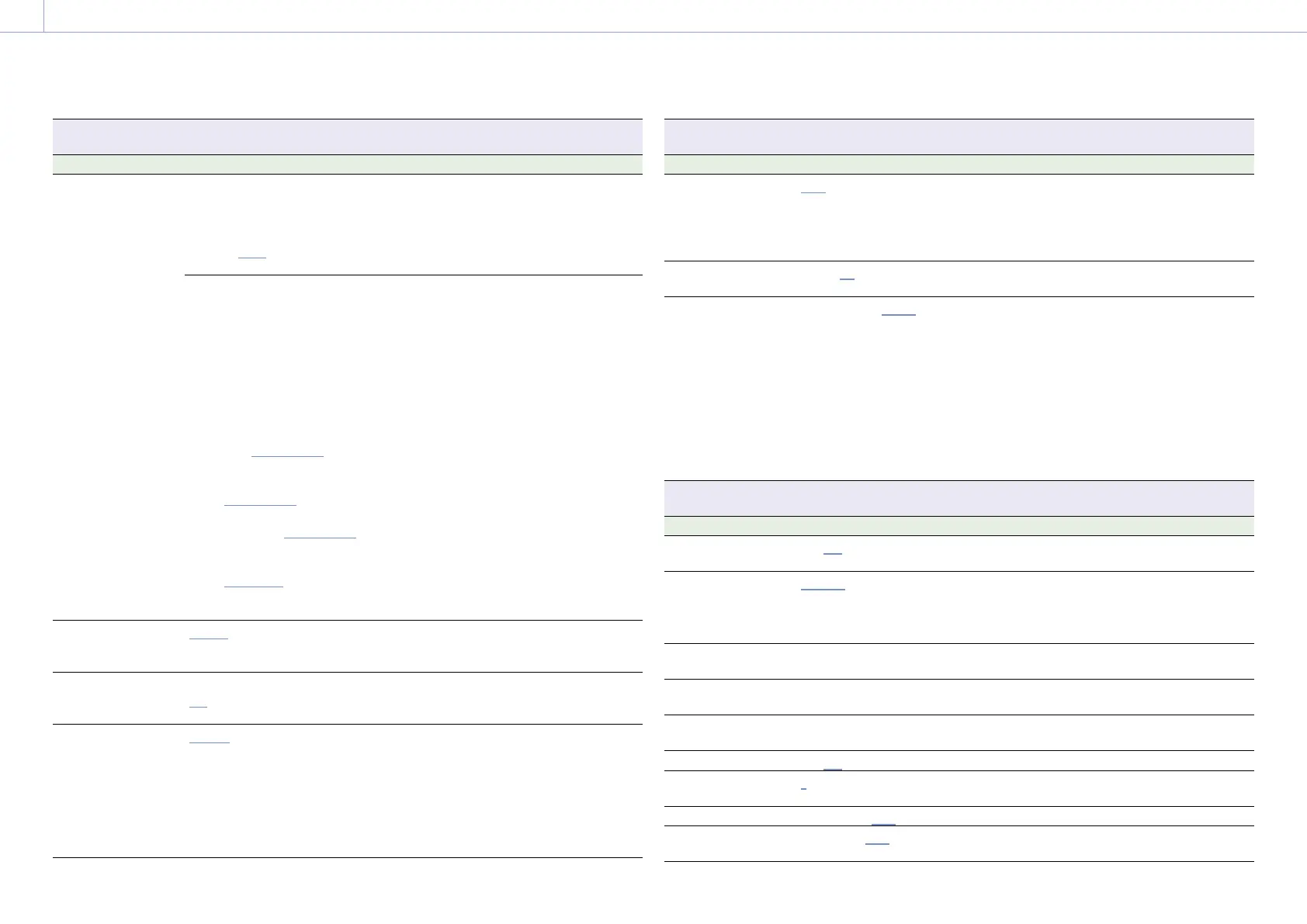
Makes settings related to the viewfinder display.
Menu item Setting Description
VF LUT
[Note]
Linked to the Shooting
> LUT Select > VF LUT
(page 70) settings in
the full menu.
When Technical > Special
Configuration > RM/RCP Paint
Control (page 91) is set to
Off in the full menu:
Log/s709/R709(800%)/
Look
Selects the LUT to apply to the viewfinder/
monitor screen output image.
When RM/RCP Paint Control is
set to On:
The settings change as
follows depending on the
Project > Basic Setting >
Input Color Space
(page 72) setting in the
full menu.
S-Gamut3.Cine/SLog3 or
S-Gamut3/SLog3:
Log/R709(800%)
HLG(Natural):
HLG(Natural)/
R709(800%)
HLG(Live):
HLG(Live)/R709(800%)
Rec.2020/User Gamma:
User Gamma/
R709-Like
Rec.709/User Gamma:
User Gamma
Selects the type of viewfinder/monitor screen
output image.
[Notes]
• An SDR gain value (–12 dB) is applied to the
viewfinder/monitor output image.
• You can change the output gain using SDR Gain
when set to R709(800%) or R709-Like.
Overlay Info. A/Info. B/Rec Ind./Off Selects the information to display
superimposed on the viewfinder/monitor
screen output image.
Frame Line
Frame Line A/Frame Line B/
Off
Selects the frame lines to display
superimposed on the viewfinder/monitor
screen output image.
VF Magnifier Mode
Toggle/Press & Hold Selects the method for turning the focus
magnifier function of the viewfinder on/off.
Toggle: Toggles the magnification on/off
each time you press an assignable button
assigned with VF Focus Magnifier.
Press & Hold: Turns the magnification on
while you press an assignable button
assigned with VF Focus Magnifier.
Monitoring > VF Display
Makes settings related to the viewfinder display.
Menu item Setting Description
VF Magnifier Ratio
×2.0 / ×4.0 / ×2.0/×4.0 Selects the focus magnification ratio for the
viewfinder.
[Note]
×2.0/×4.0 cannot be selected when VF Magnifier
Mode is set to Press & Hold.
Color –99 to ±0 to +99 Adjusts the color depth of the viewfinder
image.
SDR Gain
–15dB to 0dB (–12dB)
(1dB increments)
Sets the SDR output gain when RM/RCP Paint
Control is set to On.
You can use this to change the gain of the
Monitor or viewfinder output that is set to
R709(800%) or R709-Like.
[Notes]
• Linked to the Shooting > LUT Select > SDR Gain
(page 71) settings in the full menu.
• Configurable when Technical > Special
Configuration > RM/RCP Paint Control
(page 91) is set to On in the full menu.
Monitoring > VF Function
Makes settings related to viewfinder functions.
Menu item Setting Description
Double Speed Scan
On/Off Turns the viewfinder double speed scan
function on/off.
Peaking Frequency
Normal/High Selects whether the peaking frequency is
normal or high during peaking.
[Note]
The peaking level is set using the viewfinder menu.
Assign<VF A> page 48 Assigns a function to assignable button A on
the viewfinder (DVF-EL200).
Assign<VF B> page 48 Assigns a function to assignable button B on
the viewfinder (DVF-EL200).
Assign<VF C> page 48 Assigns a function to assignable button C on
the viewfinder (DVF-EL200).
Zebra
On/Off Turns the zebra function on/off.
Zebra Select
1/2/Both Selects the zebra pattern type (Zebra 1, Zebra
2, Both).
Zebra1 Level
0% to 107% (41%) Sets the display level of zebra 1.
Zebra1 Aperture
Level
1% to 20% (10%) Sets the aperture level of zebra 1.














 To Next Page