17
GB
Location and Function of Controls
Overview
qs RESET/ESCAPE key
Functions as a RESET key.
Resets the value of an item to its factory
preset value or returns the enlarged
image to its original size. This key
functions when the menu or a setting
item is displayed on the screen.
qd D ZOOM (Digital Zoom) +/– key
Enlarges the image at a desired location
on the screen.
qf Arrow keys (M/m/</,)
qg MENU/TAB key
Functions as a MENU key.
qh APA (Auto Pixel Alignment) key
Automatically adjusts a picture to its
clearest while a signal is input from a
computer.
For details, see “Smart APA” in the SET
SETTING menu on page 35.
qj VOLUME +/– keys
qk LENS key
Each time you press this key, Focus
adjustment menu and Zoom adjustment
menu are displayed alternately.
ql PJ/NETWORK (Projector/
Network) selector switch
Normally, set to “PJ.”
w; COMMAND ON/OFF switch
When this switch is set to OFF, no key
on the Remote Commander function.
This saves battery power.
wa Infrared transmitter
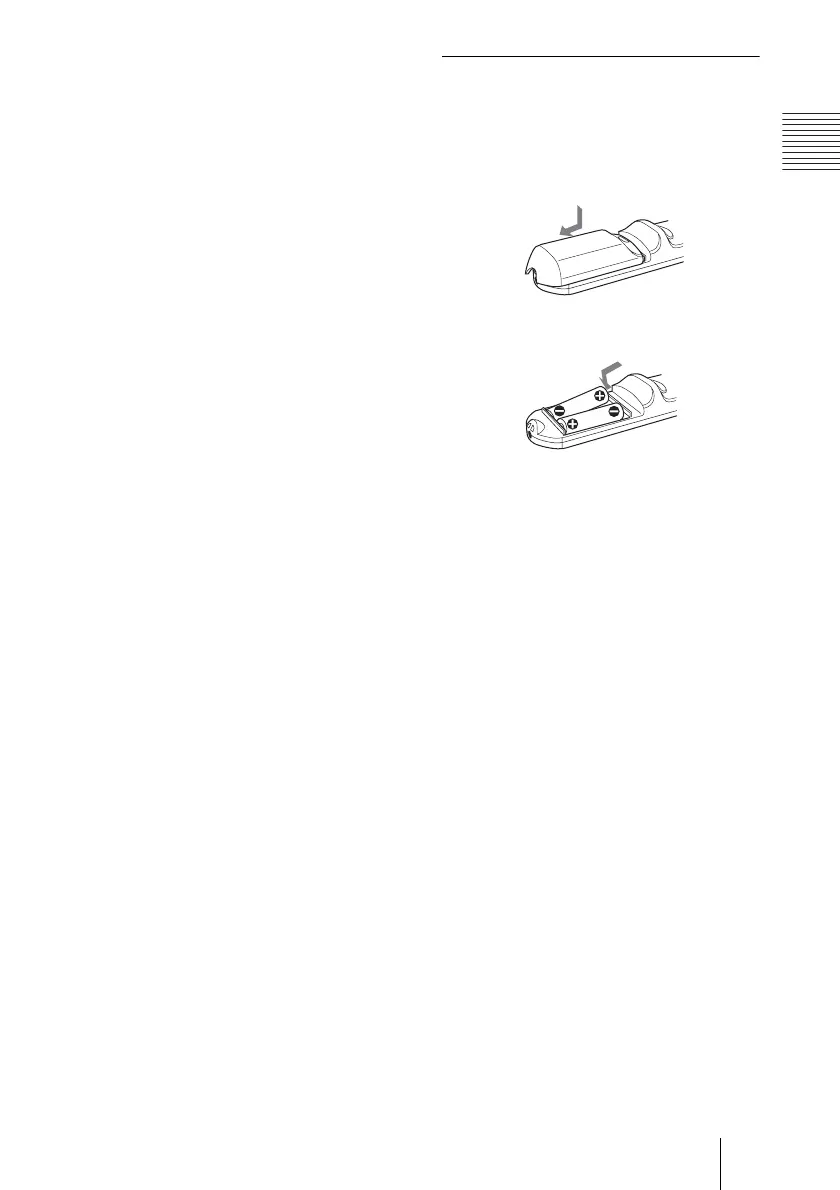
To install batteries
1 Push and slide to open the lid, then
install the two size AA (R6) batteries
(supplied) with the correct polarity.
2 Replace the lid.
Be sure to install the battery
from the
# side.
While pressing the lid, slide it.



 To Next Page