GB
20 Connecting the Projector
Connecting the
Projector
When you connect the projector,
make sure to:
• Turn off all equipment before making any
connections.
• Use the proper cables for each connection.
• Insert the cable plugs firmly; loose
connections may increase noise and
reduce performance of picture signals.
When pulling out a cable, be sure to pull it
out from the plug, not the cable itself
When connecting to a wireless LAN by using
the Air Shot, see “Operating Instructions for
Air Shot” contained in the CD-ROM (VPL-
CX75 only).
This section describes how to connect the
projector to a computer.
For more information, refer to the
computer’s instruction manual.
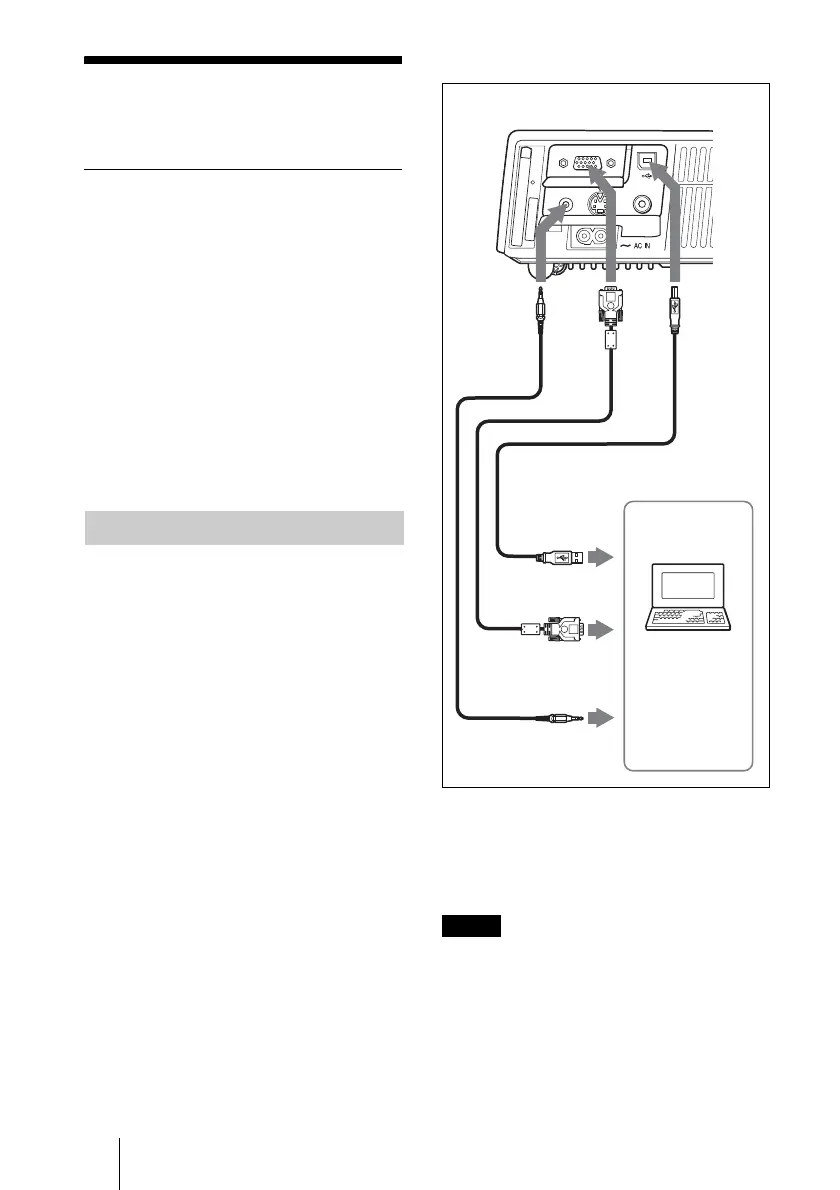
To connect a computer
1 USB cable (supplied)
(Connect the USB cable to use a wireless
mouse.)
2 HD D-sub 15-pin cable (supplied)
3 Stereo audio connecting cable (not supplied)
(Use a no-resistance cable.)
• The projector accepts VGA, SVGA, XGA,
SXGA and SXGA+ signals. However, we
recommend that you set the output mode of
your computer to XGA mode for the external
monitor.
• If you set your computer, such as a notebook
type, to output the signal to both your
computer’s display and the external monitor,
the picture of the external monitor may not
Connecting with a Computer
Notes
AUDIO
STD/DUO
S VIDEO
INPUT A
VIDEO
123
to USB
connector
Left side
to monitor
output
Computer
to audio output





 To Next Page