9
Connecting the Projector
Preparation
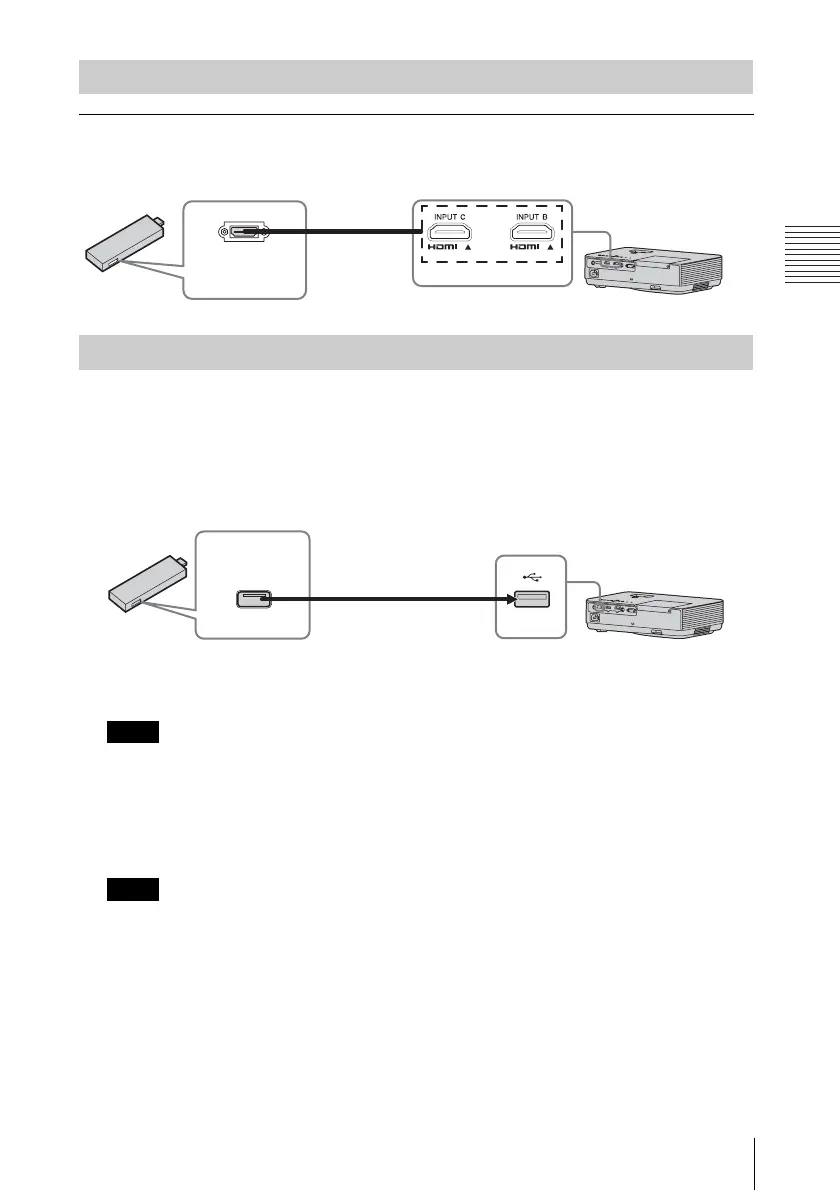
INPUT C
For connecting an external device with an HDMI output terminal. Connect the external device
to INPUT C.
The unit supplies power (5V/2A maximum) via the USB cable to the external device (stick type
PC, etc.).
1 Connect the unit to the external device using the USB cable (with type A USB
terminal).
• Use external devices with the appropriate specification for using this unit.
• If you connect the unit in wrong ways, the external device may cause a malfunction. In this
case, Sony assumes no responsibility.
2 Set “Power Supply” to “On” in the Connection/Power menu (page 25).
The unit supplies power to the external device through the USB cable.
• Only VPL-DX271/DX241/DW241 has the INPUT C terminal.
• Use HDMI-compatible equipment and cable(s) that have an HDMI logo on them.
• The HDMI terminal of this projector is not compatible with DSD (Direct Stream Digital)
Signal or CEC (Consumer Electronics Control) Signal.
• Use a high speed HDMI cable(s) on which the cable type logo is specified. (Sony products are
recommended.)
• The maximum resolution of the INPUT C terminal is set to 720p.
Connecting to an external device
Supplying the power to the external device
Notes
Notes
External
device
HDMI cable
(not supplied)
HDMI output
terminal
Stick type external devices with HDMI
output terminal, such as wireless devices,
small-sized PC, etc. (not supplied)
USB terminal
(Type A)
USB cable
(type A USB terminal)
Power supply
terminal


 To Next Page