11
Connecting the Projector
Preparation
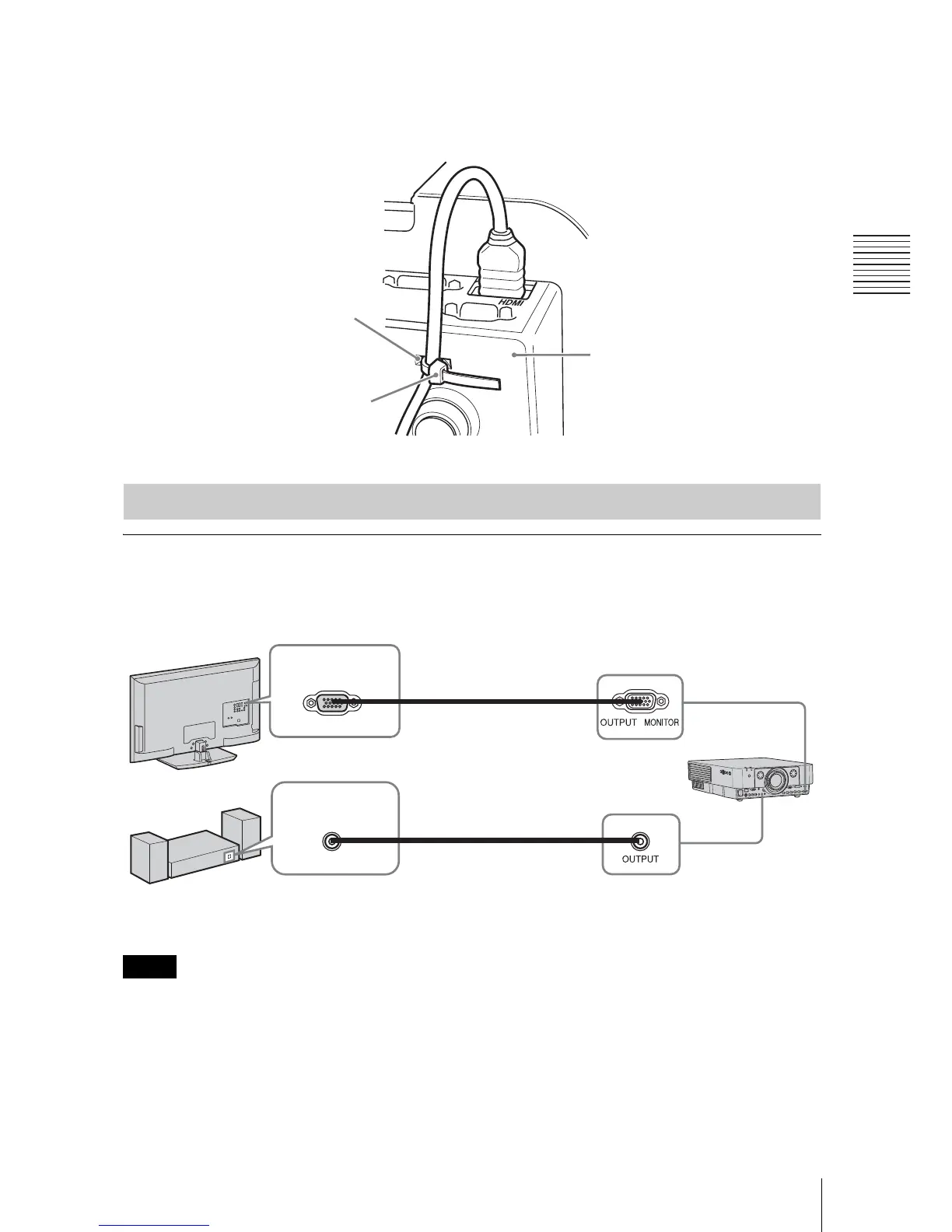
To attach the HDMI cable
Fix the cable to the cable tie holder at the bottom of the projector, using a commercially
available cable tie, as in the illustration.
Use a cable tie of less than 1.9 mm × 3.8 mm in thickness.
OUTPUT
Projected images and input audio can be output to display equipment such as a monitor and
audio equipment such as speakers with a built-in amplifier.
This terminal outputs the projected image or audio. The image is output as a computer signal input
from the RGB input terminal (INPUT A, INPUT B) or a video signal input from the YP
BPR input
terminal (INPUT A).
Connecting an External Monitor and Audio Equipment
Cable tie holder
Cable tie
(commercially
available)
Bottom of the projector
Note
Mini D-sub 15-
pin cable
(not supplied)
RGB input
terminal
Display equipment
Audio input
terminal
Audio cable
(stereo mini plug)
(not supplied)
Audio equipment





 To Next Page