13
Projecting an Image
Projecting/Adjusting an Image
Adjusting the tilt of the projector with the front feet (adjustable)
When the projector is installed on an uneven
surface and the projected position is low, you
can adjust using the front feet (adjustable).
To correct any trapezoidal distortion of the
projected image, use the Keystone
correction feature (pages 14,
29).
• Be careful not to let the projector down on your fingers.
• Do not push hard on the top of the projector with the front feet (adjustable) extended.
• Since the Keystone adjustment is an electronic correction, the image may be deteriorated.
Displaying a pattern for adjusting an image
You can display a pattern for adjusting the projected image with the PATTERN key on the
Remote Commander. Press the PATTERN key again to restore the previous image.
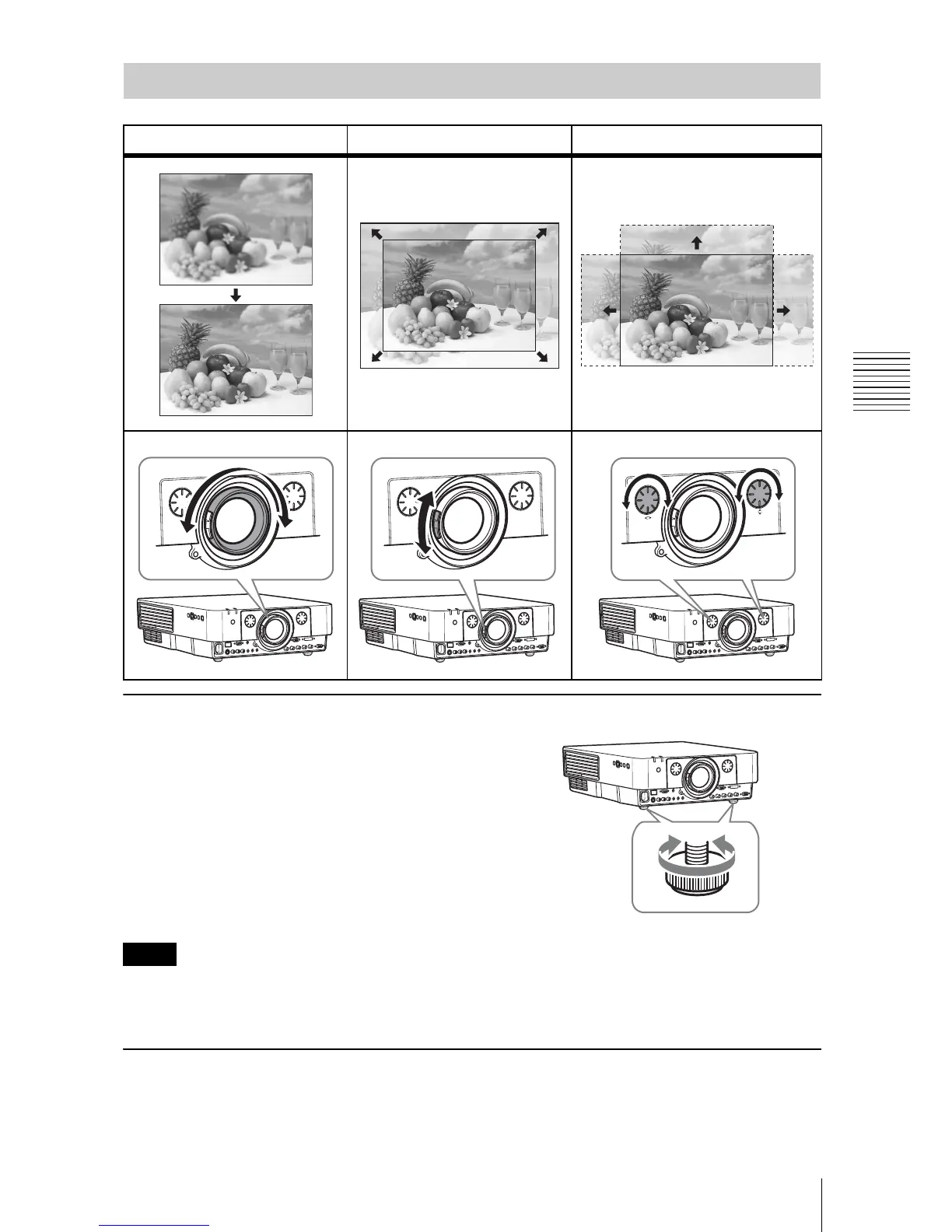
Adjusting the Focus, Size, and Position of the Projected image
Focus Size (Zoom) Position (Lens shift)
Notes





 To Next Page