EasyManua.ls Logo

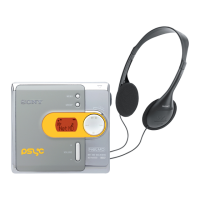
Sony Walkman MZ-N420D - User Manual

Sony Walkman MZ-N420D
56 pages
Print Icon
To Next Page IconTo Next Page
Loading...
3-263-411-11(1)
Portable
MiniDisc Player
Operating Instructions
Player Operation
_
______________________________
_
Software Operation
_
____________________________
_
page 11
page 32
© 2004 Sony Corporation
MZ-N420D
“WALKMAN” is a registered trademark of Sony Corporation to
represent Headphone Stereo products. is a
trademark of Sony Corporation.

Table of Contents

Other manuals for Sony Walkman MZ-N420D

Questions and Answers

  • K
    kathleenpeckAug 16, 2025
    Why is there no sound through my Sony MiniDisc Player headphones?
    • A
      Alicia BrownAug 16, 2025
      If no sound is coming through your headphones/earphones when using your Sony MiniDisc Player, first ensure the headphone/earphone plug is firmly connected. If that doesn't work, adjust the volume by pressing VOL + or –. Also, check if the plug is dirty and needs cleaning.
  • E
    emilycardenasAug 19, 2025
    What to do if my Sony Walkman MZ-N420D skips tracks?
    • W
      wbrandtSep 12, 2025
      If your Sony MiniDisc Player is skipping to several tracks ahead or behind when you press . or >, it's likely the GROUP button has been pressed. The player will return to normal if no operation has been made for 5 seconds.
  • M
    Matthew GeorgeAug 22, 2025
    Why my Sony Walkman MZ-N420D does not work?
    • A
      Amanda MillerAug 22, 2025
      If your Sony MiniDisc Player isn't working or is working poorly, first, disable HOLD by sliding the HOLD switch to the opposite direction of the arrow. Ensure the lid is firmly closed until it clicks. If moisture has condensed inside, take the MD out and leave the player in a warm place for several hours. Check the dry battery; replace it if it's weak or insert it correctly. Make sure a recorded MD is inserted, and if the disc is damaged, replace it. If the player received a mechanical shock, remove the dry battery, wait 30 seconds, and reinsert it.
  • K
    Karen SpencerAug 25, 2025
    What to do if my Sony MiniDisc Player works poorly?
    • S
      Sonia WhitakerAug 26, 2025
      If your Sony MiniDisc Player is not working or works poorly, ensure the volume is not set too low and turn it up. Also, make sure a disc is inserted into the player. If not, insert a recorded disc.
  • K
    Kelly ReyesAug 28, 2025
    Why does my Sony MiniDisc Player skip during playback?
    • H
      Henry PettyAug 28, 2025
      If your Sony MiniDisc Player is experiencing playback sound skips, ensure the player is placed on a stable surface, away from continuous vibration. Also, very short tracks may cause skipping, so avoid creating tracks under one second long.
  • J
    jamesrodriguezAug 31, 2025
    Why does my Sony Walkman MZ-N420D MiniDisc Player have static?
    • S
      Sara MillerAug 31, 2025
      If your Sony MiniDisc Player is producing sound with a lot of static, strong magnetism from a television or similar device may be interfering with its operation. Move the player away from the source of strong magnetism.
  • E
    Elizabeth EvansSep 3, 2025
    Why won't my Sony Walkman MZ-N420D MiniDisc Player play normally?
    • C
      christina04Sep 3, 2025
      If your Sony MiniDisc Player is not playing an MD normally, check if repeat play is selected or if the playback mode has been changed. Use the MENU on the player to change back to the normal play.
  • K
    kathleenpriceSep 6, 2025
    Why does my Sony Walkman MZ-N420D MiniDisc Player not play from the first track?
    • M
      Mrs. Angel Trevino DDSSep 6, 2025
      If your Sony MiniDisc Player is not playing an MD from the first track, it could be because the disc playing stopped before it reached the last track. Press NX for 2 seconds or more to start playing. Alternatively, group play mode might be selected; use MENU on the player to change back to normal play, and then press NX for 2 seconds or more.
  • V
    victorsmithSep 9, 2025
    Why doesn't the digital sound preset function work on my Sony MiniDisc Player?
    • B
      Brian BernardSep 9, 2025
      If the digital sound preset function on your Sony MiniDisc Player is not working, ensure that the digital sound preset is turned on. Select “SOUND1” or “SOUND2”.
  • R
    Robin ThompsonSep 12, 2025
    Why does the group function not operate on my Sony Walkman MZ-N420D?
    • A
      Allison EscobarSep 12, 2025
      If the group function on your Sony MiniDisc Player does not operate, it may be because you're using a disc with no group setting. Use a disc with a group setting.

Summary

Player Operation

Getting Started and Basic Controls

Checks accessories, explains controls, and guides initial player setup and connections.

Playing and Managing MDs

Details MD insertion, playback, modes, sound settings, and group play functions.

Advanced Player Features

Explains viewing information, quick playback, hearing protection (AVLS), and control locking (HOLD).

Safety, Maintenance, and Specifications

Covers safety precautions, maintenance, technical specifications, and player troubleshooting.

Software and PC Connectivity

Software Installation and System Requirements

Details system requirements and the process for installing SonicStage/MD Simple Burner software.

Connecting and Using the MD Walkman with a PC

Guides on connecting the player to a computer for software interaction and data transfer.

Software Functions and Audio Management

Instructions for recording, importing, transferring audio, and managing music via software.

Software Help and Troubleshooting

Covers accessing help, searching information, and resolving common software issues.

Sony Walkman MZ-N420D Specifications

General IconGeneral
TypeMiniDisc Player
Recording ModesSP, LP2, LP4
Audio Formats SupportedATRAC, ATRAC3
Frequency Response20 Hz - 20 kHz
Signal-to-Noise Ratio90 dB
DisplayLCD
PC ConnectivityUSB
ATRAC Type-R DSPYes
Net MDYes
Power SourceAA Battery or AC Adapter
Headphone Output3.5 mm
Remote ControlYes

Related product manuals