Help Guide
Wireless Noise Canceling Stereo Headset
WF-SP700N
Replacing the earbuds
The headset comes with the M size earbuds. If the headset tends to come off or you feel a lack of low frequency sound,
change the earbuds to another size to fit your right and left ears comfortably and snugly.
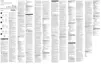
Long Hybrid silicone rubber earbuds
A: SS size (red)
B: S size (orange)
C: M size (green)
D: L size (light blue)
4-730-308-11(4) Copyright 2018 Sony Corporation
Remove the earbuds.
Do not pinch the end of the earbud when removing it.
1
Attach the earbuds.
Do not attach the earbuds loose or skewed.
2



 To Next Page