EasyManua.ls Logo

Sony WM-D6 - How to Use the Unit; Battery Insertion

Sony WM-D6
32 pages
Print Icon
To Next Page IconTo Next Page
To Previous Page IconTo Previous Page
Loading...
SECTION
1
OUTLINE
1-1,
HOW
TO
USE
THE
UNIT
PRECAUTIONS
@
Operate
the
set
only
on
6
V
dc.
@
Do
not
leave
the
set
in
a
location
near
heat
sources,
or
in
a
place
subject
to
direct
sunlight,
excessive
dust,
moisture,
rain
or
mechanical
shock.
@
Should
any
liquid
or
solid
object
fall
into
the
set,
remove
the
batteries
and
have
it
checked
by
qualified
personnel.
®@
Avoid
playing
your
WM-D6
at
so
loud
a
volume
that
extended
play
might
affect
your
hearing.
@
At
a
high
volume
outside
sounds
may
become
inaudible.
Avoid
listening
to
your
WM-D6
in
situations
where
hearing
must
not
be
impaired,
for
example,
while
driving
or
cycling.
@
As
the
supplied
headphones
are
of
open-
air
design,
sounds
go
out
through
the
head-
phones.
Remember
not
to
disturb
those
close
to
you.
if
you
have
any
questions,
please
consult
your
nearest
Sony
dealer.
BATTERY
INSERTION
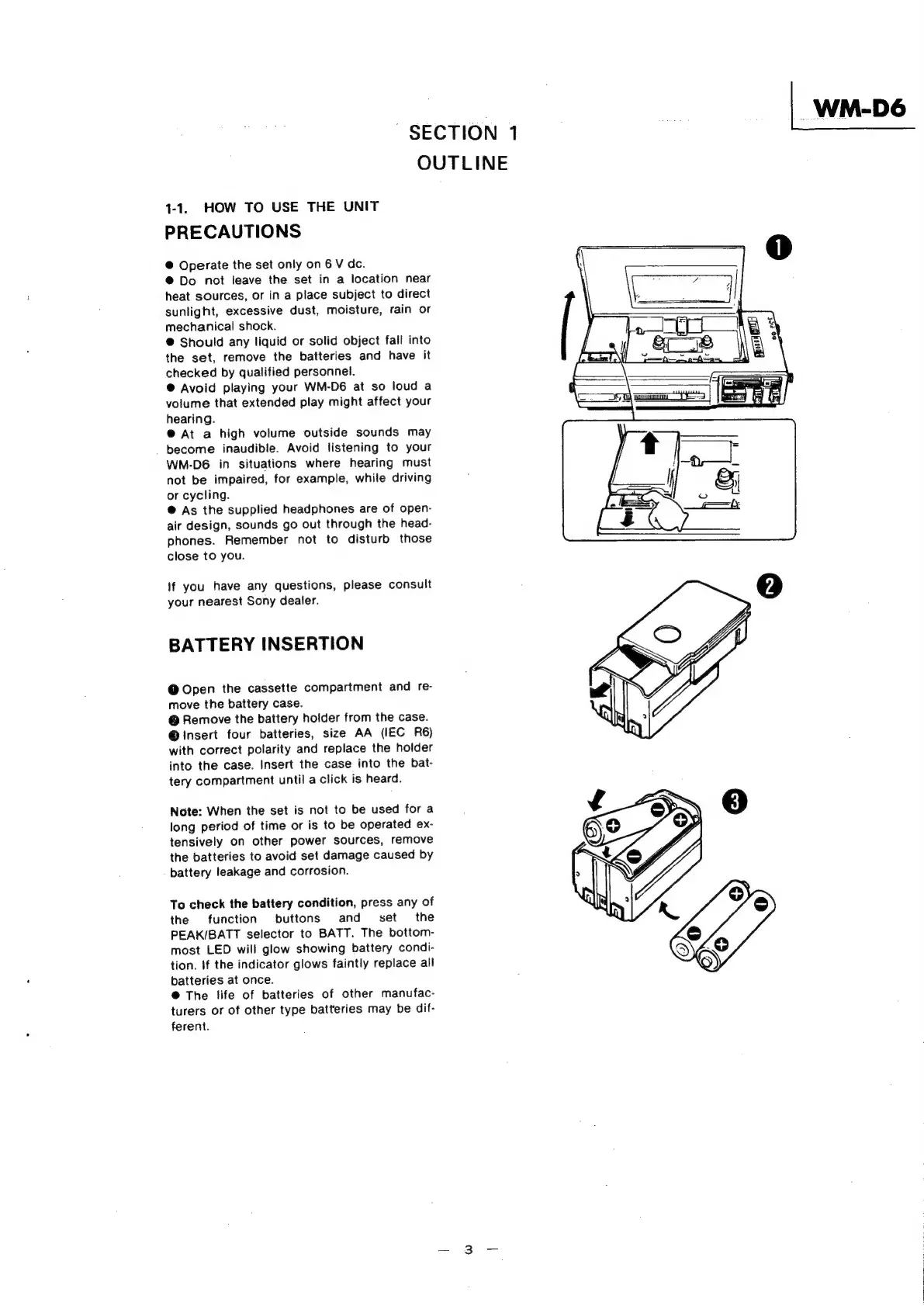
@
Open
the
cassette
compartment
and
re-
move
the
battery
case.
@
Remove
the
battery
holder
from
the
case.
@
insert
four
batteries,
size
AA
(IEC
R6)
with
correct
polarity
and
replace
the
holder
into
the
case.
Insert
the
case
into
the
bat-
tery
compartment
until
a
click
is
heard.
Note:
When
the
set
is
not
to
be
used
for
a
long
period
of
time
or
is
to
be
operated
ex-
tensively
on
other
power
sources,
remove
the
batteries
to
avoid
set
damage
caused
by
battery
leakage
and
corrosion.
To
check
the
battery
condition,
press
any
of
the
function
buttons
and
set
the
PEAK/BATT
selector
to
BATT.
The
bottom-
most
LED
will
glow
showing
battery
condi-
tion.
If
the
indicator
glows
faintly
replace
all
batteries
at
once.
@
The
life
of
batteries
of
other
manufac-
turers
or
of
other
type
batteries
may
be
dif-
ferent.

Related product manuals