EasyManua.ls Logo

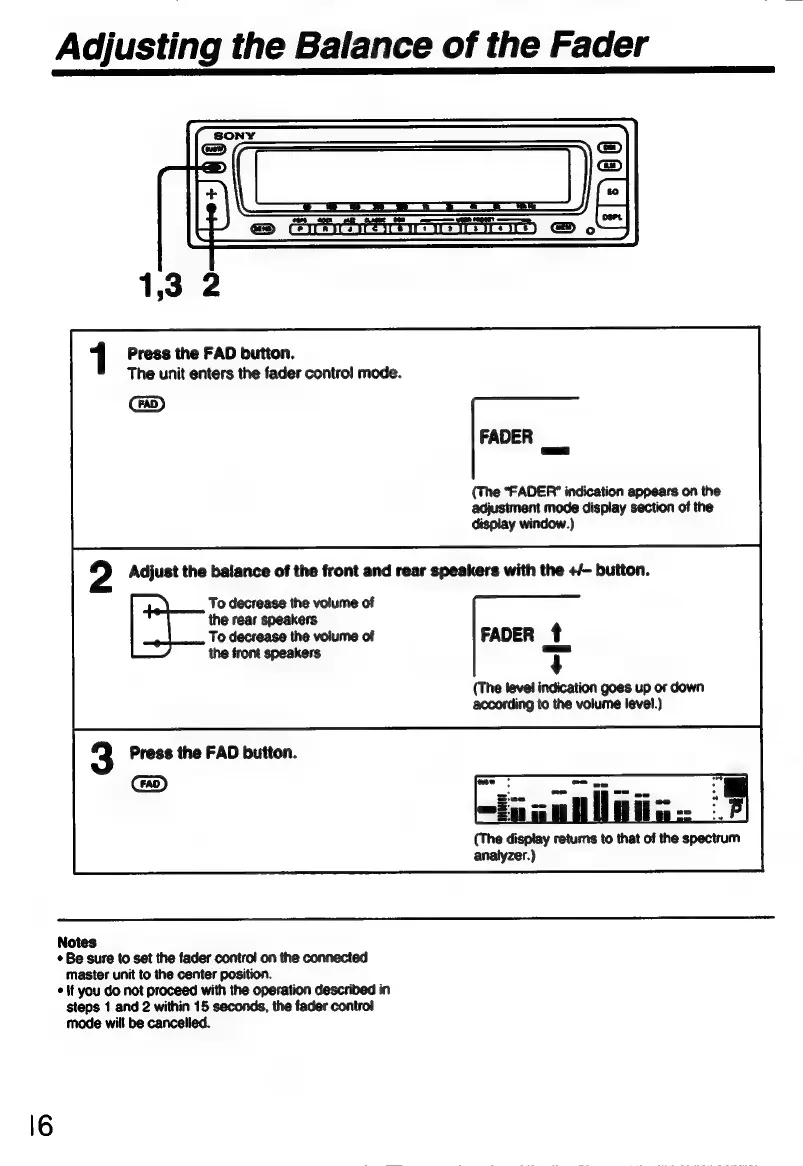
Sony XE-744 - Speaker Balance Adjustment (Fader); Enter Fader Control Mode; Adjust Front;Rear Speaker Balance

Sony XE-744
65 pages
Print Icon
To Next Page IconTo Next Page
To Previous Page IconTo Previous Page
Loading...
Adjusting
the
Balance
of
the
Fader
Press
the
FAD
button.
The
unit
enters
the
fader
control
mode.
FADER
au
(The
"FADER"
indication
appears
on
the
adjustment
mode
display
section
of
the
display
window.)
Adjust
the
balance
of
the
front
and
rear
speakers
with
the
+/-
button.
To
decrease
the
volume
of
the
rear
speakers
To
decrease
the
volume
of
FADER
t
the
front
speakers
T
(The
level
indication
goes
up
or
down
according
to
the
volume
level.)
Press
the
FAD
button.
mu
„B
(The
display
returns
to
that
of
the
spectrum
analyzer.)
Notes
+
Be
sure
to
set
the
fader
control
on
the
connected
master
unit
to
the
center
position.
*
it
you
do
not
proceed
with
the
operation
described
in
steps
1
and
2
within
15
seconds,
the
fader
control
mode
will
be
cancelled.

Related product manuals