EasyManua.ls Logo

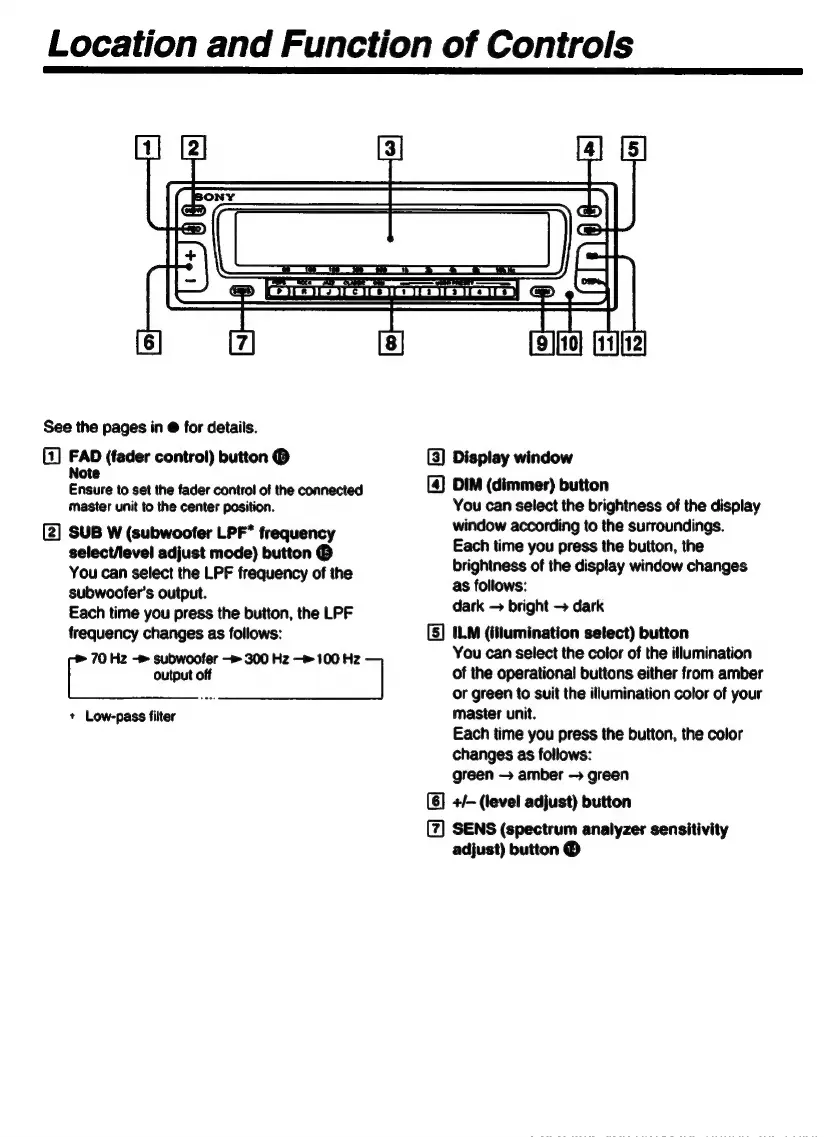
Sony XE-744 - Control Panel Layout; Fader Control Button; Subwoofer Output Control; Display Window Functionality

Sony XE-744
65 pages
Print Icon
To Next Page IconTo Next Page
To Previous Page IconTo Previous Page
Loading...
Location
and
Function
of
Controls
mm
See
the
pages
in
&
for
details.
(1]
FAD
(fader
control)
button
(D
(3)
Display
window
Note
Ensure
to
set
the
fader
control
of
the
connected
[4]
DIM
(dimmer)
button
master
unit
to
the
center
position.
You
can
select
the
brightness
of
the
display
[Z]
SUB
W
(subwoofer
LPF*
frequen
window
according
to
the
surroundings.
a
adjust
mode)
Ee
©
Each
time
you
press
the
button,
the
You
can
select
the
LPF
freguency
of
the
brightness
of
the
display
window
changes
subwoofer's
output.
as
degi
:
;
Each
time
you
press
the
button,
the
LPF
dark
bright
dar
freguency
changes
as
follows:
[5]
ILM
(illumination
select)
button
70
Hz
subwoofer
300
Hz
100
Hz
You
can
select
the
color
of
the
illumination
|
output
off
|
of
the
operational
buttons
either
from
amber
=
or
green
to
suit
the
illumination
color
of
your
+
Low-pass
filter
master
unit.
Each
time
you
press
the
button,
the
color
changes
as
follows:
green
amber
green
+/-
(level
adjust)
button
SENS
(spectrum
analyzer
sensitivity
adjust)
button
Ê

Related product manuals