EasyManua.ls Logo

Sony XE-744 - Changing Spectrum Analyzer Display; Cycle Through Display Patterns

Sony XE-744
65 pages
Print Icon
To Next Page IconTo Next Page
To Previous Page IconTo Previous Page
Loading...
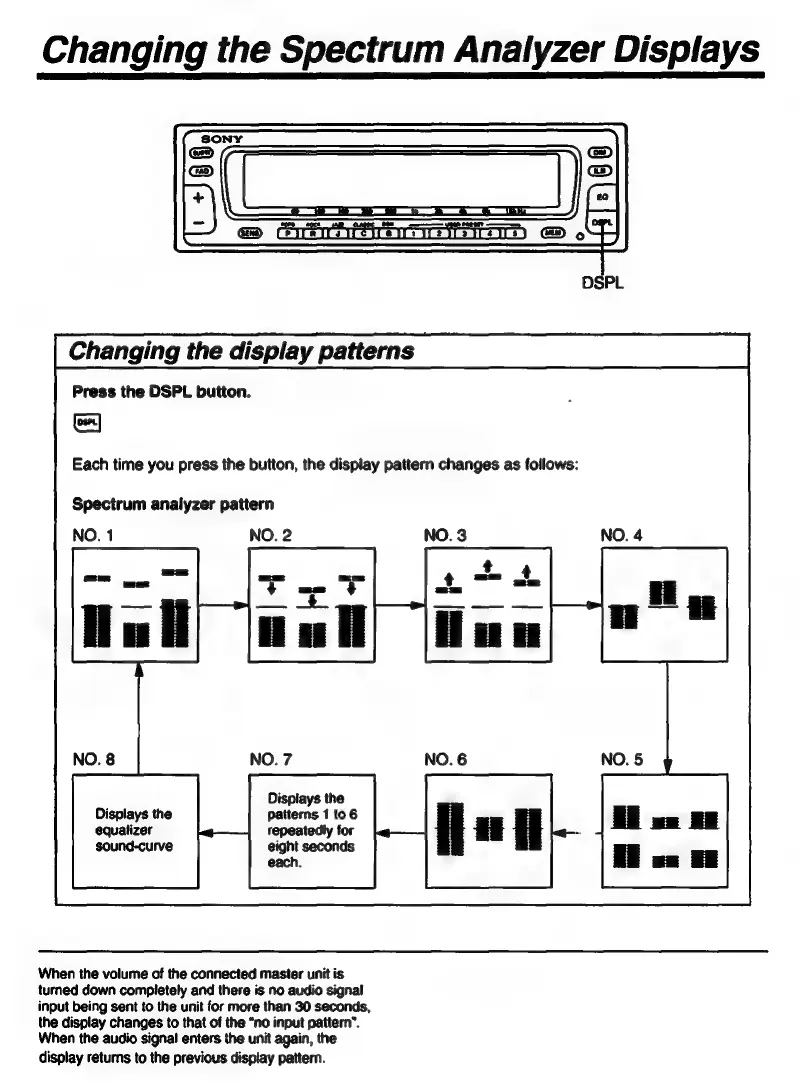
Changing
the
Spectrum
Analyzer
Displays
Changing
the
display
patterns
Press
the
DSPL
button.
Each
time
you
press
the
button,
the
display
pattern
changes
as
follows:
Spectrum
analyzer
pattern
NO.
1
|
NO.
3
Displays
the
Displays
the
patterns
1
to
6
equalizer
repeatedly
for
sound-curve
eight
seconds
each.
When
the
volume
of
the
connected
master
unit
is
turned
down
completely
and
there
is
no
audio
signal
input
being
sent
to
the
unit
for
more
than
30
seconds,
the
display
changes
to
that
of
the
“no
input
pattern”.
When
the
audio
signal
enters
the
unit
again,
the
display
retums
to
the
previous
display
pattern.

Related product manuals