EasyManua.ls Logo

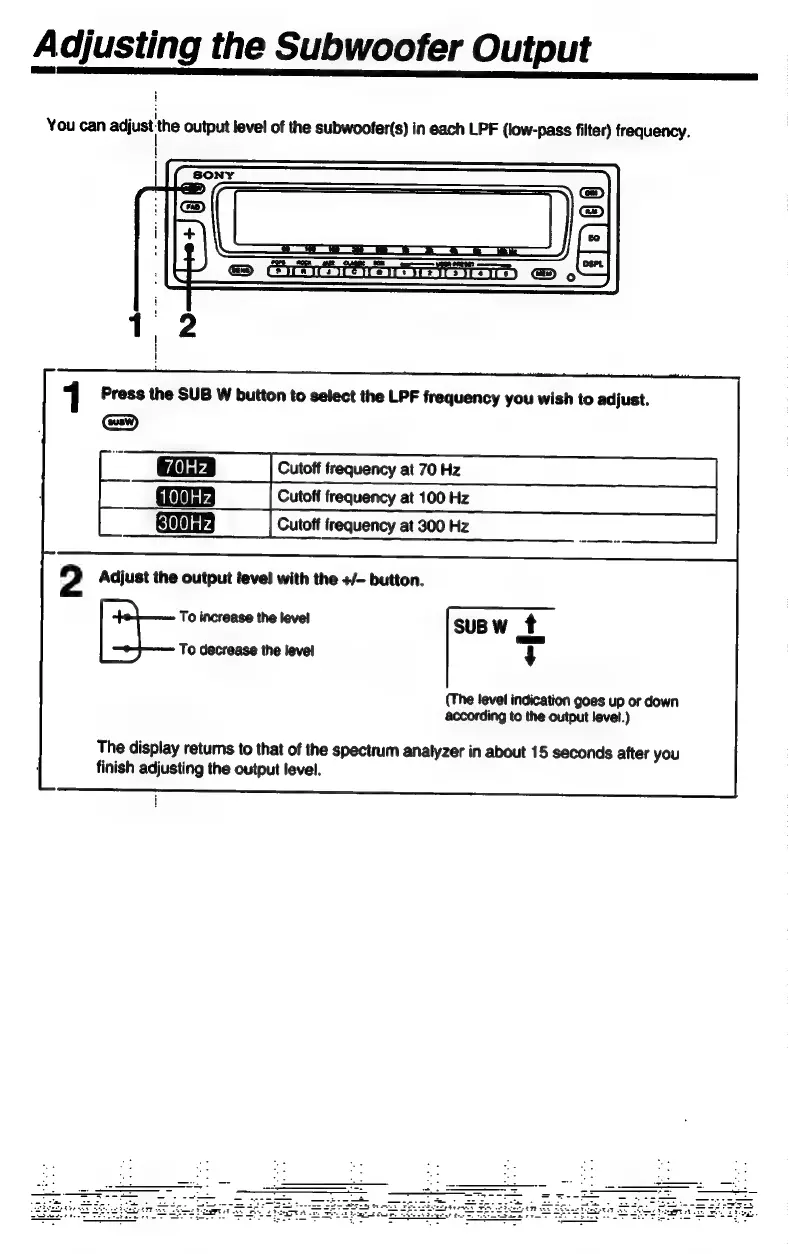
Sony XE-744 - Subwoofer Output Level Adjustment; Select Subwoofer LPF Frequency; Adjust Subwoofer Output Level

Sony XE-744
65 pages
Print Icon
To Next Page IconTo Next Page
To Previous Page IconTo Previous Page
Loading...
A
djusting
the
Subwoofer
Output
You
can
adjust
the
output
level
of
the
subwoofer(s)
in
each
LPF
(low-pass
filter)
frequency.
1
Press
the
SUB
W
button
to
select
the
LPF
frequency
you
wish
to
adjust.
GW)
Cutoff
freguency
at
70
Hz
Cutoff
freguency
at
100
Hz
Cutoff
freguency
at
300
Hz
100Hz
300Hz
2
Adjust
the
output
level
with
the
+/-
button.
To
increase
the
level
SUBW
t
[d
To
decrease
the
level
4
(The
level
indication
goes
up
or
down
according
to
the
output
level.)
The
display
retums
to
that
of
the
spectrum
analyzer
in
about
15
seconds
after
you
finish
adjusting
the
output
level.

Related product manuals