EasyManua.ls Logo

Sony XE-744 - Adjusting Audio with Graphic Equalizer; Select Speaker Output; Enter Sound Curve Set Mode; Select Frequency to Adjust

Sony XE-744
65 pages
Print Icon
To Next Page IconTo Next Page
To Previous Page IconTo Previous Page
Loading...
Adjusting
the
Sound
With
the
Graphic
|
Equalizer
FEWN
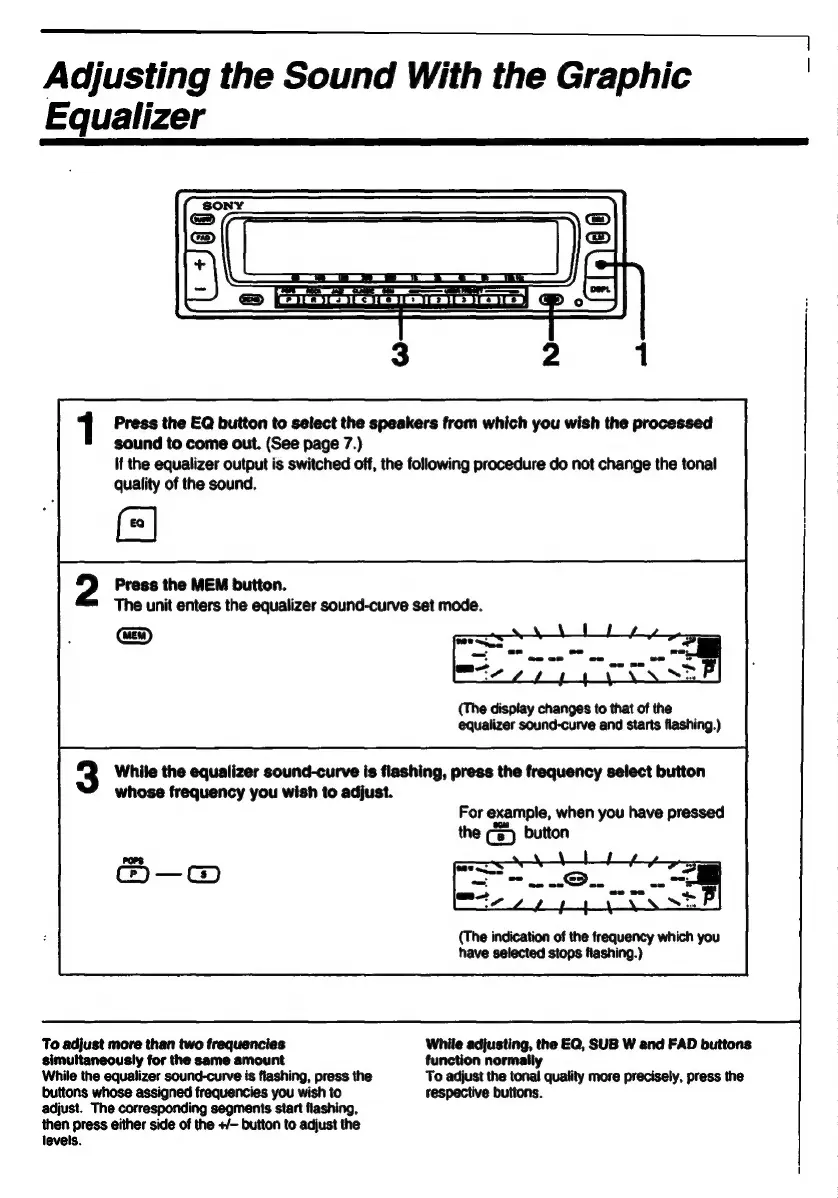
Press
the
EO
button
to
select
the
speakers
from
which
you
wish
the
processed
sound
to
come
out.
(See
page
7.)
If
the
egualizer
output
is
switched
off,
the
following
procedure
do
not
change
the
tonal
guality
of
the
sound.
a
Press
the
MEM
button.
The
unit
enters
the
equalizer
sound-curve
set
mode.
(EN
(The
display
changes
to
that
of
the
equalizer
sound-curve
and
starts
flashing.)
While
the
equalizer
sound-curve
is
flashing,
press
the
frequency
select
button
whose
frequency
you
wish
to
adjust.
For
example,
when
you
have
pressed
the
($)
button
(The
indication
of
the
frequency
which
you
have
selected
stops
flashing.)
To
adjust
more
than
two
freguencies
While
adjusting,
the
EQ,
SUB
W
and
FAD
buttons
simultaneously
for
the
same
amount
function
normally
While
the
equalizer
sound-curve
is
flashing,
press
the
To
adjust
the
n
more
precisely,
press
the
buttons
whose
assigned
freguencies
you
wish
to
respective
button:
adjust.
The
corresponding
segments
start
flashing,
then
press
either
side
of
the
+/-
button
to
adjust
the
levels.

Related product manuals