EasyManua.ls Logo

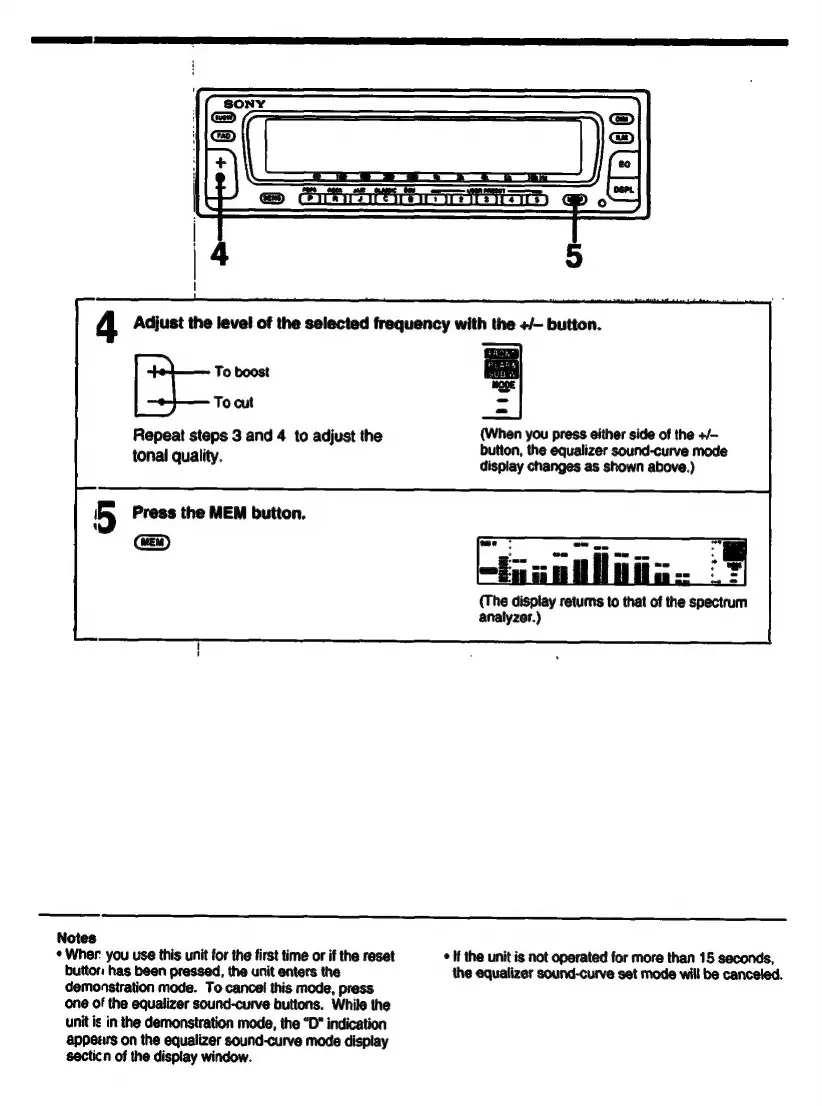
Sony XE-744 - Graphic Equalizer Adjustment Steps; Adjust Frequency Levels; Save Adjusted Sound Curve

Sony XE-744
65 pages
Print Icon
To Next Page IconTo Next Page
To Previous Page IconTo Previous Page
Loading...
To
boost
To
cut
Repeat
steps
3
and
4
to
adjust
the
(When
you
press
either
side
of
the
+/-
"
button,
the
equalizer
sound-curve
mode
tonal
quality.
display
changes
as
shown
above.)
5
Press
the
MEM
button.
1
(The
display
returns
to
that
of
the
spectrum
analyzer.)
Notes
*
Wher
you
use
this
unit
for
the
first
time
or
if
the
reset
e
If
the
unit
is
not
operated
for
more
than
15
seconds,
buttori
has
been
pressed,
the
unit
enters
the
the
equalizer
sound-curve
set
mode
will
be
canceled.
demonstration
mode.
To
cancel
this
mode,
press
one
of
the
egualizer
sound-curve
buttons.
While
the
unit
is
in
the
demonstration
mode,
the
“D”
indication
appears
on
the
equalizer
sound-curve
mode
display
secticn
of
the
display
window.

Related product manuals