Need help?
Do you have a question about the Sophos SG 105 and is the answer not in the manual?
Lists items included in the appliance package.
Shows the back panel of the SG devices with ports.
Details connecting the EO/LAN and E1/WAN ports to networks.
Instructions for mounting the device in a rack using an optional kit.
Guides connecting power adapters and powering on the appliance.
Explains how to access the WebAdmin interface via a web browser.
Describes the meaning of LEDs on RJ45 Ethernet ports.
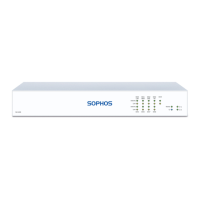
Details the meaning of front panel status LEDs.
Describes the meaning of LEDs on SFP connectors.
 General
| Firewall throughput | 1500 Mbit/s |
|---|---|
| Maximum data transfer rate | 1000 Mbit/s |
| IPS/IDS throughput | 350 Mbit/s |
| Wi-Fi | No |
| USB 2.0 ports quantity | 2 |
| Connectivity technology | Wired |
| Gigabit Ethernet (copper) ports quantity | 4 |
| LED indicators | Status |
| AC input voltage | 100-240 V |
| AC input frequency | 50 - 60 Hz |
| Power consumption (typical) | 9.84 W |
| Storage media type | SSD |
| Certification | CE, FCC B, CB, VCCI, C-Tick, UL, CCC |
| Heat dissipation | 33.55 BTU/h |
| Concurrent connections | 1000000 |
| Rack mounting | Yes |
| Storage temperature (T-T) | -20 - 80 °C |
| Operating temperature (T-T) | 0 - 40 °C |
| Operating relative humidity (H-H) | 10 - 90 % |
 Weight and Dimensions
| Weight | 1190 g |
|---|---|
| Dimensions (WxDxH) | 225 x 150 x 44 mm |

 To Next Page