Advanced Operation Sorensen DLM-E Series
34 Operation Manual
Programming Output Voltage with Resistance
1. Set S1-1, the rear panel DIP Switch, UP, in the open position for 0–5k ohm programming
range.
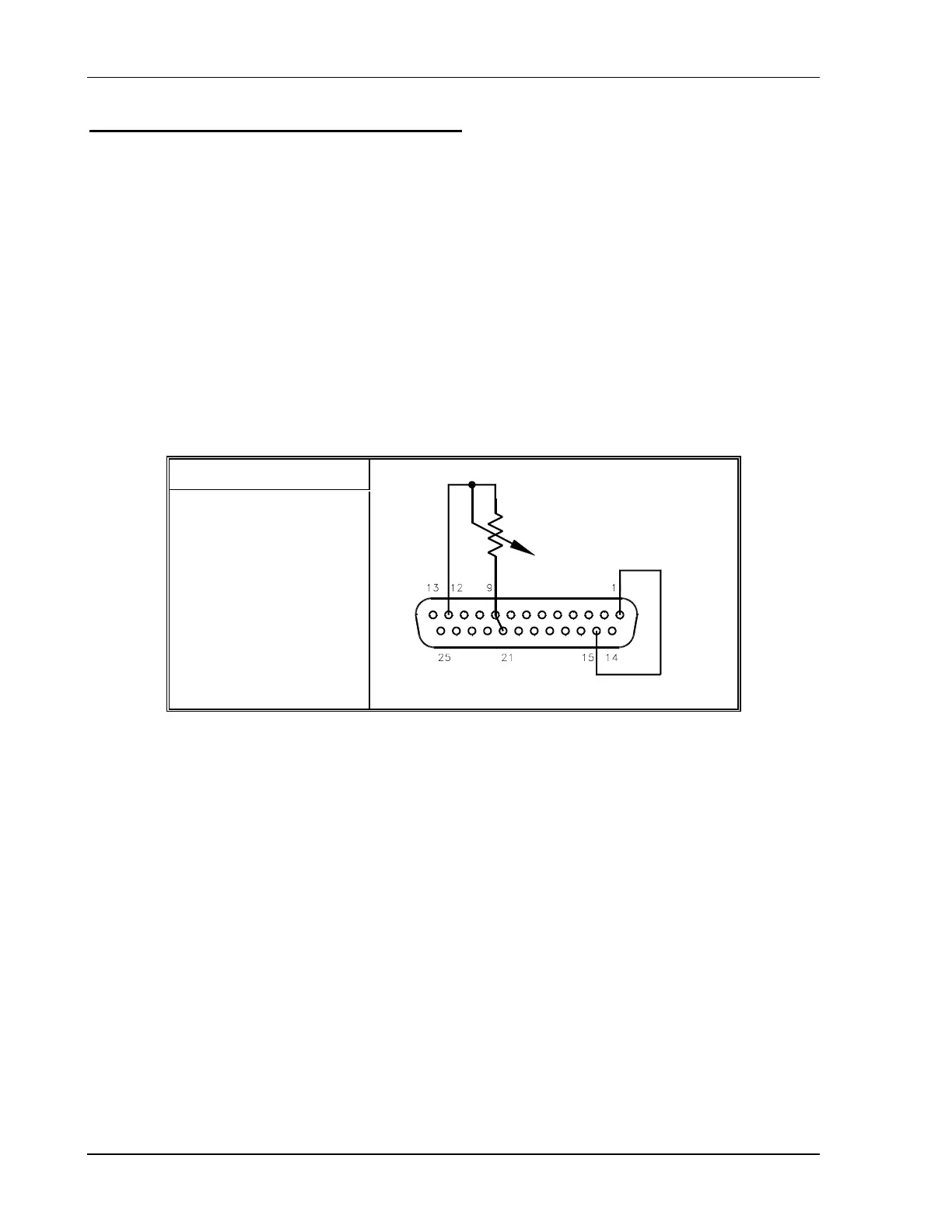
2. Connect pins 9 (voltage programming input/positive) and 21 (1mA current source for
voltage control) to the counter–clockwise end of the potentiometer and connect the tap
and clockwise end of the potentiometer to pin 12 (return). Adjusting the resistance from
0 to maximum will vary the output voltage from 0 to 100% of the model rating. Adjust the
programming signal to zero.
3. Turn the power supply ON.
4. Set the front panel LOCAL/REMOTE switch to the REMOTE position and adjust the
external programming resistance. By pressing the V&I PREVIEW button and observing
the front panel voltmeter reading, the external control can be adjusted to the desired
setting.
S1 Switch Settings
S1-1 OPEN = 0–5K
Figure 4–5. Programming Output Voltage with a 0–5k Ohm Resistance



 To Next Page