88
ELECTRIC PANEL
BSS-134
CHAP.- 8
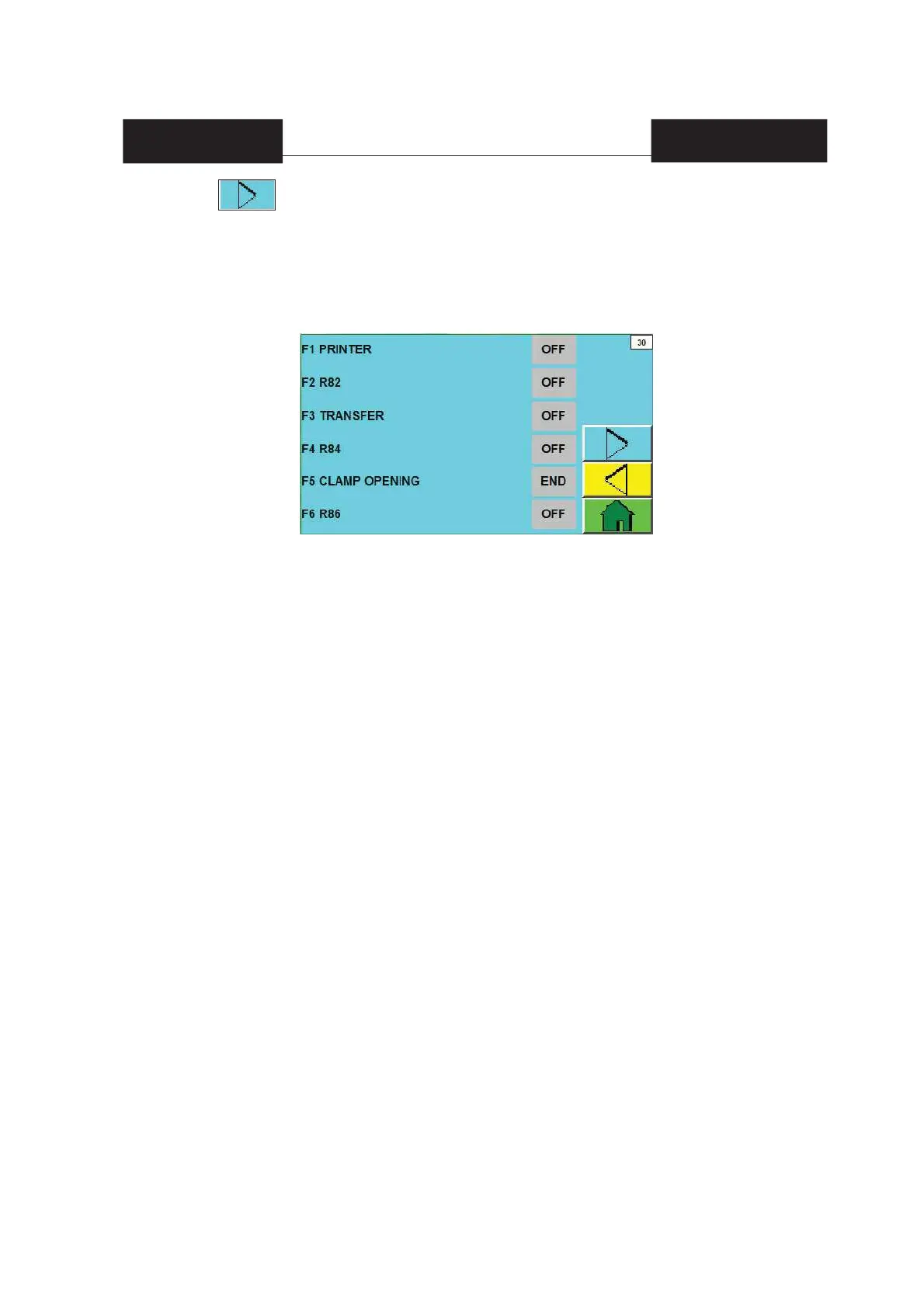
F1 PRINTER [ON/OFF] = to select [ON] or [OFF] and enable / disable the printer.
F2 R82 = free option.
F3 TRANSFER [ON/OFF] = to select [ON] or [OFF] and enable / disable the thermal transfer printer.
F4 R84 = free option.
F5 CLAMP OPENING [FIN/ANT] = TO SELECT [ANT] o [FIN] to open the horizontal sealing pliers
after cooling down or after unloading products (recommended).
F6 R86 = free option.
If you press on page 22 or F3 on page 02 (BASIC MENU), you access page 30 (page with
enabled HELP):
WHERE YOU ENABLE MACHINE CONFIGURATION PROCEDURES.
N.B. = IT IS RECOMMENDED NOT TO APPLY NEW SETTINGS (AFTER THE INITIAL
CONFIGURATION) UNLESS SORMA SERVICE SUGGESTS TO DO IT.


 To Next Page