25
START-UP AND STOP
BSS-134
CHAP.- 7
7.1 Machine start-up
- Check that the mobile protections, provided with safety micro switch, are closed correctly,
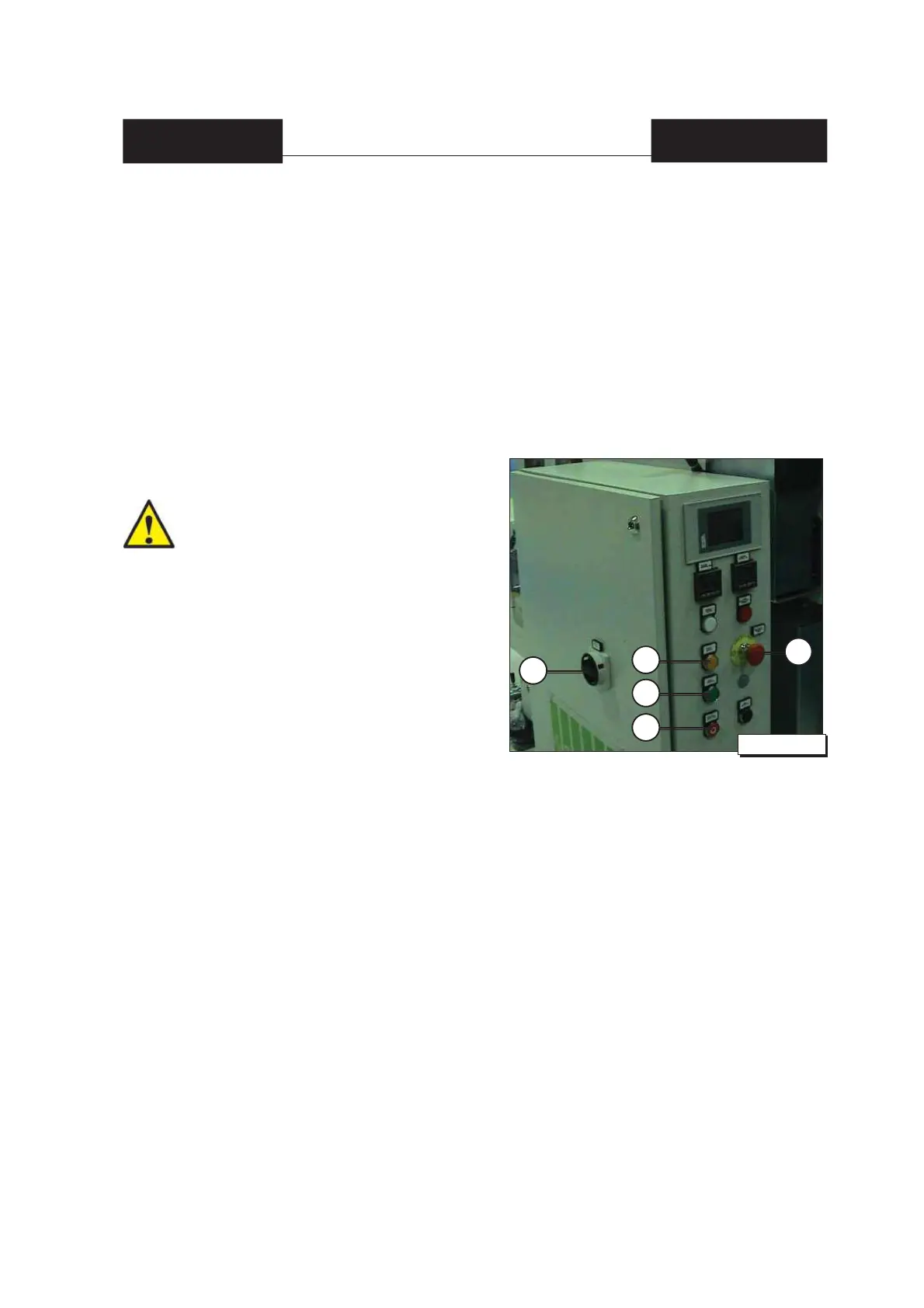
- Set the [10] main switch (see fi g.1 chap.7) to the [ON] position,
- Verify that all components are in phase (coil unit, fi lm, etc.) and there are no obstructing conditions
and/or hazardous conditions for machine operation,
- Press the orange MANUAL RUN [7] button (see fi g.1 chap.7) and wait for the sealing unit to warm
up (approx. 15 minutes - the blue line or arrows disappear),
- Press the [6] (see fi g.1 chap.7) AUTOMATIC RUNNING MODE button, the green light comes on to
confi rm the AUTOMATIC RUN, after the sealing unit reaches the set temperature range).
Even if the machine is in automatic drive,
it can appear to be idle if no crates are
added.
The green AUTOMATIC RUN button [6]
(see fi g.1 chap.7) and the semaphore
light are lit when automatic mode is set
and the operation cycle restarts when
crates are added.
10
Fig.1 chap.7
7
2
6
3
7.2 Stop at the end of the working day
- Press STOP IN PHASE button [2] (see fi g.1 chap.7),
- Wait the completion of the production cycle in progress and the consequent stop in “phase”,
- Press the [3] red mushroom-shaped STOP button (see fi g.1 chap.7),
- Set the main switch [10] (see fi g.1 chap.7) to [OFF].
7.3 Machine stop in emergency status
- Thoroughly press the red mushroom-shaped STOP button [3] (see fi g.1 chap.7). This operation
allows the immediate stop of every machine operation.
7.4 Machine start-up after emergency intervention
- Check that the mobile protections, provided with safety micro switch, are closed correctly,
- Check that the [3] red mushroom-shaped STOP button (see fi g.1 chap.7) is released,
- Press the orange MANUAL RUN [7] button (see fi g.1 chap.7), complete the continuous cycle manually,
- Press the [6] (see fi g.1 chap.7) AUTOMATIC RUNNING MODE button.


 To Next Page