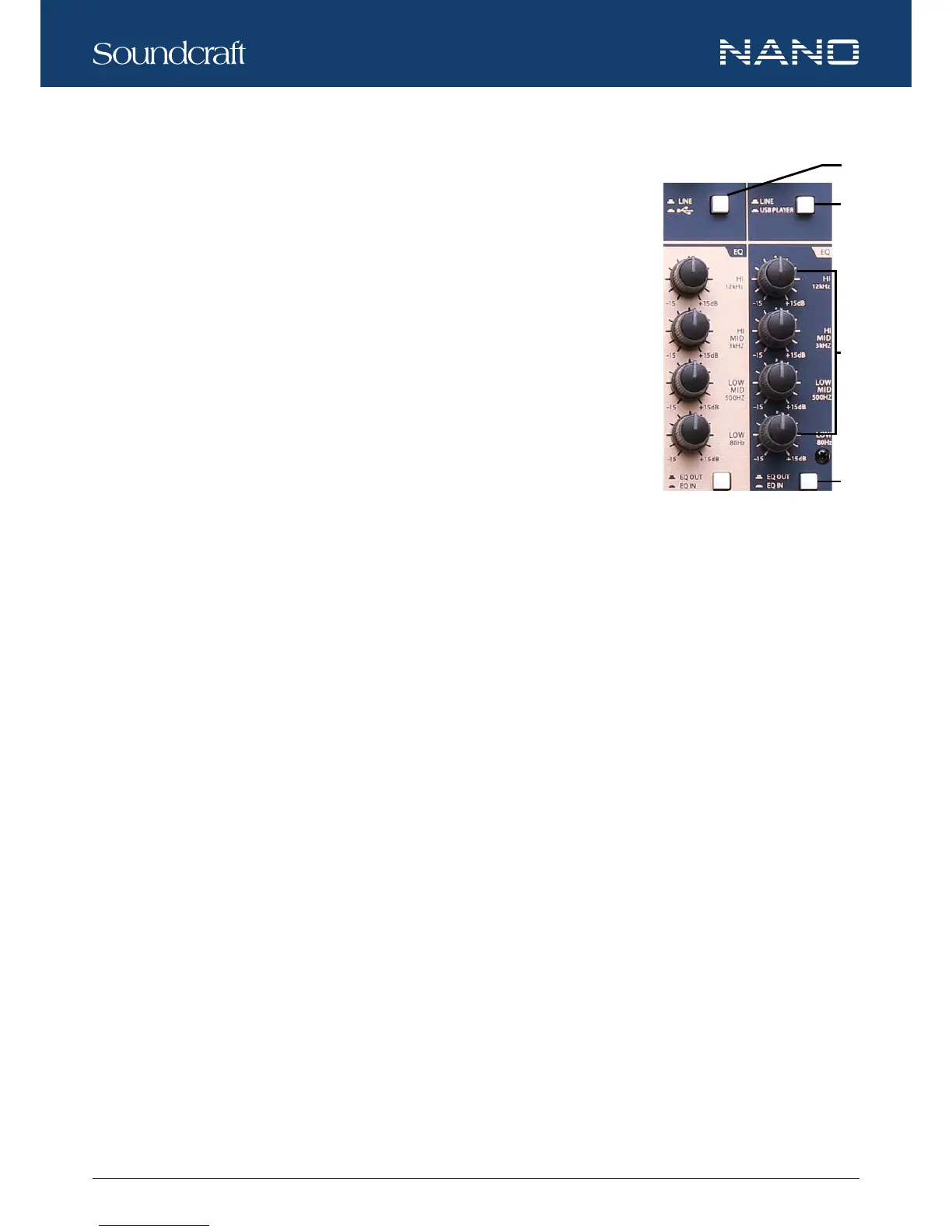
9. LINE / USB SWTICH
Press down the button switches to the USB mode, then the USB signal will be sent to this
channel. Press up this button will send LINE IN signal to the channel.
10. LINE / USB PLAYER SWITCH
Press down the button will switch to the USB PLAYER mode, then the signal of USB PLAYER
module will be sent to the channel.
11. EQ CONTROLS
There are 3-band EQ with sweepable MID on all mono input channels (CH 1-8 for M16; CH
1-16 for M24): HI, MID and LOW band. There are 4-band xed frequency EQ on the stereo
channels (CH 9-16 for M16; CH 17-24 for M24): HI, HI-MID, MID-LOW and LOW band. All
bands provide up to 15dB of boost or cut.
HI
If you turn this control up, you will boost all frequencies above 12kHz (shelving lter). You will add transparency to vocals and guitar
and also make cymbals crispier. Turn the control down will cut all frequencies above 12kHz. In such way, you can reduce sibilance
of human voice or reduce the hiss of a tape player.
MID
This is a peaking lter and boosts or cuts frequencies from 100Hz to 8kHz depending on the position of the MID control. This con-
trol will affect especially upper male and lower female vocal ranges and also the harmonics of most musical instruments.
HI-MID
This control gives you up to 15dB boost or cut at 3kHz. It is useful for controlling voice and can accurately polish your performance
via adjusting this knob.
MID-LOW
This control gives you up to 15dB boost or cut at 500Hz.
LOW
If you turn this control up, you will boost all frequencies below 80Hz. This will add more punch to bass drum and bass guitar and
make the vocalist more “macho”. Turn it down, you will cut all frequencies below 80Hz. This will reduce low frequency vibrations
and resonance thus preserving the life of your woofers.
12. EQ ON/ EQ OFF SWITCH
This switch allows user to engage or bypass the EQ section in signal path. It can be used to make A/B comparisons between
equalized and non-equalized signals. It also can be used to apply equalized at a certain point of the show, excluding it when it’s not
necessary.
Controls and Features






 To Next Page